
HCCH1 Bingo Cards - Print Free or Customize
Print free HCCH1 bingo cards or adjust them, unlimited prints! Pick from 38,500+ designs or use the bingo card generator. Add numbers, words, images, or mix them all. Play using PDF printouts, digital bingo cards, and the digital bingo caller, or combine all formats.
About: This bingo card celebrates the lively and collaborative spirit of everyday workplace life, especially in a health care or corporate team setting. It's packed with relatable moments from small wins to teamwork and a touch of office humor. Perfect for lifting morale during team-building events or staff appreciation days, this card is sure to spark camaraderie and friendly competition among colleagues.
How To: To get a printable PDF, click the Print button. You can adjust the card quantity and other print settings on the Print tab. Grid items and free space content can be edited on the Basic tab. Appearance can be totally customized on the corresponding tabs, or you can easily search any setting on the 🔍 tab.
How to play HCCH1 Bingo Cards?
- Digital Caller: Click on the Play button above.
- Printed Players: Print PDF bingo cards and physically scratch the cards.
- Printed Caller: Print PDF calling list & calling slips and physically select the slips.
- Digital Players: Click on the Play button above, and then click on the 🎫 button.
- Hybrid Mode: Pick any combination above. For instance, caller can be either Paper or Digital. And players can be Paper or Digital or a combo of both.
Step-By-Step:
- Start by saving the HCCH1 PDF by clicking on the "Print" button above.
- Open the PDF and print a hard copy.
- For random calling, you can print another copy of the call list, cut, fold and then pick them randomly at play time.
- Cut the bingo cards at the cut lines if there are greater than 1 bingo cards per page.
- Give one card to each player. For marking, you can use markers. Crayons cost the least.
- Pick one person to be the caller. If you are playing in a small group, the caller may also play along with their own Bingo card.
- The caller starts the play by randomly pulling an item from the call list and saying it to everyone.
- The players scan their cards to see if they have the called word. If they do, they cross off that word.
- The first player to complete a horizontal, vertical, or a diagonal line of crossed items announces "Bingo!" and wins the game.
- The caller checks that the items marked form a proper line according to the Bingo card and call list.
- You can play for multiple patterns or a full card blackout for a longer game.
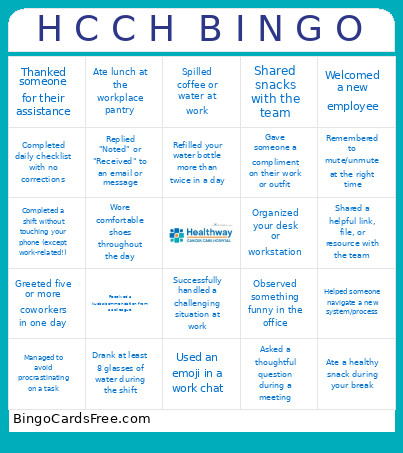 This HCCH1 Bingo Cards Game contains following Words or Phrases: Completed a task before the deadline, Received a kudos/commendation from a colleague, Helped a teammate solve a problem, Successfully handled a challenging situation at work, Completed mandatory training on time, Shared an idea that was implemented, Received positive feedback from a patient/client, Mentored a colleague or new hire, Attended a meeting that could have been an email 😄, Arrived early for work, Stayed a few minutes late to help the team, Finished a full day with an empty inbox, Had coffee before starting the shift, Experienced back‑to‑back meetings, Ate lunch at the workplace pantry, Printed something only to realize the printer was out of ink, Joined a team‑building activity, Participated in a company‑wide event, Wore the official HCCH uniform with pride, Learned something new about a coworker, Celebrated a colleague's birthday, Shared snacks with the team, Welcomed a new employee, Had a fun conversation during break time, Forgot where the ID/lanyard was for a moment, Had to reset a password, Experienced a system glitch at the worst moment, Spilled coffee or water at work, Helped someone navigate a new system/process, Signed a document only to realize it needed another signature, Completed a shift without touching your phone (except work‑related!), Parked far because the parking lot was full, Gave directions to someone looking for a department, Assisted a patient or visitor beyond your usual scope, Participated in a wellness activity, Guided someone through a process (e.g., forms, schedule, inquiries), Completed daily checklist with no corrections, Used the office scanner without needing help, Connected to Wi‑Fi on the first try, Joined a meeting with the correct link on the first click, Remembered to mute/unmute at the right time, Closed multiple tabs after realizing they were no longer needed, Adjusted your chair or workstation for comfort, Successfully fixed a minor tech issue on your own, Organized your desk or workstation, Found a pen that actually worked on the first try, Refilled your water bottle more than twice in a day, Cleaned your workspace at the end of the shift, Used a sticky note and actually remembered what it was for, Returned office supplies to the right drawer or cabinet, Decorated your workspace for a special occasion or season, Asked a thoughtful question during a meeting, Replied "Noted" or "Received" to an email or message, Sent a reminder message to someone politely, Explained a policy or guideline clearly to a colleague, Greeted five or more coworkers in one day, Chatted with someone from another department, Thanked someone for their assistance, Drank at least 8 glasses of water during the shift, Took a short stretch break, Wore comfortable shoes throughout the day, Planned tasks for the next day before going home, Used your leave credits responsibly, Ate a healthy snack during your break, Managed to avoid procrastinating on a task, Observed something funny in the office, Noticed matching outfits with a coworker, Used an emoji in a work chat, Enjoyed a quiet moment before the workday started, Participated in an impromptu group photo, Gave someone a compliment on their work or outfit, Heard a ringtone that made everyone look around, Attended a huddle or quick sync meeting, Shared a helpful link, file, or resource with the team, Coordinated schedules with colleagues smoothly.