
Handuraw Singalong Bingo! Cards - Print Free or Customize
Print free Handuraw Singalong bingo! cards or personalize, unlimited prints! Choose from 33,500+ designs or use the bingo card generator. Add numbers, words, images, or mix them all. Play using printable PDF, virtual bingo cards, and the virtual bingo caller, or go hybrid.
About: Get ready for a lively night of music, laughter, and unexpected moments with this karaoke-themed bingo card! Packed with quirky host antics, impromptu performances, and classic crowd reactions, it’s perfect for energizing any open mic or talent show audience. Spot the wild onstage shenanigans and see who can fill their card first at your next musical gathering.
How To: To download a printable PDF, click the Print button. You can adjust the card count and other printing preferences on the Print tab. Grid items and free space text can be added on the Basic tab. Appearance can be entirely customized on the corresponding tabs, or you can easily search any preference using the 🔍 tab.
How to play Handuraw Singalong Bingo! Cards?
- Printed Caller: Print PDF calling list & calling slips and physically draw the slips.
- Digital Caller: Click on the Play button above.
- Printed Players: Print PDF bingo cards and physically write on the cards.
- Digital Players: Click on the Play button above, and then click on the 🎫 button.
- Hybrid Mode: Choose any combination above. For instance, caller can be either Printed or Digital. And players can be Printed or Digital or a combo of both.
Step-By-Step:
- Start by downloading the Handuraw Singalong Bingo! PDF by clicking on the "Print" button above.
- Open the PDF and print a hard copy.
- For random calling, you can print another copy of the call list, cut, fold and then pull them randomly at play time.
- Cut the bingo cards at the cut marks if there are more than 1 bingo cards per page.
- Give one card to each player. For marking, you can use pencils. Crayons cost the least.
- Choose one person to be the caller. If you are playing in a small group, the caller can as well play along with their own Bingo card.
- The caller begins the play by randomly pulling an item from the call list and announcing it to all players.
- The players look at their cards to see if they have the called word. If they do, they cross off that word.
- The first player to finish a horizontal, vertical, or a diagonal line of marked items shouts "Bingo!" and wins the game.
- The caller verifies that the items marked form a correct line as per the Bingo card and call list.
- You can play for multiple patterns or a full card blackout for an extended game.
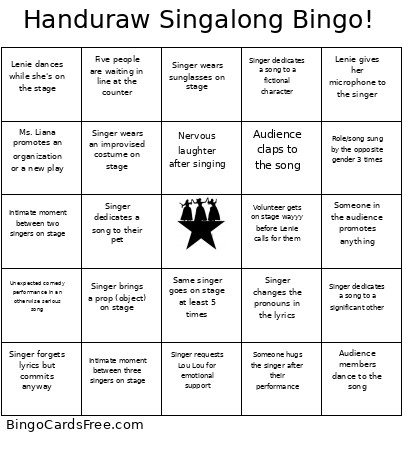 This Handuraw Singalong Bingo! Cards Game contains following Words or Phrases: Lenie says "alright" at least 5 times (keep track!), Lenie sings while she's on the stage, Lenie dances while she's on the stage, Lenie interviews someone in the audience, Lenie interviews the singer on stage, Lenie gives her microphone to the singer, Lenie coerces someone from the audience into singing a song, Lenie calls a name but they are absent, Singer requests Pau for emotional support, Singer requests Klaus for emotional support, Singer requests Lou Lou for emotional support, Ms. Liana calls for audio or tech support 2 times, Ms. Liana promotes an organization or a new play, Lenie promotes an organization or a new play, Someone in the audience promotes anything, 2 people volunteer for a song when Lenie calls for volunteers, Lenie tells the audience to buy more drinks/pizza, Volunteer gets on stage wayyy before Lenie calls for them, Same singer goes on stage at least 5 times, Singer pants into the microphone, Singer moans into the microphone, Singer brings a prop (object) on stage, Singer brings a portable fan on stage, Singer wears sunglasses on stage, Audience shouts "AYIEEEE", Singer forgets lyrics but commits anyway, A singer closes their eyes for a long emotional note, Singer wipes away fake or real tears, Singer dramatically fakes fainting at the end of the song, Singer dramatically points into the distance while singing, Singer dedicates a song to an ex, Singer dedicates a song to a significant other, Singer dedicates a song to a fictional character, Singer dedicates a song to their parents, Singer dedicates a song to their pet, Singer does overly emotional arm gestures on stage, Singer looks personally attacked by the lyrics, Someone hugs the singer after their performance, Someone from the audience goes on stage mid-song to dance, Singer performs with pizza in hand, Singer feeds the other singer during a duet, Singer sings with a drink in hand, Mic feedback squeal 5 times (keep track!), Nervous laughter after singing, Singer sits in a chair on stage, Singer wears an improvised costume on stage, Singer sets up their recording device before singing, Audience claps to the song, Audience members dance to the song, Singer knows the choreography, Performer acts the scene, not just sings, Unexpected comedy performance in an otherwise serious song, A shy singer sings on stage, Jazz hands!, Five people are waiting in line at the counter, A song gets skipped, Singer switches microphones mid-song, Role/song sung by the opposite gender 3 times, Singer changes the pronouns in the lyrics, A solo song turns into a duet, Someone takes on two roles in a song, Someone does a split on stage (Pau will NEVER do this), Intimate moment between two singers on stage, Intimate moment between three singers on stage, Happy Birthday song! (it doesn't have to be anyone's b-day right?).