
healthcare Bingo Cards - Print Free or Customize
Print free healthcare bingo cards or customize, unlimited prints! Choose from 42,200+ templates or use our bingo card generator. Add numbers, phrases, photos, or any combination. Play using printable PDF, digital bingo cards, and our digital bingo caller, or mix physical and digital.
About: This bingo card is all about careers and roles in the healthcare field, making it perfect for students exploring health sciences or anyone attending a medical career day or job fair. It highlights the range of jobs available, from direct patient care and therapy to research, administration, and support services, offering insights into how every role contributes to wellbeing.
How To: To get a PDF to print, click the Print button. You can change the card quantity and other printing settings on the Print tab. Grid items and free space content can be added on the Basic tab. Appearance can be exactly personalized on the corresponding tabs, or you can easily search any option on the 🔍 tab.
How to play healthcare Bingo Cards?
- Printed Caller: Print PDF calling list & calling slips and manually draw the slips.
- Printed Players: Print PDF bingo cards and manually cross off the cards.
- Online Caller: Click on the Play button above.
- Online Players: Click on the Play button above, and then click on the 🎫 button.
- Combo Play: Pick any combination above. For instance, caller can be either Offline or Online. And players can be Offline or Online or a mix of both.
Step-By-Step:
- Start by saving the healthcare PDF by clicking on the "Print" button above.
- Open the PDF and print a hard copy.
- For random calling, you can print another copy of the call list, cut, fold and then pull them randomly at play time.
- Cut the bingo cards at the cut marks if there are greater than 1 bingo cards per page.
- Give one card to each player. For marking, you can use markers. Crayons are the cheapest.
- Pick one person to be the caller. If you are playing in a small group, the caller can as well play along with their own Bingo card.
- The caller initiates the game by randomly picking an item from the call list and saying it to all players.
- The players check their cards to see if they have the announced word. If they do, they dab that word.
- The first player to finish a horizontal, vertical, or a diagonal line of crossed items shouts "Bingo!" and wins the play.
- The caller verifies that the items marked form a proper line as per the Bingo card and call list.
- You can play for varied patterns or a full card blackout for an extended play.
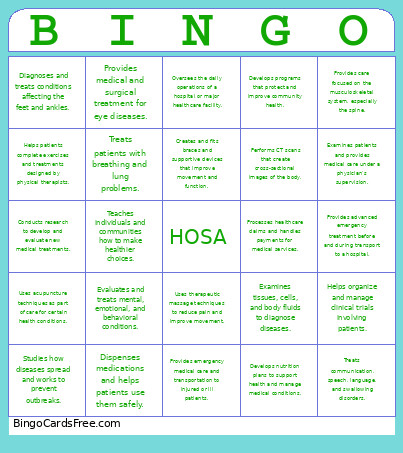 This healthcare Bingo Cards Game contains following Words or Phrases: Diagnoses illnesses and develops treatment plans for patients., Provides patient care, gives medications, and monitors health conditions., Provides basic nursing care under the supervision of nurses or doctors., Examines patients, diagnoses conditions, and can prescribe treatments., Examines patients and provides medical care under a physician's supervision., Performs operations to treat injuries, diseases, and medical conditions., Administers anesthesia and monitors patients during surgery., Diagnoses and treats problems involving teeth, gums, and oral health., Cleans teeth and teaches patients how to maintain good oral hygiene., Dispenses medications and helps patients use them safely., Prepares prescriptions and assists pharmacists with medication services., Helps patients improve movement, strength, and physical function., Helps patients complete exercises and treatments designed by physical therapists., Helps people regain skills needed for everyday activities., Guides patients through therapeutic activities to improve daily functioning., Treats communication, speech, language, and swallowing disorders., Tests hearing and treats hearing and balance problems., Examines eyes and treats vision problems and certain eye conditions., Provides medical and surgical treatment for eye diseases., Uses imaging equipment such as X-rays to create pictures of the body., Operates MRI scanners to produce detailed images of internal body structures., Performs CT scans that create cross-sectional images of the body., Uses sound waves to create images of organs, tissues, and developing babies., Uses radioactive substances to help diagnose and treat diseases., Tests blood, tissue, and other samples to help diagnose diseases., Draws blood from patients for testing or donation., Performs clinical and administrative tasks in healthcare settings., Helps patients with daily activities such as bathing, eating, and moving., Provides emergency medical care and transportation to injured or ill patients., Provides advanced emergency treatment before and during transport to a hospital., Treats patients with breathing and lung problems., Performs tests that help diagnose heart and blood-vessel conditions., Uses ultrasound to create images of the heart., Develops nutrition plans to support health and manage medical conditions., Helps people manage emotional, behavioral, and mental health challenges., Evaluates and treats mental, emotional, and behavioral conditions., Diagnoses mental illnesses and can prescribe medications., Helps patients and families access resources and cope with life challenges., Helps people understand how genetics may affect their health and family., Studies how diseases spread and works to prevent outbreaks., Develops programs that protect and improve community health., Teaches individuals and communities how to make healthier choices., Converts medical diagnoses and procedures into standardized billing codes., Processes healthcare claims and handles payments for medical services., Manages and maintains patients' electronic health records., Manages the operations, staff, and resources of healthcare organizations., Oversees the daily operations of a hospital or major healthcare facility., Organizes and maintains accurate patient medical records., Helps organize and manage clinical trials involving patients., Conducts research to develop and evaluate new medical treatments., Examines tissues, cells, and body fluids to diagnose diseases., Designs and fits artificial limbs for people who have lost limbs., Creates and fits braces and supportive devices that improve movement and function., Provides care focused on the musculoskeletal system, especially the spine., Diagnoses and treats conditions affecting the feet and ankles., Diagnoses and treats diseases and injuries in animals., Assists veterinarians with animal examinations, treatments, and procedures., Uses therapeutic massage techniques to reduce pain and improve movement., Uses acupuncture techniques as part of care for certain health conditions., Helps people with health-related and daily living needs in their homes..