
HELLWEEK BINGO Cards - Print Free or Customize
Print free HELLWEEK BINGO cards or personalize, limitless cards! Pick from 41,500+ designs or use our bingo card generator. Add numbers, phrases, photos, or all of them. Play using printed PDF, online bingo cards, and our online bingo caller, or go hybrid.
About: This bingo card captures all the fun and camaraderie of Filipino Culture Night (FCN) prep week at UGA, making it perfect for student organizations or cultural clubs. With plenty of lighthearted prompts about food runs, dance practice, and team spirit, it energizes participants while encouraging connection and support throughout a busy but rewarding time together.
How To: To save a PDF to print, click the Print button. You can modify the number of cards and other print options on the Print tab. Grid items and free space content can be edited on the Basic tab. Appearance can be fully personalized on the relevant tabs, or you can easily find any option using the 🔍 tab.
How to play HELLWEEK BINGO Cards?
- Virtual Players: Click on the Play button above, and then click on the 🎫 button.
- Virtual Caller: Click on the Play button above.
- Printed Players: Print PDF bingo cards and physically mark the cards.
- Printed Caller: Print PDF calling list & calling slips and physically pick the slips.
- Hybrid Play: Pick any combination above. For example, caller can be either Offline or Virtual. And players can be Offline or Virtual or a combo of both.
Step-By-Step:
- Start by saving the HELLWEEK BINGO PDF by clicking on the "Print" button above.
- Open the PDF and print a hard copy.
- For random drawing, you can print another copy of the call list, cut, fold and then draw them randomly at play time.
- Cut the bingo cards at the cut lines if there are more than 1 bingo cards per page.
- Distribute one card per player. For marking, you can use markers. Crayons cost the least.
- Pick one person to be the caller. If you are playing in a small group, the caller can as well play along with their own Bingo card.
- The caller initiates the game by randomly pulling an item from the call list and saying it to all players.
- The players check their cards to see if they have the called word. If they do, they mark that word.
- The first player to complete a horizontal, vertical, or a diagonal line of marked items announces "Bingo!" and wins the game.
- The caller confirms that the items crossed off form a correct line according to the Bingo card and call list.
- You can play for multiple patterns or a full card blackout for a longer game.
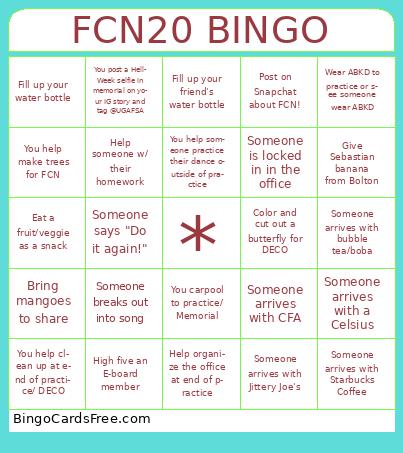 This HELLWEEK BINGO Cards Game contains following Words or Phrases: Help deco committee for 30 Minutes, Grab dinner with another member after practice, Wear crazy socks to practice/deco, Someone brings food to practice, Someone brings food to DECO, Color and cut out a butterfly for DECO, You hear Tinikling music, Someone naps in memorial, Ace an exam during hell week, Ace a quiz during hell week, Someone breaks out into song, Someone arrives with Starbucks Matcha, Someone arrives with Starbucks Coffee, Someone arrives with Jittery Joe's, Someone arrives with a Monster, Someone arrives with a Celsius, Someone arrives with CFA, Someone is locked in in the office, You help someone practice their dance outside of practice, Someone says "Do it again!", You walk with someone to Memorial Hall, You get 8 hours of sleep, You compliment someone's efforts!, Someone arrives with bubble tea/boba, Someone arrives with Bubble Cafe food, You help paint the FCN banner, You help make trees for FCN, You post about FCN on your IG story and tag @ugafsa, You text 5 friends and tell them to go to FCN, You help organize costumes or props, Take a selfie with every E-board member, Catch someone doomscrolling, Teach someone or learn someone's 8 count from their dance, You bring Athena a banana from Bolton, You help clean up at end of practice/ DECO, You post a Hell-Week selfie in memorial on your IG story and tag @UGAFSA, You bring Win a cookie from Bolton, You carpool to practice/ Memorial, Bring mangoes to share, You bring James an Italian ice cup from Bolton, Fill up your water bottle, Fill up your friend's water bottle, Bring James a flower you found on campus, Help organize the office at end of practice, Help reset the Hall of Nations after practice, Post on Snapchat about FCN!, 3 daps/ fist bumps from James in 1 hr, Help someone w/ their homework, Eat a fruit/veggie as a snack, Wear ABKD to practice or see someone wear ABKD, High five an E-board member, Give Sebastian banana from Bolton.