Print free HFMA bingo Card or customize,
unlimited cards! Select from 41,500+ designs or use our bingo card generator.
Add numbers, phrases, pictures, or any combination.
Play using printable PDF, virtual bingo cards,
and our virtual bingo caller, or mix physical and digital.
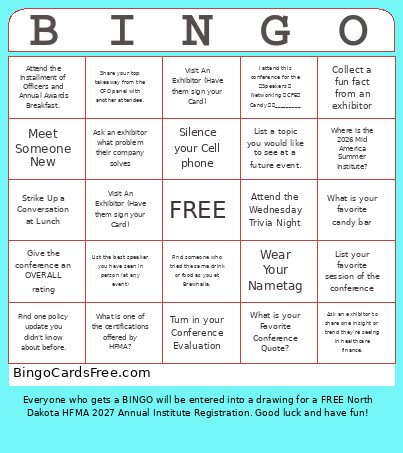
About: This bingo card captures the lively spirit of a professional conference, encouraging participants to connect, share insights, and fully engage with sessions, exhibitors, and fellow attendees. It is perfect for breaking the ice and adding a fun twist to events like industry summits or annual meetings, making networking and learning both accessible and rewarding.
How To: To get a printable PDF, click the Print button.
You can change the number of cards and other
print options on the Print tab.
Grid items and free space content can be edited on the Basic tab.
Appearance can be completely customized on the
corresponding tabs, or you can quickly locate any option
on the 🔍 tab.
How to play HFMA Bingo Card?
Paper Players: Print PDF bingo cards and physically mark the cards.
Paper Caller: Print PDF calling list & calling slips and physically draw the slips.
Online Players: Click on the Play button above, and then click on the 🎫 button.
Online Caller: Click on the Play button above.
Combo Mode: Select any combination above.
For instance, caller can be either Offline or Online.
And players can be Offline or Online or a combo of both.
Step-By-Step:
Start by getting the HFMA Bingo Card PDF by clicking on the "Print" button above.
Open the PDF and print it.
For random calling, you can print another copy of the call list, cut, fold and then pull them randomly at play time.
Cut the bingo cards at the cut lines if there are greater than 1 bingo cards per page.
Give one card to each player. For marking, you can use markers. Crayons cost the least.
Select one person to be the caller. If you are playing in a small group, the caller may as well play along with their own Bingo card.
The caller initiates the play by randomly pulling an item from the call list and calling out it to all players.
The players look at their cards to see if they have the announced word. If they do, they dab that word.
The first player to complete a horizontal, vertical, or a diagonal line of crossed items yells "Bingo!" and wins the game.
The caller validates that the items crossed off form a correct line as per the Bingo card and call list.
You can play for multiple patterns or a full card blackout for an extended game.
This HFMA Bingo Card Game contains following Words or Phrases: Collect a fun fact from an exhibitor, What is your favorite candy bar, Attend the Wednesday Trivia Night, Turn in your Conference Evaluation, Ask an exhibitor what problem their company solves, Silence your Cell phone, Visit An Exhibitor (Have them sign your Card), Find someone who tried the same drink or food as you at Brewhalla., List your favorite session of the conference, Give the conference an OVERALL rating, Ask an exhibitor to share one insight or trend they're seeing in healthcare finance., Find one policy update you didn't know about before., Wear Your Nametag, What is one of the certifications offered by HFMA?, Meet Someone New, Attend the Installment of Officers and Annual Awards Breakfast., What is your Favorite Conference Quote?, I attend this conference for the Speakers Networking CPE Candy _________, Strike Up a Conversation at Lunch, List a topic you would like to see at a future event., Where is the 2026 Mid America Summer Institute?, Visit An Exhibitor (Have them sign your Card), List the best speaker you have seen in person (at any event), Share your top takeaway from the CFO panel with another attendee..

 This HFMA Bingo Card Game contains following Words or Phrases: Collect a fun fact from an exhibitor, What is your favorite candy bar, Attend the Wednesday Trivia Night, Turn in your Conference Evaluation, Ask an exhibitor what problem their company solves, Silence your Cell phone, Visit An Exhibitor (Have them sign your Card), Find someone who tried the same drink or food as you at Brewhalla., List your favorite session of the conference, Give the conference an OVERALL rating, Ask an exhibitor to share one insight or trend they're seeing in healthcare finance., Find one policy update you didn't know about before., Wear Your Nametag, What is one of the certifications offered by HFMA?, Meet Someone New, Attend the Installment of Officers and Annual Awards Breakfast., What is your Favorite Conference Quote?, I attend this conference for the Speakers Networking CPE Candy _________, Strike Up a Conversation at Lunch, List a topic you would like to see at a future event., Where is the 2026 Mid America Summer Institute?, Visit An Exhibitor (Have them sign your Card), List the best speaker you have seen in person (at any event), Share your top takeaway from the CFO panel with another attendee..