Print free hindi bingo cards or customize,
limitless cards! Pick from 41,500+ designs or use our bingo card generator.
Add numbers, phrases, photos, or any combination.
Play using printable PDF, virtual bingo cards,
and our virtual bingo caller, or combine all formats.
How To: To get a printable PDF, click the Print button.
You can alter the number of cards and other
print options on the Print tab.
Grid items and free space text can be edited on the Basic tab.
Appearance can be totally customized on the
corresponding tabs, or you can quickly find any option
on the 🔍 tab.
How to play hindi bingo Cards?
Online Caller: Click on the Play button above.
Printed Caller: Print PDF calling list & calling slips and manually choose the slips.
Online Players: Click on the Play button above, and then click on the 🎫 button.
Printed Players: Print PDF bingo cards and manually mark the cards.
Hybrid Mode: Choose any combination above.
For example, caller can be either Printed or Online.
And players can be Printed or Online or a mix of both.
Step-By-Step:
Start by downloading the hindi bingo PDF by clicking on the "Print" button above.
Open the PDF and print it.
For random calling, you can print another copy of the call list, cut, fold and then draw them randomly at play time.
Cut the bingo cards at the cut lines if there are greater than 1 bingo cards per page.
Give one card to each player. For marking, you can use markers. Crayons cost the least.
Choose one person to be the caller. If you are playing in a small group, the caller can also play along with their own Bingo card.
The caller starts the game by randomly pulling an item from the call list and saying it to everyone.
The players check their cards to see if they have the announced word. If they do, they dab that word.
The first player to finish a horizontal, vertical, or a diagonal line of marked items announces "Bingo!" and wins the play.
The caller confirms that the items marked form a correct line as per the Bingo card and call list.
You can play for multiple patterns or a full card blackout for an extended play.
This hindi bingo Cards Game contains following Words or Phrases: 1. Neele Neele Ambar Par, 2. Yeh Vaada Raha, 3. Kya Yahi Pyar Hai, 4. Kya Hua Tera Vada, 5. Dil Kya Kare, 6. Mere Dil Mein Aaj Kya Hai, 7. Kehdoon Tumhen, 8. Rimjhim Gire Sawan, 9. Chhu Kar Mere Manko, 10. Pal Pal Dil Ke Paas, 11. Wada Karo, 12. Tera Mujhse, 13. Chalte Chalte, 14. Zeehale Muskin, 15. O Mere Dil Ke Chain, 16. Aankhein Khuli, 17. Kisi Nazar Ko Tera Intezar, 18. Hamen Tumse Pyar Kitna, 19. Saagar Jaisi Aankhonwali, 20. Gulabi Ankhen, 21. Dilbar Mere, 22. Aise Na Mujhe, 23. Kya Khoob Lagti Ho, 24. Maine Poochha Chand Se, 25. Main Shair To Nahin, 26. Ek Ajnabee Haseena Se, 27. Ye Samaa Samaa Hai Pyar Ka, 28. Pal Pal Dil Ke Paas, 29. Zindagi Ek Safar Hai Suhana, 30. Dheere Dheere Se Meri Zindagi Mein Aana, 31. Ae Kash Ke Hum, 32. Tauba Tumhare Ishare, 33. Aaja Sanam Madhur Chandni Men, 34. Kahin Door Jab Din Dhal Jaye, 35. Mera Dil Bhi Kitna Pagal Hai, 36. Jab Koi Baat Bigad Jaye, 37. Piyu Bole, 38. Sochenge Tumhe Pyar, 39. Ek Main Aur Ek Tu, 40. Rabba Main Toh Mar Gaya Oye.

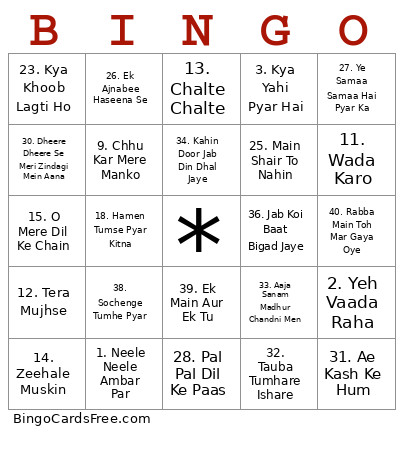 This hindi bingo Cards Game contains following Words or Phrases: 1. Neele Neele Ambar Par, 2. Yeh Vaada Raha, 3. Kya Yahi Pyar Hai, 4. Kya Hua Tera Vada, 5. Dil Kya Kare, 6. Mere Dil Mein Aaj Kya Hai, 7. Kehdoon Tumhen, 8. Rimjhim Gire Sawan, 9. Chhu Kar Mere Manko, 10. Pal Pal Dil Ke Paas, 11. Wada Karo, 12. Tera Mujhse, 13. Chalte Chalte, 14. Zeehale Muskin, 15. O Mere Dil Ke Chain, 16. Aankhein Khuli, 17. Kisi Nazar Ko Tera Intezar, 18. Hamen Tumse Pyar Kitna, 19. Saagar Jaisi Aankhonwali, 20. Gulabi Ankhen, 21. Dilbar Mere, 22. Aise Na Mujhe, 23. Kya Khoob Lagti Ho, 24. Maine Poochha Chand Se, 25. Main Shair To Nahin, 26. Ek Ajnabee Haseena Se, 27. Ye Samaa Samaa Hai Pyar Ka, 28. Pal Pal Dil Ke Paas, 29. Zindagi Ek Safar Hai Suhana, 30. Dheere Dheere Se Meri Zindagi Mein Aana, 31. Ae Kash Ke Hum, 32. Tauba Tumhare Ishare, 33. Aaja Sanam Madhur Chandni Men, 34. Kahin Door Jab Din Dhal Jaye, 35. Mera Dil Bhi Kitna Pagal Hai, 36. Jab Koi Baat Bigad Jaye, 37. Piyu Bole, 38. Sochenge Tumhe Pyar, 39. Ek Main Aur Ek Tu, 40. Rabba Main Toh Mar Gaya Oye.