Hlvrai 2 bingooooo Cards - Print Free or Customize
Print free Hlvrai 2 bingooooo cards or modify,
unlimited prints! Choose from 41,500+ templates or use the bingo card generator.
Add numbers, words, images, or any combination.
Play using PDF printouts, virtual bingo cards,
and the virtual bingo caller, or go hybrid.
About: This bingo card is perfect for fans of chaotic video game parodies and internet humor, with a strong focus on the absurd antics found in Half-Life 2 and other Valve games. Packed with unexpected twists, meta-jokes, and wild character moments, it’s a great fit for online watch parties, fandom meetups, or streaming group events where anything can happen.
How To: To get a PDF to print, click the Print button.
You can adjust the card quantity and other
print options on the Print tab.
Grid items and free space content can be edited on the Basic tab.
Appearance can be completely customized on the
corresponding tabs, or you can easily find any preference
using the 🔍 tab.
How to play Hlvrai 2 bingooooo Cards?
Digital Players: Click on the Play button above, and then click on the 🎫 button.
Paper Caller: Print PDF calling list & calling slips and manually select the slips.
Paper Players: Print PDF bingo cards and manually cross off the cards.
Digital Caller: Click on the Play button above.
Hybrid Mode: Pick any combination above.
For instance, caller can be either Paper or Digital.
And players can be Paper or Digital or a combo of both.
Step-By-Step:
Start by downloading the Hlvrai 2 bingooooo PDF by clicking on the "Print" button above.
Open the PDF and print a hard copy.
For random drawing, you can print another copy of the call list, cut, fold and then pick them randomly at play time.
Cut the bingo cards at the cut lines if there are more than 1 bingo cards per page.
Give one card to each player. For marking, you can use pencils. Crayons are the cheapest.
Pick one person to be the caller. If you are playing in a small group, the caller may also play along with their own Bingo card.
The caller starts the play by randomly drawing an item from the call list and announcing it to all players.
The players check their cards to see if they have the announced word. If they do, they dab that word.
The first player to finish a horizontal, vertical, or a diagonal line of marked items shouts "Bingo!" and wins the play.
The caller verifies that the items crossed off form a proper line according to the Bingo card and call list.
You can play for different patterns or a full card blackout for an extended play.
This Hlvrai 2 bingooooo Cards Game contains following Words or Phrases: Father Grigori has a sick musical number, We transcend the setting of half life 2 and end up in another Valve game, Tommy steals G-Man's job but not in the way you expect, This will pay dividends in the sequel!, Wikipedia mention that includes a disclaimer, SNAP CUBE INC APPEARANCE, Gordon loses his straight man status and goes on a character arc to get it back, Either Benrey or Coomer have the same low poly model while everyone else becomes HD, There's a horrific glitch and Wayne is stuck just staring at HL2 trying to break it's self, Benrey gets pissed at Breen for taking his bad guy status, or is so chill. No in-between, A new Tumblr sexy creature is born, The ending involves everyone busting Gordon out of the tram, Barney is surprisingly his own separate character?, In the background you can see left over Coomer clones., Someone eats the water ration bar and dies, Gordon says fuck you after being told to pick up a can, Someone eats Gordon's crowbar. This is not a metaphor, Someone loses a limb! This will pay dividends in the sequel!, The pigeons make a comeback and it is not pretty, Sunkist commits a war crime and that's ok, There's a wedding and by god they're crashing it, Surprise! Emotional damage! Surprise!, BBVRAI mention somewhere in the background, The Combine have a super duper cool club that totally doesn't end poorly.

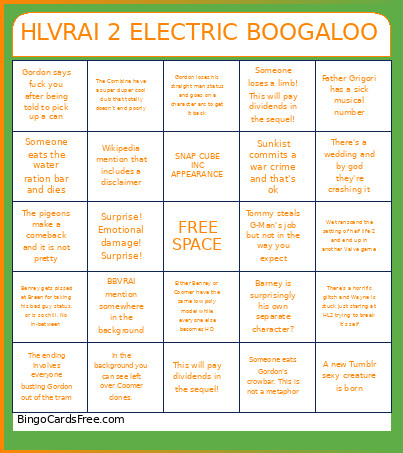 This Hlvrai 2 bingooooo Cards Game contains following Words or Phrases: Father Grigori has a sick musical number, We transcend the setting of half life 2 and end up in another Valve game, Tommy steals G-Man's job but not in the way you expect, This will pay dividends in the sequel!, Wikipedia mention that includes a disclaimer, SNAP CUBE INC APPEARANCE, Gordon loses his straight man status and goes on a character arc to get it back, Either Benrey or Coomer have the same low poly model while everyone else becomes HD, There's a horrific glitch and Wayne is stuck just staring at HL2 trying to break it's self, Benrey gets pissed at Breen for taking his bad guy status, or is so chill. No in-between, A new Tumblr sexy creature is born, The ending involves everyone busting Gordon out of the tram, Barney is surprisingly his own separate character?, In the background you can see left over Coomer clones., Someone eats the water ration bar and dies, Gordon says fuck you after being told to pick up a can, Someone eats Gordon's crowbar. This is not a metaphor, Someone loses a limb! This will pay dividends in the sequel!, The pigeons make a comeback and it is not pretty, Sunkist commits a war crime and that's ok, There's a wedding and by god they're crashing it, Surprise! Emotional damage! Surprise!, BBVRAI mention somewhere in the background, The Combine have a super duper cool club that totally doesn't end poorly.