Print free Hochzeits-bingo cards or personalize,
unlimited prints! Pick from 41,900+ templates or use our bingo card generator.
Add numbers, phrases, images, or mix them all.
Play using PDF prints, digital bingo cards,
and our digital bingo caller, or mix physical and digital.
How To: To save a PDF to print, click the Print button.
You can modify the number of cards and other
print options on the Print tab.
Grid items and free space text can be changed on the Basic tab.
Appearance can be fully customized on the
relevant tabs, or you can quickly find any setting
on the 🔍 tab.
How to play Hochzeits-Bingo Cards?
Online Caller: Click on the Play button above.
Online Players: Click on the Play button above, and then click on the 🎫 button.
Printed Players: Print PDF bingo cards and physically scratch the cards.
Printed Caller: Print PDF calling list & calling slips and physically select the slips.
Hybrid Play: Select any combination above.
For instance, caller can be either Paper or Online.
And players can be Paper or Online or a combo of both.
Step-By-Step:
Start by saving the Hochzeits-Bingo PDF by clicking on the "Print" button above.
Open the PDF and print a hard copy.
For random drawing, you can print another copy of the call list, cut, fold and then pull them randomly at play time.
Cut the bingo cards at the cut marks if there are more than 1 bingo cards per page.
Distribute one card per player. For marking, you can use markers. Crayons are the cheapest.
Select one person to be the caller. If you are playing in a small group, the caller can as well play along with their own Bingo card.
The caller starts the play by randomly pulling an item from the call list and saying it to all players.
The players scan their cards to see if they have the called word. If they do, they cross off that word.
The first player to finish a horizontal, vertical, or a diagonal line of marked items shouts "Bingo!" and wins the play.
The caller checks that the items crossed off form a correct line according to the Bingo card and call list.
You can play for varied patterns or a full card blackout for a longer play.
This Hochzeits-Bingo Cards Game contains following Words or Phrases: ein Instrument spielt, das Jannik auch spielt, nicht in Deutschland lebt, in Süddeutschland lebt, Anica oder Jannik kennt, seit sie klein waren, auf einem der JGAs war, mit Anica oder Jannik studiert hat, mit Anica oder Jannik arbeitet/gearbeitet hat, mit Anica oder Jannik Sport gemacht hat/macht, eine Geschichte über Anica oder Jannik kennt, die du nicht kennst, an einem Ort war, an den du unbeindgt reisen möchtest, das gleiche Haustier hat/hatte wie du, Anica oder Jannik länger kennt als du, denselben Berufswunsch als Kind hatte wie du, einen völlig anderen Beruf hat als du, ein gleiches Hobby hat wie du, jemanden kennt der schon einmal in der Antarktis war, schon einmal in einem Vattenfall-Gebäude, jemanden mit Bundesverdienstkreuz kennt, bei einem Chorkonzert von Anica oder Jannik war, schon einmal im Fernsehen war, schon einmal einen Bungeesprung gemacht hat, mind. 2 Versuche beim Führerschein gebraucht hat, mit Anica und/oder Jannik im Urlaub war, schon mal mit Anica Fahrrad gefahren ist, noch keinen der beiden auf einer Bühne gesehen hat, ein Kinder-/Jugenfoto von Anica oder Jannik auf dem Handy hat, an der Domschule zur Schule gegangen ist, in Janniks Auto mitgefahren ist, schon einmal von Anica bekocht wurde, selbst oder ein Familienmitglied bei der Bundeswehr war, eine Nähmaschine besitzt, etwas veröffentlicht hat, mehr als 20 Jahre im gleichen Haus wohnt, von außerhalb kommt, aber schon in Schleswig war, schon einmal in einem Fußballstadion war, mehr als 10 Pflanzen zu Hause hat, schon einmal in Memmingen war, den Jahrestag von Anica und Jannik kennt, die Hausnummer von Anica und Jannik weiß.

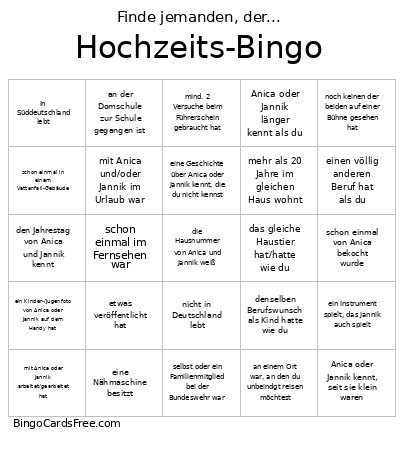 This Hochzeits-Bingo Cards Game contains following Words or Phrases: ein Instrument spielt, das Jannik auch spielt, nicht in Deutschland lebt, in Süddeutschland lebt, Anica oder Jannik kennt, seit sie klein waren, auf einem der JGAs war, mit Anica oder Jannik studiert hat, mit Anica oder Jannik arbeitet/gearbeitet hat, mit Anica oder Jannik Sport gemacht hat/macht, eine Geschichte über Anica oder Jannik kennt, die du nicht kennst, an einem Ort war, an den du unbeindgt reisen möchtest, das gleiche Haustier hat/hatte wie du, Anica oder Jannik länger kennt als du, denselben Berufswunsch als Kind hatte wie du, einen völlig anderen Beruf hat als du, ein gleiches Hobby hat wie du, jemanden kennt der schon einmal in der Antarktis war, schon einmal in einem Vattenfall-Gebäude, jemanden mit Bundesverdienstkreuz kennt, bei einem Chorkonzert von Anica oder Jannik war, schon einmal im Fernsehen war, schon einmal einen Bungeesprung gemacht hat, mind. 2 Versuche beim Führerschein gebraucht hat, mit Anica und/oder Jannik im Urlaub war, schon mal mit Anica Fahrrad gefahren ist, noch keinen der beiden auf einer Bühne gesehen hat, ein Kinder-/Jugenfoto von Anica oder Jannik auf dem Handy hat, an der Domschule zur Schule gegangen ist, in Janniks Auto mitgefahren ist, schon einmal von Anica bekocht wurde, selbst oder ein Familienmitglied bei der Bundeswehr war, eine Nähmaschine besitzt, etwas veröffentlicht hat, mehr als 20 Jahre im gleichen Haus wohnt, von außerhalb kommt, aber schon in Schleswig war, schon einmal in einem Fußballstadion war, mehr als 10 Pflanzen zu Hause hat, schon einmal in Memmingen war, den Jahrestag von Anica und Jannik kennt, die Hausnummer von Anica und Jannik weiß.