Print free CBJ bingo! cards or modify,
limitless cards! Pick from 41,900+ templates or use the bingo card generator.
Add numbers, words, photos, or mix them all.
Play using PDF prints, digital bingo cards,
and the digital bingo caller, or mix physical and digital.
About: This bingo card is perfect for diehard Columbus Blue Jackets fans who want to add extra excitement to game night. Packed with classic hockey moments, quirky penalties, and CBJ-specific happenings, it’s a lively way to keep everyone engaged. Use it at watch parties or in the arena—the energy is infectious and everyone will want in on the fun.
How To: To save a PDF to print, click the Print button.
You can change the number of cards and other
print options on the Print tab.
Grid items and free space content can be edited on the Basic tab.
Appearance can be exactly customized on the
corresponding tabs, or you can easily locate any option
on the 🔍 tab.
How to play CBJ Bingo! Cards?
Virtual Caller: Click on the Play button above.
Virtual Players: Click on the Play button above, and then click on the 🎫 button.
Paper Caller: Print PDF calling list & calling slips and physically pick the slips.
Paper Players: Print PDF bingo cards and physically cross off the cards.
Hybrid Mode: Pick any combination above.
For instance, caller can be either Printed or Virtual.
And players can be Printed or Virtual or a combination of both.
Step-By-Step:
Start by getting the CBJ Bingo! PDF by clicking on the "Print" button above.
Open the PDF and print it.
For random calling, you can print another copy of the call list, cut, fold and then pull them randomly at play time.
Cut the bingo cards at the cut lines if there are greater than 1 bingo cards per page.
Give one card to each player. For marking, you can use pencils. Crayons are the cheapest.
Pick one person to be the caller. If you are playing in a small group, the caller may also play along with their own Bingo card.
The caller starts the game by randomly picking an item from the call list and announcing it to everyone.
The players check their cards to see if they have the announced word. If they do, they mark that word.
The first player to finish a horizontal, vertical, or a diagonal line of crossed items shouts "Bingo!" and wins the play.
The caller validates that the items crossed off form a correct line as per the Bingo card and call list.
You can play for varied patterns or a full card blackout for an extended play.
This CBJ Bingo! Cards Game contains following Words or Phrases: Hat Trick!, Shorthanded Goal!, HUGE Hit!, Embellishment Penalty, Puck into the Stands, Eastern Conference Opponent, "Hockey Nickname", Marchenko Goal!, Off the Post! Ding!, Fans Dancing, Gloves off Fight, Pulled the Goalie, CBJ Successful Penalty Kill!, JACKETS! ON THE POWERPLAY!!, Empty Netter Goal, Name Pronounced Wrong, We tied it up!, 2-point lead…, "CBJ! CBJ!" Chant, "$#*%!" (Cursing), Too many Men on the Ice, Western Conference Opponent, CBJ GOOOOAL!!!, Crazy Fan Outfit, Quebecois, Original 6 Team, Mascot Sighting!, Scrum!, Hookin' Penalty, Elmo!, High Sticking Penalty, Werenski Goal!, Goalie stands on their Head!, Tripping Penalty, Stinger Sighting!, Metro Opponent, Roughing Penalty, Post 2000 Franchise, Slashing Penalty, Canadian Flag, US Flag, Fire the Cannon!!, Holding Penalty, FIGHT!, CBJ won the faceoff!, Thirds Jerseys, Coyle Goal!, Garland Goal!, Shoresey Jersey, "Neutral Zone", "Blue Paint/Line", Overtime, Official Challenge, Shootout, Ref hit by Puck, Slapshot!, Incredible Save!, Overtime…, Shootout, Odd Man Rush, Hattie Watch!, Goaltender Interference, Lost a glove!, Equipment broke, Coach's Challenge, JACKETS WIN!!!, Offside Call, Icing Call, Helmet came off!, Belly Slide!, Zamboni, Gordie Howe Hat Trick, "The Crease", "Center/Red Line", "Center Ice", "The Trapezoid", Collided with Ref, Net knocked loose, Canadian Team, Nichushkin Goal!, Wraparound Goal, Five on Three, Four on Four, Delayed Penalty, Interference Penalty, Fantilli Goal!.

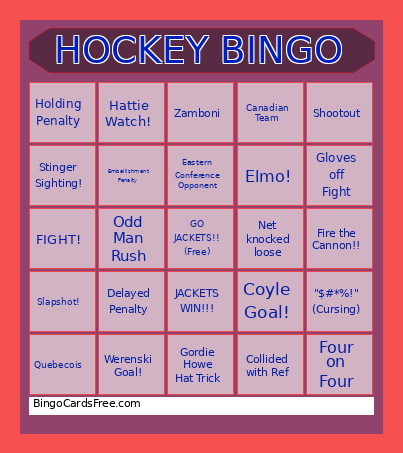 This CBJ Bingo! Cards Game contains following Words or Phrases: Hat Trick!, Shorthanded Goal!, HUGE Hit!, Embellishment Penalty, Puck into the Stands, Eastern Conference Opponent, "Hockey Nickname", Marchenko Goal!, Off the Post! Ding!, Fans Dancing, Gloves off Fight, Pulled the Goalie, CBJ Successful Penalty Kill!, JACKETS! ON THE POWERPLAY!!, Empty Netter Goal, Name Pronounced Wrong, We tied it up!, 2-point lead…, "CBJ! CBJ!" Chant, "$#*%!" (Cursing), Too many Men on the Ice, Western Conference Opponent, CBJ GOOOOAL!!!, Crazy Fan Outfit, Quebecois, Original 6 Team, Mascot Sighting!, Scrum!, Hookin' Penalty, Elmo!, High Sticking Penalty, Werenski Goal!, Goalie stands on their Head!, Tripping Penalty, Stinger Sighting!, Metro Opponent, Roughing Penalty, Post 2000 Franchise, Slashing Penalty, Canadian Flag, US Flag, Fire the Cannon!!, Holding Penalty, FIGHT!, CBJ won the faceoff!, Thirds Jerseys, Coyle Goal!, Garland Goal!, Shoresey Jersey, "Neutral Zone", "Blue Paint/Line", Overtime, Official Challenge, Shootout, Ref hit by Puck, Slapshot!, Incredible Save!, Overtime…, Shootout, Odd Man Rush, Hattie Watch!, Goaltender Interference, Lost a glove!, Equipment broke, Coach's Challenge, JACKETS WIN!!!, Offside Call, Icing Call, Helmet came off!, Belly Slide!, Zamboni, Gordie Howe Hat Trick, "The Crease", "Center/Red Line", "Center Ice", "The Trapezoid", Collided with Ref, Net knocked loose, Canadian Team, Nichushkin Goal!, Wraparound Goal, Five on Three, Four on Four, Delayed Penalty, Interference Penalty, Fantilli Goal!.