
Hockey Game Bingo Cards - Print Free or Customize
Print free Hockey Game bingo cards or adjust them, limitless prints! Choose from 41,500+ templates or use the bingo card generator. Add numbers, words, images, or any combination. Play using printed PDF, online bingo cards, and the online bingo caller, or combine all formats.
About: This bingo card captures all the excitement and unpredictability of watching a Montreal Canadiens game with family and friends. Packed with game highlights, quirky personal moments, and classic TV ad sightings, it's perfect for spicing up hockey night get-togethers or adding some competitive fun to viewing parties with devoted Habs fans.
How To: To get a printable PDF, click the Print button. You can change the card count and other printing options on the Print tab. Grid items and free space text can be edited on the Basic tab. Appearance can be highly customized on the corresponding tabs, or you can quickly locate any option on the 🔍 tab.
How to play Hockey Game Bingo Cards?
- Digital Players: Click on the Play button above, and then click on the 🎫 button.
- Printed Players: Print PDF bingo cards and physically write on the cards.
- Printed Caller: Print PDF calling list & calling slips and physically choose the slips.
- Digital Caller: Click on the Play button above.
- Combo Play: Select any combination above. For instance, caller can be either Paper or Digital. And players can be Paper or Digital or a mix of both.
Step-By-Step:
- Start by getting the Hockey Game PDF by clicking on the "Print" button above.
- Open the PDF and print a hard copy.
- For random calling, you can print another copy of the call list, cut, fold and then pick them randomly at play time.
- Cut the bingo cards at the cut lines if there are greater than 1 bingo cards per page.
- Give one card to each player. For marking, you can use crayons. Crayons are the cheapest.
- Select one person to be the caller. If you are playing in a small group, the caller may also play along with their own Bingo card.
- The caller starts the play by randomly pulling an item from the call list and calling out it to everyone.
- The players check their cards to see if they have the called word. If they do, they mark that word.
- The first player to complete a horizontal, vertical, or a diagonal line of marked items announces "Bingo!" and wins the play.
- The caller checks that the items marked form a correct line as per the Bingo card and call list.
- You can play for different patterns or a full card blackout for an extended play.
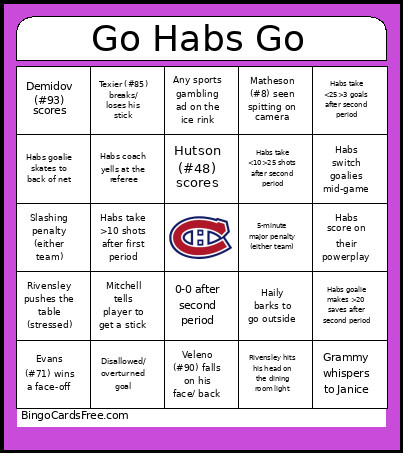 This Hockey Game Bingo Cards Game contains following Words or Phrases: Habs lead by 2, Habs call time-out, Other team call time-out, Habs have an empty net, Other team has an empty net, Game goes to overtime, Hat trick (any player), National anthem sung by man, National anthem sung by woman, 0-0 after first period, 0-0 after second period, Haily barks to go outside, Haily barks to go home, Any sports gambling ad on the ice rink, Any sports gambling ad on the boards, Any sports gambling commercial on tv, Habs take >10 shots after first period, Habs take <10>25 shots after second period, Habs take <25>3 goals after second period, Mike says "OH COME ON REF!", Mike wears his Habs jersey, Emily wears her Habs shirt, Rivensley pushes the table (stressed), Rivensley hits his head on the dining room light, Tickets.ca ad on TV, Bet MGM ad on TV, Draft Kings ad on TV, Bet 365 ad on TV, Tim Hortons ad on TV, Car ad on the boards, Wegovy ad on the boards, Ozempic ad on the boards, Mitchell kicks the stupid robot in the TV commercial, Someone says sports betting ads should be illegal, Mitchell asks Grammy to repeat, Grammy whispers to Janice, Mitchell tells player to get a stick, Fight involving >6 players, Penalty shot (either team), Disallowed/ overturned goal, 5-minute major penalty (either team), Habs score on their powerplay, Habs score on other team's powerplay, Grammy cheers for Caufield (#13), Grammy calls Caufield (#13) her "little guy", Boarding penalty (either team), Slashing penalty (either team), Holding penalty (either team), Hooking penalty (either team), Tripping penalty (either team), Cross-checking penalty (either team), Interference penalty (either team), Delay of game penalty (either team), Habs are the first team to ice the puck, Habs coach yells at the referee, Anderson (#17) scores, Anderson (#17) gets an assist, Habs goalie makes >20 saves after second period, Bolduc (#76) scores, Bolduc (#76) breaks his stick, Double-minor penalty (either team), Caufield (#13) scores, Caufield (#13) gets an assist, Dach (#77) gets injured, Dach (#77) goes to the dressing room, Danault (#24) scores, Danault (#24) gets any penalty, Demidov (#93) scores, Demidov (#93) gets an assist, Demidov (#93) goes on a breakaway, Evans (#71) seen spitting on camera, Evans (#71) scores, Evans (#71) wins a face-off, Gallagher (#11) plays >3 minutes, Gallagher (#11) gets injured, Newhook (#15) scores, Newhook (#15) gets an assist, Slafkovský (#20) gets punched in the face, Slafkovský (#20) body checks another player, Suzuki (#14) scores, Suzuki (#14) gets an assist, Texier (#85) seen spitting on camera, Texier (#85) breaks/ loses his stick, Veleno (#90) plays >3 minutes, Veleno (#90) falls on his face/ back, Carrier (#45) gets a slashing penalty, Carrier (#45) gets a high-sticking penalty, Dobson (#53) scores, Dobson (#53) breaks/ loses his stick, Guhle (#21) falls on his face/ back, Guhle (#21) is on ice when the other team scores, Hutson (#48) scores, Hutson (#48) gets an assist, Hutson (#48) goes on a breakaway, Matheson (#8) goes on a breakaway, Matheson (#8) seen spitting on camera, Struble (#47) gets injured, Struble (#47) gets an assist, Xhekaj (#72) loses his helmet, Xhekaj (#72) gets a tripping penalty, Habs goalie skates to back of net, Habs goalie drinks from Gatorade bottle, Referees/ linesmen huddle to decide on a call, Mitchell's friend texts him about the game, Habs switch goalies mid-game, Other team switches goalie mid-game, Habs score first (any period), Other team scores first (any period), Emily falls asleep during the game.