House Church Bingo Cards - Print Free or Customize
Print free House Church bingo cards or modify,
unlimited cards! Pick from 42,600+ designs or use our bingo card generator.
Add numbers, phrases, photos, or all of them.
Play using PDF printouts, digital bingo cards,
and our digital bingo caller, or mix physical and digital.
About: This bingo card captures the quirky, heartwarming, and sometimes unpredictable energy of a close-knit house church gathering. Perfect for church families or small group get-togethers, it highlights all those inside jokes, unexpected teaching moments, and endearing interactions that make these communal Sundays special. Get ready for some laughs and spot-on moments as you play along!
How To: To download a printable PDF, click the Print button.
You can adjust the number of cards and other
print preferences on the Print tab.
Grid items and free space text can be edited on the Basic tab.
Appearance can be fully customized on the
corresponding tabs, or you can quickly locate any option
using the 🔍 tab.
How to play House Church Bingo Cards?
Paper Caller: Print PDF calling list & calling slips and manually select the slips.
Paper Players: Print PDF bingo cards and manually cross off the cards.
Virtual Players: Click on the Play button above, and then click on the 🎫 button.
Virtual Caller: Click on the Play button above.
Mixed Play: Select any combination above.
For example, caller can be either Offline or Virtual.
And players can be Offline or Virtual or a combo of both.
Step-By-Step:
Start by saving the House Church Bingo PDF by clicking on the "Print" button above.
Open the PDF and print a hard copy.
For random calling, you can print another copy of the call list, cut, fold and then pick them randomly at play time.
Cut the bingo cards at the cut lines if there are more than 1 bingo cards per page.
Give one card to each player. For marking, you can use pencils. Crayons cost the least.
Select one person to be the caller. If you are playing in a small group, the caller can as well play along with their own Bingo card.
The caller starts the game by randomly drawing an item from the call list and announcing it to everyone.
The players scan their cards to see if they have the announced word. If they do, they mark that word.
The first player to complete a horizontal, vertical, or a diagonal line of crossed items announces "Bingo!" and wins the play.
The caller verifies that the items crossed off form a proper line as per the Bingo card and call list.
You can play for different patterns or a full card blackout for an extended play.
This House Church Bingo Cards Game contains following Words or Phrases: "I don't want to be called a pastor" or some equivalent, "Is anyone hot?", "My house is your house" or something like that, "Tell people about Jesus, use words if you have to.", A child (probably Evelyn) gives Troy a dirty look, A kid helps with communion, An out-of-left-field comparison leaves Troy speechless, At least 3 people go for the kinetic sand, Blake emerges from the back with an unknown object, Blake makes a pouty face, Blake wants to take something home, Branden tells a sibling to stop doing what they're doing, "Please take food home", Kat starts screaming, Music time finally starts after 10:50am, Nevaeh teaches an old person slang, Someone arrives after the teaching, Someone audibly reacts to learning a new Bible fact, Someone is amazed or confused at the existence of Alexa, T swift mentioned teaching gets temporarily derailed by a nerdy tangent, Troy calls a kid "love", Troy makes a comment about how cool and unexpected House Church, Troy mentions learning Hebrew, Troy says someone else can take his throne, Troy and Trae have a sibling moment, Troy mentions learning Hebrew AT LEAST 3 TIMES, Someone plays darts, Ryder or Neveah bother each other, More chairs have to come out mid-teaching, Troy apologizes, Some conversation is trauma-informed, Sara makes fun of Troy, Troy doesn't know about something we do regularly, Smoke break, Ann knows that's right, Jorn makes a cat screech, Someone takes home more than one clamshell, New person arrives, "Oh I love this song", 3 languages get mentioned (Aramaic, Greek, Hebrew, anything else), Second pot of coffee gets made, "To be honest".

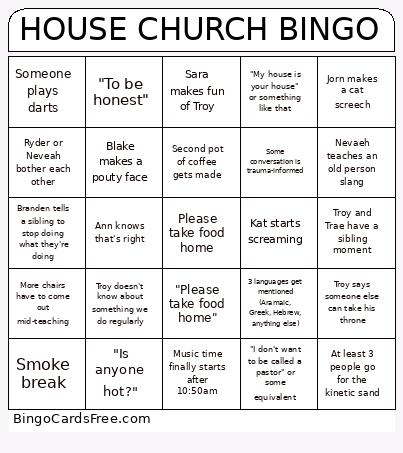 This House Church Bingo Cards Game contains following Words or Phrases: "I don't want to be called a pastor" or some equivalent, "Is anyone hot?", "My house is your house" or something like that, "Tell people about Jesus, use words if you have to.", A child (probably Evelyn) gives Troy a dirty look, A kid helps with communion, An out-of-left-field comparison leaves Troy speechless, At least 3 people go for the kinetic sand, Blake emerges from the back with an unknown object, Blake makes a pouty face, Blake wants to take something home, Branden tells a sibling to stop doing what they're doing, "Please take food home", Kat starts screaming, Music time finally starts after 10:50am, Nevaeh teaches an old person slang, Someone arrives after the teaching, Someone audibly reacts to learning a new Bible fact, Someone is amazed or confused at the existence of Alexa, T swift mentioned teaching gets temporarily derailed by a nerdy tangent, Troy calls a kid "love", Troy makes a comment about how cool and unexpected House Church, Troy mentions learning Hebrew, Troy says someone else can take his throne, Troy and Trae have a sibling moment, Troy mentions learning Hebrew AT LEAST 3 TIMES, Someone plays darts, Ryder or Neveah bother each other, More chairs have to come out mid-teaching, Troy apologizes, Some conversation is trauma-informed, Sara makes fun of Troy, Troy doesn't know about something we do regularly, Smoke break, Ann knows that's right, Jorn makes a cat screech, Someone takes home more than one clamshell, New person arrives, "Oh I love this song", 3 languages get mentioned (Aramaic, Greek, Hebrew, anything else), Second pot of coffee gets made, "To be honest".