Household 2026 Bingo Cards - Print Free or Customize
Print free Household 2026 bingo cards or adjust them,
unlimited cards! Choose from 41,500+ designs or use the bingo card generator.
Add numbers, phrases, photos, or any combination.
Play using printable PDF, digital bingo cards,
and the digital bingo caller, or go hybrid.
About: This bingo card is a fun, unpredictable mix of milestones, inside jokes, and quirky events perfect for a close-knit group of friends or housemates. The tone is playful and celebratory with nods to both everyday victories and wild, once-in-a-lifetime moments. It's ideal for get-togethers, game nights, or just adding extra excitement to shared routines.
How To: To get a PDF to print, click the Print button.
You can change the number of cards and other
print preferences on the Print tab.
Grid items and free space content can be edited on the Basic tab.
Appearance can be completely customized on the
relevant tabs, or you can quickly find any preference
on the 🔍 tab.
How to play Household 2026 Bingo Cards?
Online Players: Click on the Play button above, and then click on the 🎫 button.
Online Caller: Click on the Play button above.
Paper Caller: Print PDF calling list & calling slips and physically choose the slips.
Paper Players: Print PDF bingo cards and physically scratch the cards.
Hybrid Mode: Select any combination above.
For instance, caller can be either Paper or Online.
And players can be Paper or Online or a mix of both.
Step-By-Step:
Start by saving the Household 2026 Bingo PDF by clicking on the "Print" button above.
Open the PDF and print a hard copy.
For random calling, you can print another copy of the call list, cut, fold and then draw them randomly at play time.
Cut the bingo cards at the cut marks if there are more than 1 bingo cards per page.
Distribute one card per player. For marking, you can use pens. Crayons are the cheapest.
Select one person to be the caller. If you are playing in a small group, the caller can also play along with their own Bingo card.
The caller begins the play by randomly drawing an item from the call list and announcing it to everyone.
The players scan their cards to see if they have the called word. If they do, they cross off that word.
The first player to complete a horizontal, vertical, or a diagonal line of marked items shouts "Bingo!" and wins the play.
The caller verifies that the items crossed off form a correct line according to the Bingo card and call list.
You can play for multiple patterns or a full card blackout for an extended play.
This Household 2026 Bingo Cards Game contains following Words or Phrases: Shelby gets a Voice Acting Job, Shelby gets a car, Anyone gets a pay raise, New Fish Drops, Fletcher walks, AC gets fixed, Shelby gets a website, Cody releases a game on Steam, Kate gets pregnant, AI bubble pops, Fletcher says a word frl, Cramer builds his 3D printer, Gas prices drop to the $3 range, One of us is detained, Cody goes on a date, New useless invention craze, Cramer finishes a project, Household plays Daggerheart again, Household Family Dinner Night, Double Rainbow, Travel, Nautical disaster, Poker Night, Friendsgiving, New household pet, Disneyland Trip, Conspiracy theory gets noticeable proof, Another Spiderman, Dual movie event, Chris gets engaged, New Sport Drops, Farmer uprising, Lord of the Rings dinner party, Fletcher answers a question, Christmas Dice, Moriah gets pregnant, Warren ends, Cody gets a job, Pinecone, Highwater, It snows, Temps reach 120F (app), Temps reach 15F (app), Another Youtuber movie, Cinthya gets a new job, Cody Killian gets a new job, New Prince Kid relationship, Shelby goes on a date, Someone is caught moving Jeffrey, Alli moves, Shelby burns furniture, New couch.

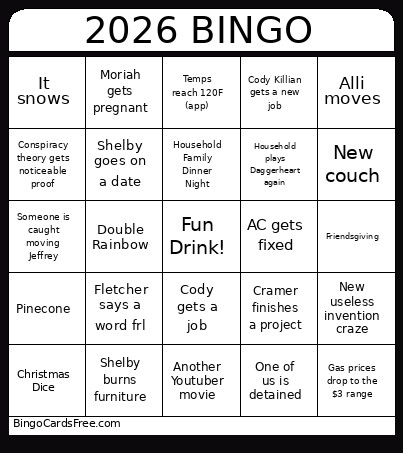 This Household 2026 Bingo Cards Game contains following Words or Phrases: Shelby gets a Voice Acting Job, Shelby gets a car, Anyone gets a pay raise, New Fish Drops, Fletcher walks, AC gets fixed, Shelby gets a website, Cody releases a game on Steam, Kate gets pregnant, AI bubble pops, Fletcher says a word frl, Cramer builds his 3D printer, Gas prices drop to the $3 range, One of us is detained, Cody goes on a date, New useless invention craze, Cramer finishes a project, Household plays Daggerheart again, Household Family Dinner Night, Double Rainbow, Travel, Nautical disaster, Poker Night, Friendsgiving, New household pet, Disneyland Trip, Conspiracy theory gets noticeable proof, Another Spiderman, Dual movie event, Chris gets engaged, New Sport Drops, Farmer uprising, Lord of the Rings dinner party, Fletcher answers a question, Christmas Dice, Moriah gets pregnant, Warren ends, Cody gets a job, Pinecone, Highwater, It snows, Temps reach 120F (app), Temps reach 15F (app), Another Youtuber movie, Cinthya gets a new job, Cody Killian gets a new job, New Prince Kid relationship, Shelby goes on a date, Someone is caught moving Jeffrey, Alli moves, Shelby burns furniture, New couch.