
Human Scavenger Hunt Bingo Cards - Print Free or Customize
Print free Human Scavenger Hunt bingo cards or customize, unlimited prints! Pick from 38,500+ designs or use our bingo card generator. Add numbers, words, photos, or mix them all. Play using printable PDF, online bingo cards, and our online bingo caller, or mix physical and digital.
About: This bingo card is perfect for icebreaker events at Miami University or within the Oxford community, especially among staff, faculty, or new hires. It’s designed to spark conversation and help people learn interesting facts about each other in a relaxed, upbeat setting. The prompts are fun and encourage connections over shared experiences and quirky personal tidbits.
How To: To get a printable PDF, click the Print button. You can change the card quantity and other printing options on the Print tab. Grid items and free space content can be added on the Basic tab. Appearance can be fully customized on the relevant tabs, or you can easily locate any preference on the 🔍 tab.
How to play Human Scavenger Hunt Bingo Cards?
- Virtual Players: Click on the Play button above, and then click on the 🎫 button.
- Virtual Caller: Click on the Play button above.
- Printed Players: Print PDF bingo cards and manually scratch the cards.
- Printed Caller: Print PDF calling list & calling slips and manually select the slips.
- Mixed Play: Pick any combination above. For instance, caller can be either Printed or Virtual. And players can be Printed or Virtual or a combination of both.
Step-By-Step:
- Start by saving the Human Scavenger Hunt PDF by clicking on the "Print" button above.
- Open the PDF and print a hard copy.
- For random calling, you can print another copy of the call list, cut, fold and then draw them randomly at play time.
- Cut the bingo cards at the cut marks if there are greater than 1 bingo cards per page.
- Distribute one card per player. For marking, you can use crayons. Crayons are the cheapest.
- Pick one person to be the caller. If you are playing in a small group, the caller can as well play along with their own Bingo card.
- The caller begins the game by randomly pulling an item from the call list and calling out it to everyone.
- The players look at their cards to see if they have the announced word. If they do, they mark that word.
- The first player to complete a horizontal, vertical, or a diagonal line of crossed items yells "Bingo!" and wins the game.
- The caller verifies that the items crossed off form a correct line as per the Bingo card and call list.
- You can play for different patterns or a full card blackout for a longer game.
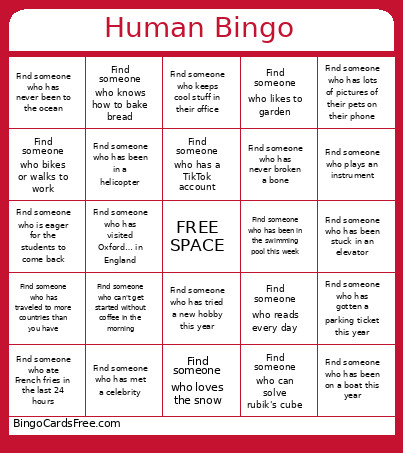 This Human Scavenger Hunt Bingo Cards Game contains following Words or Phrases: Find someone who graduated from Miami, Find someone who moved in the last year, Find someone who has worked at Miami for 10+ years, Find someone who speaks another language, Find someone who plays an instrument, Find someone who has lived in a foreign country, Find someone born in the same month as you, Find someone who is from Oxford, Find someone who has children, Find someone who has met a celebrity, Find someone who has more than two pets, Find someone who works on a different floor than you, Find someone who bikes or walks to work, Find someone with a red vehicle, Find someone who traveled this summer, Find someone who has been on a boat this year, Find someone who can name all the planets in order, Find someone who loves karaoke, Find someone who knows how to bake bread, Find someone who is left handed, Find someone whose name starts with the same letter as yours, Find someone who has never broken a bone, Find someone who went to a Miami basketball game last season, Find someone who knits or crochets, Find someone who loves camping or hiking, Find someone who likes spicy food, Find someone who likes pineapple on pizza, Find someone who has the same number of siblings as you, Find someone who loves the snow, Find someone who has been stuck in an elevator, Find someone who has been in a helicopter, Find someone who can do a handstand or cartwheel, Find someone who has been on a roller coaster this year, Find someone who can solve rubik's cube, Find someone who has been on tv, Find someone who can't get started without coffee in the morning, Find someone who loves pens and stationery, Find someone who packs their lunch almost every day, Find someone who saw a live concert in the last year, Find someone who ate French fries in the last 24 hours, Find someone who likes to garden, Find someone who has visited Oxford… in England, Find someone who has visited Miami… in Florida, Find someone who has been in the swimming pool this week, Find someone who completed a project this summer, Find someone who likes to wake up early, Find someone who keeps cool stuff in their office, Find someone who lives further away from the library than you do, Find someone who has gotten a parking ticket this year, Find someone who is eager for the students to come back, Find someone who reads every day, Find someone who has been a museum this year, Find someone who has a TikTok account, Find someone who has lots of pictures of their pets on their phone, Find someone who has never been to the ocean, Find someone who knows how to skate, Find someone who has run out of gas in their car, Find someone who has tried a new hobby this year, Find someone who has traveled to more countries than you have, Find someone who collects something unique.