
Hypershiftbingo! Cards - Print Free or Customize
Print free Hypershiftbingo! cards or modify, unlimited cards! Select from 42,600+ designs or use our bingo card generator. Add numbers, phrases, photos, or all of them. Play using PDF prints, virtual bingo cards, and our virtual bingo caller, or combine all formats.
About: This bingo card is packed with wild plot twists, pop culture nods, and offbeat character antics that are perfect for a chaotic group watch, roleplay session, or fan community event. Expect hilarious running gags, meme-worthy moments, and references from across games and fandoms, making it a great fit for anyone who loves unpredictable fun and inside jokes.
How To: To get a printable PDF, click the Print button. You can modify the number of cards and other print preferences on the Print tab. Grid items and free space content can be edited on the Basic tab. Appearance can be entirely customized on the corresponding tabs, or you can easily search any option on the 🔍 tab.
How to play Hypershiftbingo! Cards?
- Printed Players: Print PDF bingo cards and manually scratch the cards.
- Online Players: Click on the Play button above, and then click on the 🎫 button.
- Printed Caller: Print PDF calling list & calling slips and manually choose the slips.
- Online Caller: Click on the Play button above.
- Hybrid Play: Pick any combination above. For instance, caller can be either Paper or Online. And players can be Paper or Online or a mix of both.
Step-By-Step:
- Start by downloading the Hypershiftbingo! PDF by clicking on the "Print" button above.
- Open the PDF and print a hard copy.
- For random drawing, you can print another copy of the call list, cut, fold and then draw them randomly at play time.
- Cut the bingo cards at the cut lines if there are greater than 1 bingo cards per page.
- Distribute one card per player. For marking, you can use crayons. Crayons are the cheapest.
- Pick one person to be the caller. If you are playing in a small group, the caller can as well play along with their own Bingo card.
- The caller begins the game by randomly picking an item from the call list and announcing it to everyone.
- The players check their cards to see if they have the called word. If they do, they dab that word.
- The first player to complete a horizontal, vertical, or a diagonal line of marked items announces "Bingo!" and wins the play.
- The caller validates that the items crossed off form a proper line according to the Bingo card and call list.
- You can play for varied patterns or a full card blackout for an extended play.
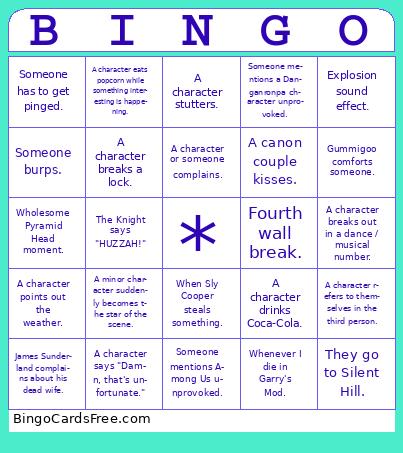 This Hypershiftbingo! Cards Game contains following Words or Phrases: "Why don't you back that up with a source?" 69 joke., A canon couple kisses., A character backflips., A character blames Monokuma / Monomascot(s)., A character breaks a lock., A character breaks down a wall or door., A character breaks out in a dance / musical number., A character commits arson., A character cooks food., A character dramatically flips a table for no reason., A character drinks Coca-Cola., A character eats popcorn while something interesting is happening., A character insists they're "not like other characters.", A character invests in Bitcoin., A character issues a bomb threat., A character makes an overly complicated plan that immediately fails., A character mentions Hot Topic., A character or someone complains., A character plays a musical instrument., A character points out the weather., A character refers to themselves in the third person., A character says "Bazinga!", A character says "Damn, that's unfortunate.", A character states their age., A character stutters., A character visibly simps., A minor character suddenly becomes the star of the scene., Any character crashes out., Anytime the wheel lands on Shuichi., Atlas kisses Jade., Atlas lore dumps., Characters go to a new universe., Clover finger guns., Contradiction sound effect., Disboard server bump., Explosion sound effect., Fourth wall break., Gummigoo comforts someone., Gummigoo tips his cowboy hat., James Sunderland complains about his dead wife., Kokichi bullies Kiibo., Minos Prime jumpscare., Nagito says the word "hope.", Pomni has a panic attack., Sable gets lost in Grimm's eyes., Sable Ward says "yum" or "yummy.", Someone accidentally reveals a major spoiler mid-conversation., Someone burps., Someone dies., Someone gets scared by a harmless NPC or object., Someone has to get pinged., Someone mentions a Danganronpa character unprovoked., Someone mentions Among Us unprovoked., Someone mispronounces a character's name., Someone says "your mom.", Someone starts singing., Someone submits a new character., Someone turns into a werewolf., Someone's forced to leave VC., Spiderman 2099 appears with canon event sound., The Knight says "HUZZAH!", They go to Silent Hill., Uzi says "BITE ME.", When a wheel has to be respun., When Kaede plays a piano., When Sly Cooper steals something., Whenever I die in Garry's Mod., Wholesome Pyramid Head moment., Zooble just doesn't care..