Print free Bigback bingo cards or personalize,
unlimited cards! Choose from 41,500+ designs or use the bingo card generator.
Add numbers, words, pictures, or mix them all.
Play using PDF prints, digital bingo cards,
and the digital bingo caller, or mix physical and digital.
About: This bingo card is all about celebrating the wonderful world of food in a fun, kid-friendly way. With playful descriptions of everyday favorites and silly facts, it’s perfect for a classroom game, family activity, or nutrition lesson. The upbeat tone encourages curiosity and conversation about what we eat and why these foods are so tasty.
How To: To download a PDF to print, click the Print button.
You can change the card quantity and other
printing options on the Print tab.
Grid items and free space text can be added on the Basic tab.
Appearance can be completely customized on the
relevant tabs, or you can quickly locate any setting
using the 🔍 tab.
How to play Bigback Bingo Cards?
Printed Players: Print PDF bingo cards and manually write on the cards.
Printed Caller: Print PDF calling list & calling slips and manually pick the slips.
Online Players: Click on the Play button above, and then click on the 🎫 button.
Online Caller: Click on the Play button above.
Hybrid Play: Choose any combination above.
For instance, caller can be either Printed or Online.
And players can be Printed or Online or a combo of both.
Step-By-Step:
Start by saving the Bigback PDF by clicking on the "Print" button above.
Open the PDF and print it.
For random drawing, you can print another copy of the call list, cut, fold and then pull them randomly at play time.
Cut the bingo cards at the cut marks if there are more than 1 bingo cards per page.
Distribute one card per player. For marking, you can use pens. Crayons cost the least.
Choose one person to be the caller. If you are playing in a small group, the caller can also play along with their own Bingo card.
The caller starts the game by randomly picking an item from the call list and saying it to all players.
The players check their cards to see if they have the announced word. If they do, they cross off that word.
The first player to finish a horizontal, vertical, or a diagonal line of marked items announces "Bingo!" and wins the play.
The caller confirms that the items marked form a correct line according to the Bingo card and call list.
You can play for varied patterns or a full card blackout for an extended play.
This Bigback Bingo Cards Game contains following Words or Phrases: Avocados make guacamole green and creamy, Bananas are yellow and sweet, Beans can be baked, boiled, or steamed, Bread is soft and fluffy inside, Broccoli looks like tiny trees, Butter spreads easily on toast, Carrots help you see in the dark, Celery crunches when you bite it, Cereal is crunchy with milk, Chicken nuggets are fun to dip, Cookies taste best with milk, Corn grows tall on the farm, Crackers snap when you break them, Cucumbers are crunchy and cool, Donuts have holes in the middle, Eggs can be scrambled or boiled, Fish swim in water before becoming dinner, Grapes can be green or purple, Honey comes from busy bees, I like to eat apples, Ice cream melts in the sun, Jelly jiggles on my plate, Juice comes from squeezing fruits, Lettuce makes salads crispy, Melons grow big on vines, Milk is good for strong bones, Oatmeal warms me up at breakfast, Oranges are full of vitamin C, Pasta comes in many shapes and sizes, Peanut butter sticks to the roof of your mouth, Peas are small and green spheres, Pizza is my favorite food, Popcorn pops when it gets hot, Potatoes can be mashed or fried, Pumpkins become pies for dessert sometimes, Sausages sizzle in the pan, Soup keeps me warm in winter, Tomatoes are red and round, Waffles have squares for syrup, Yogurt is creamy and smooth.

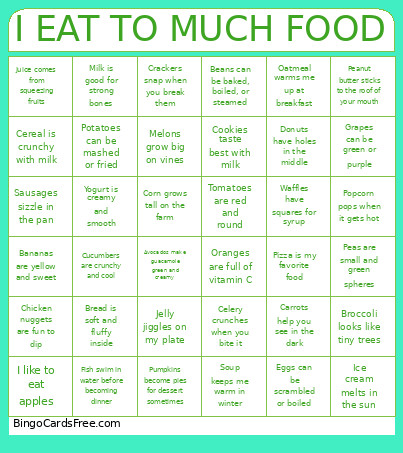 This Bigback Bingo Cards Game contains following Words or Phrases: Avocados make guacamole green and creamy, Bananas are yellow and sweet, Beans can be baked, boiled, or steamed, Bread is soft and fluffy inside, Broccoli looks like tiny trees, Butter spreads easily on toast, Carrots help you see in the dark, Celery crunches when you bite it, Cereal is crunchy with milk, Chicken nuggets are fun to dip, Cookies taste best with milk, Corn grows tall on the farm, Crackers snap when you break them, Cucumbers are crunchy and cool, Donuts have holes in the middle, Eggs can be scrambled or boiled, Fish swim in water before becoming dinner, Grapes can be green or purple, Honey comes from busy bees, I like to eat apples, Ice cream melts in the sun, Jelly jiggles on my plate, Juice comes from squeezing fruits, Lettuce makes salads crispy, Melons grow big on vines, Milk is good for strong bones, Oatmeal warms me up at breakfast, Oranges are full of vitamin C, Pasta comes in many shapes and sizes, Peanut butter sticks to the roof of your mouth, Peas are small and green spheres, Pizza is my favorite food, Popcorn pops when it gets hot, Potatoes can be mashed or fried, Pumpkins become pies for dessert sometimes, Sausages sizzle in the pan, Soup keeps me warm in winter, Tomatoes are red and round, Waffles have squares for syrup, Yogurt is creamy and smooth.