Print free IEA/RA BINGO 2026 cards or alter them,
unlimited cards! Pick from 41,500+ designs or use our bingo card generator.
Add numbers, words, photos, or mix them all.
Play using printable PDF, virtual bingo cards,
and our virtual bingo caller, or go hybrid.
About: This bingo card captures the lively atmosphere of an Illinois Education Association or NEA delegate assembly, filled with procedural moments, spirited debates, and familiar faces at the mic. Perfect for delegates or observers, it adds some fun to meetings where educators shape policy, recognize colleagues, and share plenty of laughs and a few classic complaints along the way.
How To: To get a PDF to print, click the Print button.
You can adjust the number of cards and other
printing options on the Print tab.
Grid items and free space text can be added on the Basic tab.
Appearance can be completely customized on the
corresponding tabs, or you can easily locate any setting
on the 🔍 tab.
How to play IEA/RA BINGO 2026 Cards?
Paper Caller: Print PDF calling list & calling slips and manually pick the slips.
Virtual Caller: Click on the Play button above.
Virtual Players: Click on the Play button above, and then click on the 🎫 button.
Paper Players: Print PDF bingo cards and manually cross off the cards.
Combo Mode: Choose any combination above.
For instance, caller can be either Paper or Virtual.
And players can be Paper or Virtual or a combo of both.
Step-By-Step:
Start by getting the IEA/RA BINGO 2026 PDF by clicking on the "Print" button above.
Open the PDF and print it.
For random drawing, you can print another copy of the call list, cut, fold and then draw them randomly at play time.
Cut the bingo cards at the cut lines if there are greater than 1 bingo cards per page.
Distribute one card per player. For marking, you can use crayons. Crayons cost the least.
Choose one person to be the caller. If you are playing in a small group, the caller can also play along with their own Bingo card.
The caller begins the play by randomly pulling an item from the call list and calling out it to everyone.
The players check their cards to see if they have the called word. If they do, they dab that word.
The first player to complete a horizontal, vertical, or a diagonal line of marked items shouts "Bingo!" and wins the game.
The caller checks that the items marked form a proper line as per the Bingo card and call list.
You can play for different patterns or a full card blackout for an extended game.
This IEA/RA BINGO 2026 Cards Game contains following Words or Phrases: someone complains about the temperature, An NEA Director speaks, IEA Retired Member speaks, "I move to close debate", Someone goes to the mic with the wrong card, A New Business Item is NOT passed, "Fiduciary", "ESSA", Someone complains about the wifi, Delegates are asked to quiet down, "Recruitment and Retention", IEA Foundation is mentioned, Someone calls for a ROLE CALL, Karl mentions running, Someone is reminded to say "name and region", Parliamentarian is consulted, Princess Moss speaks, Mayday, Gladys speaks Spanish, President Support Team is mentioned, Attend a PD session, "Stronger United", Let's get rowdy with Shoudy, Summer Leadership Academy is mentioned, Mike W. speaks at the mic, Giina shows a picture of her grandchildren, "IEA is a light house", PAC Fund mentioned, rESPect Campaign mentioned, Attend an open-hearning, Someone complains about the temperature, A question about the budget is posed, You bought raffle tickets for a SCORE Basket, "1st time delegate", There is a schedule change, IEA Retired Jack Tucker goes to the mic, Gina mentions Gigi, Call for division is made, Someone says, "All the thing!.", A New Business Item is passed, The legislative platform is considered by the body, The IEA website is mentioned, plenty with Denney, Students Perform, A Bylaw amendment is passed, SCORE Grants are mentioned, There is a standing ovation, "Early Career Committee", 2026 NEA RA - Denver, CO is mentioned, Illinois Teacher of the Year is recognized, Dues Bands, 2026 NEA ESP Conference is mentione, An amendment is made, Walk-in's is talked about, "Micro Grants", 2026 Aspiring Educators Conference is mentioned, A Student IEA member speaks, JB Pritzker is mentioned, Candidate speeches take place, Becky Pringle speaks.

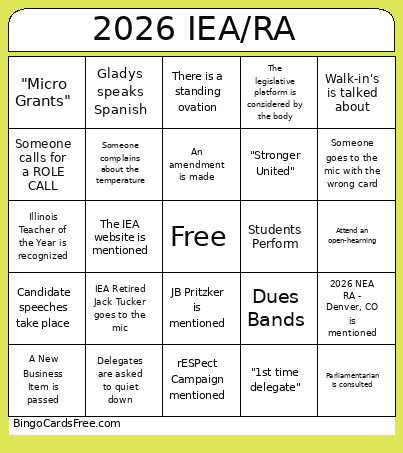 This IEA/RA BINGO 2026 Cards Game contains following Words or Phrases: someone complains about the temperature, An NEA Director speaks, IEA Retired Member speaks, "I move to close debate", Someone goes to the mic with the wrong card, A New Business Item is NOT passed, "Fiduciary", "ESSA", Someone complains about the wifi, Delegates are asked to quiet down, "Recruitment and Retention", IEA Foundation is mentioned, Someone calls for a ROLE CALL, Karl mentions running, Someone is reminded to say "name and region", Parliamentarian is consulted, Princess Moss speaks, Mayday, Gladys speaks Spanish, President Support Team is mentioned, Attend a PD session, "Stronger United", Let's get rowdy with Shoudy, Summer Leadership Academy is mentioned, Mike W. speaks at the mic, Giina shows a picture of her grandchildren, "IEA is a light house", PAC Fund mentioned, rESPect Campaign mentioned, Attend an open-hearning, Someone complains about the temperature, A question about the budget is posed, You bought raffle tickets for a SCORE Basket, "1st time delegate", There is a schedule change, IEA Retired Jack Tucker goes to the mic, Gina mentions Gigi, Call for division is made, Someone says, "All the thing!.", A New Business Item is passed, The legislative platform is considered by the body, The IEA website is mentioned, plenty with Denney, Students Perform, A Bylaw amendment is passed, SCORE Grants are mentioned, There is a standing ovation, "Early Career Committee", 2026 NEA RA - Denver, CO is mentioned, Illinois Teacher of the Year is recognized, Dues Bands, 2026 NEA ESP Conference is mentione, An amendment is made, Walk-in's is talked about, "Micro Grants", 2026 Aspiring Educators Conference is mentioned, A Student IEA member speaks, JB Pritzker is mentioned, Candidate speeches take place, Becky Pringle speaks.