IET Bingo 25-26 SY Cards - Print Free or Customize
Print free IET bingo 25-26 SY cards or alter them,
limitless prints! Select from 42,200+ designs or use the bingo card generator.
Add numbers, phrases, images, or all of them.
Play using printable PDF, virtual bingo cards,
and the virtual bingo caller, or mix physical and digital.
About: This bingo card is a perfect fit for high school orientations or student workshops at an institute focused on engineering and technology. It highlights important school policies, pathways, and key staff members that students need to know, along with reminders about academic requirements and resources. The tone is educational yet approachable, making it great for engaging both new students and parents as they get familiar with school life and expectations.
How To: To save a printable PDF, click the Print button.
You can change the card quantity and other
printing preferences on the Print tab.
Grid items and free space text can be added on the Basic tab.
Appearance can be highly customized on the
corresponding tabs, or you can quickly locate any preference
using the 🔍 tab.
How to play IET Bingo 25-26 SY Cards?
Virtual Players: Click on the Play button above, and then click on the 🎫 button.
Printed Caller: Print PDF calling list & calling slips and physically draw the slips.
Virtual Caller: Click on the Play button above.
Printed Players: Print PDF bingo cards and physically write on the cards.
Combo Play: Choose any combination above.
For instance, caller can be either Offline or Virtual.
And players can be Offline or Virtual or a combination of both.
Step-By-Step:
Start by getting the IET Bingo 25-26 SY PDF by clicking on the "Print" button above.
Open the PDF and print a hard copy.
For random calling, you can print another copy of the call list, cut, fold and then pull them randomly at play time.
Cut the bingo cards at the cut lines if there are more than 1 bingo cards per page.
Give one card to each player. For marking, you can use markers. Crayons are the cheapest.
Choose one person to be the caller. If you are playing in a small group, the caller can as well play along with their own Bingo card.
The caller starts the play by randomly picking an item from the call list and saying it to all players.
The players look at their cards to see if they have the announced word. If they do, they cross off that word.
The first player to complete a horizontal, vertical, or a diagonal line of crossed items announces "Bingo!" and wins the play.
The caller confirms that the items crossed off form a proper line according to the Bingo card and call list.
You can play for different patterns or a full card blackout for a longer play.
This IET Bingo 25-26 SY Cards Game contains following Words or Phrases: No Cellphone Policy, New IET Counselor Mr. ________, Dress Code Policy, 2 Tardies equals ____ unexcused absences, 24 credits to graduate, School Planner, Academy of I_______ & E________ Technology, Ms. Kinjo (alpha __-__), IET AP Mr. ______, 5th unexcused absence, Golden Rule, Honesty is the Best Policy, Try your best!, Engineering, IET has ___ Pathways, Cyber Security, Welding, Automotive Maintenance & Light Repair, Architectural Design, Residential & Commercial Construction, Automation & Robotics Technology, Credit Recovery, SLT is on _____ and _____, Need at least ___ credits to be Sophomore, School ID, Ms. PeBenito (alpha __-__), IET AP Mrs. _______, Need at least ___ credits to be Junior, PTP, Career Life Planning, PE Fit/PE Act, Health, Complete in Foundations, Parent Called, Counselor Referral, No extracurricular participation, No credit.

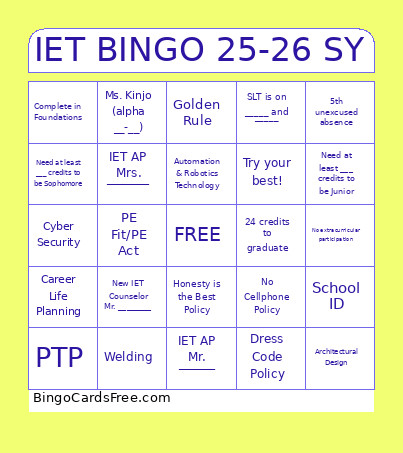 This IET Bingo 25-26 SY Cards Game contains following Words or Phrases: No Cellphone Policy, New IET Counselor Mr. ________, Dress Code Policy, 2 Tardies equals ____ unexcused absences, 24 credits to graduate, School Planner, Academy of I_______ & E________ Technology, Ms. Kinjo (alpha __-__), IET AP Mr. ______, 5th unexcused absence, Golden Rule, Honesty is the Best Policy, Try your best!, Engineering, IET has ___ Pathways, Cyber Security, Welding, Automotive Maintenance & Light Repair, Architectural Design, Residential & Commercial Construction, Automation & Robotics Technology, Credit Recovery, SLT is on _____ and _____, Need at least ___ credits to be Sophomore, School ID, Ms. PeBenito (alpha __-__), IET AP Mrs. _______, Need at least ___ credits to be Junior, PTP, Career Life Planning, PE Fit/PE Act, Health, Complete in Foundations, Parent Called, Counselor Referral, No extracurricular participation, No credit.