imposter Bino Bingo Cards - Print Free or Customize
Print free imposter Bino bingo cards or modify,
limitless cards! Choose from 41,500+ designs or use the bingo card generator.
Add numbers, phrases, photos, or any combination.
Play using printed PDF, online bingo cards,
and the online bingo caller, or go hybrid.
About: This bingo card perfectly captures the ups and downs of graduate school life, filled with relatable moments of self-doubt, procrastination, and academic anxiety. It's a great fit for orientations, grad student socials, or mental health workshops aiming to break the ice and remind students they're not alone in their struggles.
How To: To download a PDF to print, click the Print button.
You can change the number of cards and other
printing options on the Print tab.
Grid items and free space text can be changed on the Basic tab.
Appearance can be entirely customized on the
relevant tabs, or you can easily locate any preference
on the 🔍 tab.
How to play imposter Bino Bingo Cards?
Printed Caller: Print PDF calling list & calling slips and manually choose the slips.
Printed Players: Print PDF bingo cards and manually cross off the cards.
Virtual Players: Click on the Play button above, and then click on the 🎫 button.
Virtual Caller: Click on the Play button above.
Combo Mode: Pick any combination above.
For example, caller can be either Printed or Virtual.
And players can be Printed or Virtual or a mix of both.
Step-By-Step:
Start by saving the imposter Bino PDF by clicking on the "Print" button above.
Open the PDF and print it.
For random calling, you can print another copy of the call list, cut, fold and then draw them randomly at play time.
Cut the bingo cards at the cut lines if there are greater than 1 bingo cards per page.
Give one card to each player. For marking, you can use crayons. Crayons are the cheapest.
Pick one person to be the caller. If you are playing in a small group, the caller may as well play along with their own Bingo card.
The caller initiates the game by randomly picking an item from the call list and calling out it to everyone.
The players look at their cards to see if they have the called word. If they do, they cross off that word.
The first player to complete a horizontal, vertical, or a diagonal line of crossed items shouts "Bingo!" and wins the play.
The caller validates that the items crossed off form a correct line as per the Bingo card and call list.
You can play for varied patterns or a full card blackout for an extended play.
This imposter Bino Bingo Cards Game contains following Words or Phrases: Nodded along in a meeting, then Googled something afterward, Re-read the same paragraph four times, Drafted an email, deleted it, and drafted it again, Started class without finishing the assigned reading, Said "That's a great point" while having no idea what it meant, Wondered if the admissions committee made a mistake, Felt panic when a professor said "Any questions?", Apologized for a question before asking it, Stayed up too late on a paper that turned out to be fine, Gotten feedback and read it as harsher than it was, Opened a document and stared at it for 20 minutes, Said "I'm just so behind" even though you haven't missed any deadlines, Felt like the only one who didn't understand the reading, Put off emailing their advisor for far too long, Googled "is it normal to..." about grad school, Gotten praise/a good grade and assumed it was luck, Put something off for days, then finished it quickly, Felt like everyone else was better at small talk at events, Assumed everyone in the room was smarter than them, Panicked because someone else was farther along on a project/thesis.

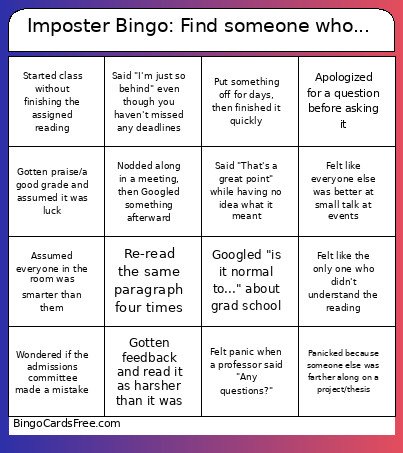 This imposter Bino Bingo Cards Game contains following Words or Phrases: Nodded along in a meeting, then Googled something afterward, Re-read the same paragraph four times, Drafted an email, deleted it, and drafted it again, Started class without finishing the assigned reading, Said "That's a great point" while having no idea what it meant, Wondered if the admissions committee made a mistake, Felt panic when a professor said "Any questions?", Apologized for a question before asking it, Stayed up too late on a paper that turned out to be fine, Gotten feedback and read it as harsher than it was, Opened a document and stared at it for 20 minutes, Said "I'm just so behind" even though you haven't missed any deadlines, Felt like the only one who didn't understand the reading, Put off emailing their advisor for far too long, Googled "is it normal to..." about grad school, Gotten praise/a good grade and assumed it was luck, Put something off for days, then finished it quickly, Felt like everyone else was better at small talk at events, Assumed everyone in the room was smarter than them, Panicked because someone else was farther along on a project/thesis.