introduckie member Bingo Cards - Print Free or Customize
Print free introduckie member bingo cards or modify,
limitless cards! Pick from 42,200+ templates or use our bingo card generator.
Add numbers, words, pictures, or mix them all.
Play using printable PDF, virtual bingo cards,
and our virtual bingo caller, or go hybrid.
About: This bingo card is all about celebrating quirky personalities and unique stories within a close-knit group, making it perfect for an icebreaker at a student association or club meetup. With its playful and humorous tone, it invites everyone to share fun facts, offbeat talents, and memorable experiences while getting to know each other better.
How To: To get a PDF to print, click the Print button.
You can change the number of cards and other
printing settings on the Print tab.
Grid items and free space text can be added on the Basic tab.
Appearance can be totally customized on the
relevant tabs, or you can easily search any preference
using the 🔍 tab.
How to play introduckie member Bingo Cards?
Printed Caller: Print PDF calling list & calling slips and manually select the slips.
Online Players: Click on the Play button above, and then click on the 🎫 button.
Printed Players: Print PDF bingo cards and manually scratch the cards.
Online Caller: Click on the Play button above.
Hybrid Play: Pick any combination above.
For example, caller can be either Offline or Online.
And players can be Offline or Online or a mix of both.
Step-By-Step:
Start by saving the introduckie member PDF by clicking on the "Print" button above.
Open the PDF and print a hard copy.
For random drawing, you can print another copy of the call list, cut, fold and then pick them randomly at play time.
Cut the bingo cards at the cut lines if there are more than 1 bingo cards per page.
Give one card to each player. For marking, you can use crayons. Crayons cost the least.
Pick one person to be the caller. If you are playing in a small group, the caller can also play along with their own Bingo card.
The caller begins the play by randomly drawing an item from the call list and calling out it to all players.
The players look at their cards to see if they have the announced word. If they do, they cross off that word.
The first player to finish a horizontal, vertical, or a diagonal line of crossed items shouts "Bingo!" and wins the play.
The caller validates that the items crossed off form a proper line according to the Bingo card and call list.
You can play for different patterns or a full card blackout for a longer play.
This introduckie member Bingo Cards Game contains following Words or Phrases: My embodiment is actually a purple hat _________, I dyed my hair for the first time ever this summer _________, I've done board at a different association _________, I have a cat called Marx _________, I used to be in all three theater clubs in my elementary school _________, I will talk about finance to you _________, I have made a cat sticker pack of 60 stickers _________, During the weekends I drive trains as a hobby _________, I LOVEEEEE the band "King Gizzard & the Lizard Wizard" _________, My main hobby is making maps of imaginary train systems _________, I like hamilton(a loooot) _________, I am not a cult leader, I promise _________, I speak 4 languages _________, I spent pretty much all of summer at the koornbeurs to klus _________, I plak 2000 posters every year _________, I became an aunt at 17 _________, My favorite animal is goose _________, I am graying and also the sleepiest guy _________, I have a cow plushie that ive had since birth _________, I'm the potato guy _________, I love monkeys _________, I am very kind, a charmer and always dressed to impress _________, I like cheese _________, I play guitar and in the past I learned a bit of Quenya (elvish language from LOTR) _________, Koornbeursers first knew me from the kattonchat _________, I have a beard and a moustache _________, I had a motorcycle accident in Vietnam _________, I am known as Jezus at the KB(one of the many find the right one) _________, I recently reorganised my closet and found out I have over 30 funky ties! _________, I got a spinal tattoo with wings _________, I have no feelings _________, I have a slight obsession with sailing _________.

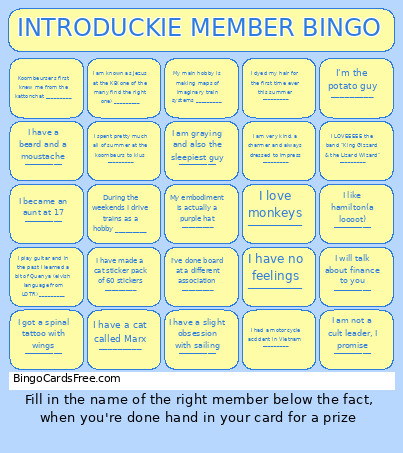 This introduckie member Bingo Cards Game contains following Words or Phrases: My embodiment is actually a purple hat _________, I dyed my hair for the first time ever this summer _________, I've done board at a different association _________, I have a cat called Marx _________, I used to be in all three theater clubs in my elementary school _________, I will talk about finance to you _________, I have made a cat sticker pack of 60 stickers _________, During the weekends I drive trains as a hobby _________, I LOVEEEEE the band "King Gizzard & the Lizard Wizard" _________, My main hobby is making maps of imaginary train systems _________, I like hamilton(a loooot) _________, I am not a cult leader, I promise _________, I speak 4 languages _________, I spent pretty much all of summer at the koornbeurs to klus _________, I plak 2000 posters every year _________, I became an aunt at 17 _________, My favorite animal is goose _________, I am graying and also the sleepiest guy _________, I have a cow plushie that ive had since birth _________, I'm the potato guy _________, I love monkeys _________, I am very kind, a charmer and always dressed to impress _________, I like cheese _________, I play guitar and in the past I learned a bit of Quenya (elvish language from LOTR) _________, Koornbeursers first knew me from the kattonchat _________, I have a beard and a moustache _________, I had a motorcycle accident in Vietnam _________, I am known as Jezus at the KB(one of the many find the right one) _________, I recently reorganised my closet and found out I have over 30 funky ties! _________, I got a spinal tattoo with wings _________, I have no feelings _________, I have a slight obsession with sailing _________.