ITS Year in Review Bingo Cards - Print Free or Customize
Print free ITS Year in Review bingo cards or personalize,
limitless cards! Pick from 42,200+ templates or use the bingo card generator.
Add numbers, phrases, photos, or mix them all.
Play using printed PDF, virtual bingo cards,
and the virtual bingo caller, or mix physical and digital.
About: This bingo card is perfect for Harvard Law School staff gatherings or team-building events, celebrating the unique experiences and quirks of campus life. It captures memorable moments, funny mishaps, and shared traditions that come with working at HLS. Play it at your next office party to spark laughter and reminisce about your time together!
How To: To get a PDF to print, click the Print button.
You can modify the number of cards and other
printing settings on the Print tab.
Grid items and free space content can be edited on the Basic tab.
Appearance can be exactly customized on the
relevant tabs, or you can easily search any preference
on the 🔍 tab.
How to play ITS Year in Review Bingo Cards?
Digital Players: Click on the Play button above, and then click on the 🎫 button.
Digital Caller: Click on the Play button above.
Printed Caller: Print PDF calling list & calling slips and physically select the slips.
Printed Players: Print PDF bingo cards and physically mark the cards.
Mixed Mode: Pick any combination above.
For example, caller can be either Printed or Digital.
And players can be Printed or Digital or a combination of both.
Step-By-Step:
Start by saving the ITS Year in Review PDF by clicking on the "Print" button above.
Open the PDF and print it.
For random drawing, you can print another copy of the call list, cut, fold and then pull them randomly at play time.
Cut the bingo cards at the cut lines if there are greater than 1 bingo cards per page.
Give one card to each player. For marking, you can use pencils. Crayons cost the least.
Pick one person to be the caller. If you are playing in a small group, the caller may as well play along with their own Bingo card.
The caller begins the game by randomly pulling an item from the call list and saying it to everyone.
The players check their cards to see if they have the called word. If they do, they dab that word.
The first player to complete a horizontal, vertical, or a diagonal line of crossed items yells "Bingo!" and wins the game.
The caller confirms that the items marked form a proper line according to the Bingo card and call list.
You can play for varied patterns or a full card blackout for a longer game.
This ITS Year in Review Bingo Cards Game contains following Words or Phrases: Participated in the ITS bake off, Had a 10 year work anniversary this year, Pet Sasha the HUPD dog, Been sick for 3 or more consecutive days, Had to get in late or leave early because of your kids, Brought your family member or spouse to the office, Attended an HLS community event for fun, Had more than one drink at the HLS holiday party, Been personally asked for from a staff member or faculty for help, Had an appointment or a meeting no show you, Added a new knickknack to your desk at work or home, Asked for an Okta bypass code for yourself, Submitted a ticket to ITS CSS on your behalf, Borrowed an item from the Harvard library, Took a class at the extension school, Visited a Harvard museum or the Harvard Film Archive, Reported a suspicious email to phishing@harvard.edu, Had to go to a different campus/college for a work-related reason, Got a new computer, Had an encounter with Remy the Harvard Cat, Lost your ID, Gotten surprise free lunch on a day you didn't bring lunch, Been given 'other duties as assigned', such as graphic design, Been surprised by the main entrance door being out of order, Slipped and fell on ice on the way in, Stayed past 8 PM, Taken more than two hours to get in/get home, Taken out the trash from your cube/desk space.

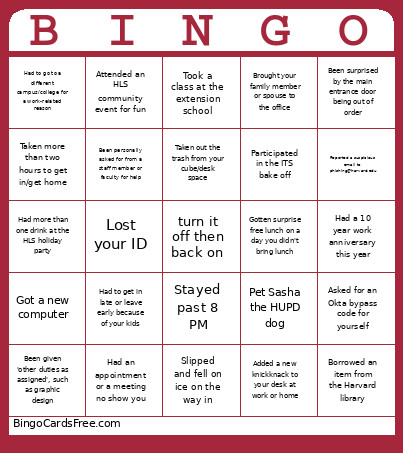 This ITS Year in Review Bingo Cards Game contains following Words or Phrases: Participated in the ITS bake off, Had a 10 year work anniversary this year, Pet Sasha the HUPD dog, Been sick for 3 or more consecutive days, Had to get in late or leave early because of your kids, Brought your family member or spouse to the office, Attended an HLS community event for fun, Had more than one drink at the HLS holiday party, Been personally asked for from a staff member or faculty for help, Had an appointment or a meeting no show you, Added a new knickknack to your desk at work or home, Asked for an Okta bypass code for yourself, Submitted a ticket to ITS CSS on your behalf, Borrowed an item from the Harvard library, Took a class at the extension school, Visited a Harvard museum or the Harvard Film Archive, Reported a suspicious email to phishing@harvard.edu, Had to go to a different campus/college for a work-related reason, Got a new computer, Had an encounter with Remy the Harvard Cat, Lost your ID, Gotten surprise free lunch on a day you didn't bring lunch, Been given 'other duties as assigned', such as graphic design, Been surprised by the main entrance door being out of order, Slipped and fell on ice on the way in, Stayed past 8 PM, Taken more than two hours to get in/get home, Taken out the trash from your cube/desk space.