
🔍
Advertisement

Japan Bingo Cards - Print Free or Customize

Print free Japan bingo cards or alter them, unlimited prints! Pick from 43,200+ templates or use the bingo card generator. Add numbers, phrases, pictures, or mix them all. Play using PDF printouts, virtual bingo cards, and the virtual bingo caller, or mix physical and digital.

Japan Bingo!
Find a lucky catGet a trading cardKonbini mind meldWear geta sandalsBlind taste test random vending machine drink
Use a public umbrellaRecord a train station's unique musical departure chimeSpot someone in hi visTry a Japanese Photo BoothBuy a prefecture exclusive Kit Kat flavor
Go to a station department store basement (Depachika)Eat some fancy fruit (more than $20)Get a gachapon itemUse a bidet and report backEat a melon pan
See a pretty view at an observation deckRide an elevator operated by an attendantOrder something you wouldn't normally find in a vending machineDiscover a pocket shrineGet a fortune
Consume something made of Hokkaido milkFind a monument or reminder of the 1972 Sapporo Winter OlympicsDrink "Sapporo Classic"beerEat fresh mochiDrink a pocari sweat
This is shown at the top of the template and game pages.
Optional. If this template makes to the front page, you will be credited for creating it.
Shown at the top of each bingo card.

This can be text or an image. Images larger than 50 KB may be compressed and may lose transparency.
If words on a line are separated by this text, then:
  • Bingo card will only show the text on the right side of the separator.
  • The PDF call list will show the full text.
  • To disable this feature, clear this field.
Quiz Mode ON
Select which side of the quiz separator to show on the card preview on this page. When printing or playing, calling cards always show the right side only.
If words on a line are separated by this text, then:
  • The text on the right side of the separator will be spoken by the online game play.
  • Bingo card will only show the text on the left side of the separator.
  • The PDF call list will show the full text.
  • To disable this feature, clear this field.
Audio Mode ON
Use separate item lists for each column. This is useful for american traditional 75 ball number bingo or cards where each column should draw from a different set of items.
Enter numbers, words or phrases, each one on a new line. Up to 255 items are supported.

Items Per Column:
To specify items per column, eg for 75 ball bingo, turn ON the "Items Per Column" setting.
Sort   |   No Dups
Supports:
  1. Up to 99 images.
  2. Single or multiple image uploads.
  3. Up to 5 MB file size per image.
  4. You can use both Grid Items and Grid Images.
  5. Click an image or label to edit the label or delete the image.
  6. If an image background changes to white, remove transparency or reduce the image size to < 10KB.
    Choose whether image labels appear on bingo cards. Image labels are always shown on the calling card.
    Grid size in Columns x Rows format.
    Free space is usually the center square of the card. It is like a joker or a wild square, and counts towards the winning pattern.
    • Shows text or an image in the Free Space cell.
    • Make sure Free Space Cell is not set to "None".
    • To show text, enter text.
    • To show an image, click the button on the right and select an image.
    • If the image background changes to white, remove transparency or reduce the image size to < 10KB.
    Select Yes to generate unique random cards.

    If No is selected, all cards will have the same text in the same order, which might be useful in educational or quiz settings.
    Text is automatically resized to fit inside each cell. Shorter text may appear very large. Choose a smaller maximum font size to limit how large the text can get.
    Title text color.

    * Applicable when Card Title is text.
    Title background shape.

    * Requires Title Back Opacity to be > 0%.
    Title background opacity.

    * Requires Title Back Shape.
    Title background shape color.

    * Requires Title Back Shape.
    * Requires Title Back Opacity to be > 0%.
    Title background border color.

    * Requires Title Back Shape.
    * Requires Title Back Opacity to be > 0%.
    Grid Text color.
    Grid background color.
    Grid line color.
    • Background shape for cells.
    • Select a stock image or upload your own custom image.
    • You can use Cell Transparency setting to change how prominently the background shape shows.
    • If you select a shape other than Grid, you may have to increase Cell Padding if you want to fit the text inside the shape.
    • Don't see the selected image?
      Set Cell Transparency <50.
    Empty space inside each cell between border and text.
    Space between any 2 cells.
    0% makes grid background opaque. Higher setting makes grid background transparent allowing card background image or card background color to show.
    Outside border width.
    Card outside border color.

    * Requires Card Border Width > 0%
    Yes makes the card corners rounded.
    Empty space between card border and card contents.
    Card background color.
    • Background image for the whole card.
    • Select a stock image or upload your own custom image.
    • Use Card Transparency and Cell Transparency to control how much of the image shows through.
    Don't see the selected image?
    • Set Card Transparency >50.
    • Set Card Border Width >0 or Card Padding >0.
    • Set Cell Transparency >50.
    Select how the background image covers the whole card. You can also choose to repeat the image.
    Controls the transparency of the card background color. Higher values make the card background more transparent, allowing the card background image or outer background to show through.
    This mode uses rapid animations. It may cause dizziness, nausea, or trigger sensitive individuals. Please use responsibly.
    Warning! 
    Public: Anyone can see your card template, including search engines

    Private: Only you can see and edit the card template. You will need to be signed in.

    Click to Sign-Up « Free!!!

    Click to Sign-In
    Number of cards to generate and include in the Full PDF. The Preview button will always generate only 1 card.
    Choose whether to include a call list in the Full PDF. Grid prints the call list as a grid; List prints it as a text list.
    Printer paper size.
    Paper orientation for printing. Some card layouts may look better in portrait or landscape.
    Arrangement of cards on each page of paper.
    Horizontal margin on left and right sides of each card.
    Vertical margin on top and bottom sides of each card.
    Colors: Removes background to save ink for printing.

    B&W: Removes background & changes colors to black & white to save ink for printing.
    Select amount of empty space to keep in each cell for participants to write something.

    This feature is also called human bingo, people bingo, social bingo, get-to-know bingo or ice breaker bingo.
    Starting card number. Change if you need to reprint a set of cards starting with a specific card number.

    Note: If this is not 1, then call list (index card) will not be printed.
    Header height. Header is shown only when there is 1 or more characters.
    Instructions or any other message(s) at the top of each card.
    Footer height. Footer is shown only when there is 1 or more characters.
    Instructions or any other message(s) at the bottom of each card.
    All fonts support English.

    For non-English support in PDF, please try FreeSans, FreeSerif, DejaVuSans, DejaVuSerif or NotoSans
    ✉

    Suggestions | Feedback | Bug

    Similar Bingo Cards: , ,

    About: This bingo card is perfect for anyone exploring Japan and looking to have an adventure filled with quirky discoveries, cultural experiences, and memorable local encounters. The tasks range from tasting unique snacks to engaging with pop culture and traditional rituals, making it ideal for travelers, study abroad students, or groups on a cultural scavenger hunt. The tone is playful and curious, encouraging participants to dive deep into every aspect of Japanese daily life.

    How To: To get a PDF to print, click the Print button. You can modify the number of cards and other printing preferences on the Print tab. Grid items and free space text can be edited on the Basic tab. Appearance can be entirely customized on the corresponding tabs, or you can easily locate any setting on the 🔍 tab.

    How to play Japan Bingo Cards?

    • Printed Players: Print PDF bingo cards and physically scratch the cards.
    • Virtual Players: Click on the Play button above, and then click on the 🎫 button.
    • Printed Caller: Print PDF calling list & calling slips and physically choose the slips.
    • Virtual Caller: Click on the Play button above.
    • Mixed Mode: Pick any combination above. For instance, caller can be either Printed or Virtual. And players can be Printed or Virtual or a combo of both.

    Step-By-Step:

    1. Start by downloading the Japan Bingo PDF by clicking on the "Print" button above.
    2. Open the PDF and print a hard copy.
    3. For random drawing, you can print another copy of the call list, cut, fold and then pick them randomly at play time.
    4. Cut the bingo cards at the cut marks if there are greater than 1 bingo cards per page.
    5. Distribute one card per player. For marking, you can use markers. Crayons are the cheapest.
    6. Pick one person to be the caller. If you are playing in a small group, the caller can also play along with their own Bingo card.
    7. The caller starts the play by randomly pulling an item from the call list and calling out it to all players.
    8. The players look at their cards to see if they have the announced word. If they do, they cross off that word.
    9. The first player to complete a horizontal, vertical, or a diagonal line of crossed items announces "Bingo!" and wins the game.
    10. The caller validates that the items marked form a correct line as per the Bingo card and call list.
    11. You can play for multiple patterns or a full card blackout for an extended game.
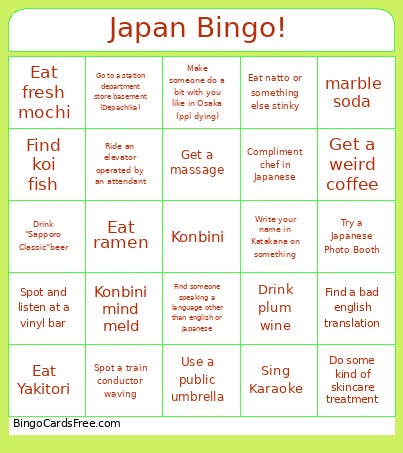
    Japan Bingo CardsThis Japan Bingo Cards Game contains following Words or Phrases: Find a lucky cat, Get a trading card, Konbini mind meld, Wear geta sandals, Blind taste test random vending machine drink, Use a public umbrella, Record a train station's unique musical departure chime, Spot someone in hi vis, Try a Japanese Photo Booth, Buy a prefecture exclusive Kit Kat flavor, Go to a station department store basement (Depachika), Eat some fancy fruit (more than $20), Get a gachapon item, Use a bidet and report back, Eat a melon pan, See a pretty view at an observation deck, Ride an elevator operated by an attendant, Order something you wouldn't normally find in a vending machine, Discover a pocket shrine, Get a fortune, Consume something made of Hokkaido milk, Find a monument or reminder of the 1972 Sapporo Winter Olympics, Drink "Sapporo Classic"beer, Eat fresh mochi, Drink a pocari sweat, Eat a sweet potato dessert or snack, Eat an exotic meat, Soak feet in a public foot bath, Spot a macaque monkey, Find the smallest vending bottle (can only be crossed off at the end of the trip), Fill water bottle from a stream/remarkable water, Find a fox guardian at an inari shrine, Attend a restaurant/cafe/hotel that has an animal on site, Eat a parfait, Spot some red lanterns on a restaurant street, Try to find Shinjuku station exit in under 5 minutes, Pet a cute cat, Get a weird coffee, Eat a tanuki cake, Have a conversation in Japanese / interact in Japanese, Spot a super weird Vending Machine, Cross off something on Atlas Obscura, Make someone do a bit with you like in Osaka (ppl dying), Get a massage, Spot a Japanese Santa Claus at a christmas market, Get a stamp anywhere (train station etc), Get a goshuin at a shrine, Visit a shrine and ring the bell, Spot Mt Fuji, Walk through a torii gate, Drink plum wine, Make a weird combination at a conbini, Eat the local speciality, Japanese cheesecake or fluffy pancake, Bow deeply to someone, Unique kit kat flavor, Lucky charm from a shrine, Spot a pokemon in the wild, Take a picture posing with any random mascot you see (recreate same pose), Spot a monk, Find koi fish, Cross a bridge, Ride an above ground train, Spot a train conductor waving, Find a bad english translation, Cherry blossom? Other blossoming tree of the region (ginkgo leaves), Spot bamboo, Spot a bonsai, Read a manga IRL, Spot anime IRL, Find a conveyor belt restaurant / order, Wear a kimono or yukata, Eat ramen, Eat Yakitori, Eat Curry, Find and eat Onsen egg, Eat Sushi, go into a restaurant that isn't omakase and omakase, marble soda, Get lost going somewhere, See a maid cafe or weird themed cafe, Drink Zero Strong (autumn recommended), Wash feet in a river, Spot and listen at a vinyl bar, Sing Karaoke, Make a convenience store health drink from one of the instagram posts, Find someone speaking a language other than english or japanese, Spot JDM car, Do some kind of skincare treatment, Compliment chef in Japanese, Find a unique Stamp rally, Find a villain - godzilla, yakuza, ninja, samurai etc., Eat natto or something else stinky, Write your name in Katakana on something, Buy something second hand, See a band or live music, Spot a Pachinko / Arcade (play a game), Go to the beach, Ride a bike or scooter, Spot a fax machine, Take a ride in the front or back of train, Spot a curse word in any language, Eki ben or any bento box, Pet a dog, See fireworks.

    Advertisement