Jennycon2026 Bingo Cards - Print Free or Customize
Print free Jennycon2026 bingo cards or customize,
unlimited cards! Select from 42,200+ designs or use our bingo card generator.
Add numbers, phrases, photos, or mix them all.
Play using PDF printouts, online bingo cards,
and our online bingo caller, or combine all formats.
About: This bingo card is all about celebrating the hilarious and memorable moments shared with Jenny, making it the perfect fit for a lively friends’ reunion, birthday bash, or Jenny-themed getaway. With inside jokes and classic party shenanigans, it’s sure to spark laughs and bring everyone closer as you reminisce and create more unforgettable memories together.
How To: To save a PDF to print, click the Print button.
You can adjust the number of cards and other
print settings on the Print tab.
Grid items and free space content can be added on the Basic tab.
Appearance can be highly customized on the
corresponding tabs, or you can easily locate any setting
on the 🔍 tab.
How to play Jennycon2026 Bingo Cards?
Printed Players: Print PDF bingo cards and manually write on the cards.
Virtual Players: Click on the Play button above, and then click on the 🎫 button.
Printed Caller: Print PDF calling list & calling slips and manually select the slips.
Virtual Caller: Click on the Play button above.
Mixed Mode: Select any combination above.
For instance, caller can be either Offline or Virtual.
And players can be Offline or Virtual or a combo of both.
Step-By-Step:
Start by saving the Jennycon2026 PDF by clicking on the "Print" button above.
Open the PDF and print it.
For random drawing, you can print another copy of the call list, cut, fold and then pick them randomly at play time.
Cut the bingo cards at the cut marks if there are greater than 1 bingo cards per page.
Give one card to each player. For marking, you can use crayons. Crayons cost the least.
Select one person to be the caller. If you are playing in a small group, the caller may as well play along with their own Bingo card.
The caller begins the game by randomly drawing an item from the call list and saying it to all players.
The players check their cards to see if they have the called word. If they do, they mark that word.
The first player to finish a horizontal, vertical, or a diagonal line of marked items yells "Bingo!" and wins the play.
The caller checks that the items crossed off form a correct line according to the Bingo card and call list.
You can play for different patterns or a full card blackout for an extended play.
This Jennycon2026 Bingo Cards Game contains following Words or Phrases: Has known Jenny for 5+ years, Has been to a previous JennyCon, Has seen Jenny blacked out, Has cooked with Jenny, Has gone both snow and waterskiing with Jenny, Met Jenny in Seattle, Met Jenny in college, Has a Costco membership, Has stayed at least 2 different Jenny's places, Knows one embarrassing Jenny story, Has done hot pot with Jenny, Has trash talked someone with Jenny, Has missed a flight, Has lost something important during a night out, Has ghosted someone, Has never waited till the night before to pack for a trip, Someone crashed skiing today, A phone with <20% battery, Someone said "I'm not drinking that much tonight", Someone said something that would be inappropriate taken out of context, Someone forgot something for this trip, Unclaimed open drink, Cannabis product, Someone said "I'm tired", Someone cannot find something, Someone wants to throw up, Benji requests My neck my back, Became a Glass Animals fan because of Jenny, Convince someone except Jenny to take a shot, Convince someone to switch outfits with you, Convince someone to believe in a crazy story you made up, Get someone to over-explain something, Get Zach to hit the vape and cough, Someone got a PB, Someone got iced, Has traveled to at least 2 other continents, Someone consults AI for something, Someone brought their work laptop, Someone got yelled at by Stella, Get Eric to say 'Jennyyy' disappointedly.

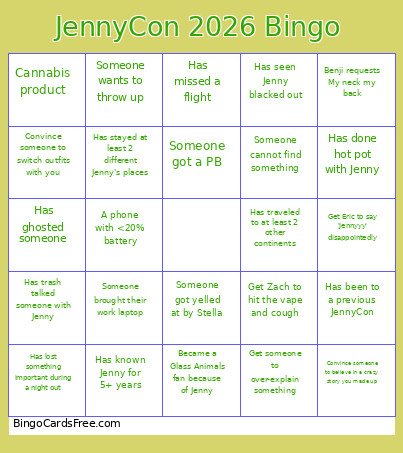 This Jennycon2026 Bingo Cards Game contains following Words or Phrases: Has known Jenny for 5+ years, Has been to a previous JennyCon, Has seen Jenny blacked out, Has cooked with Jenny, Has gone both snow and waterskiing with Jenny, Met Jenny in Seattle, Met Jenny in college, Has a Costco membership, Has stayed at least 2 different Jenny's places, Knows one embarrassing Jenny story, Has done hot pot with Jenny, Has trash talked someone with Jenny, Has missed a flight, Has lost something important during a night out, Has ghosted someone, Has never waited till the night before to pack for a trip, Someone crashed skiing today, A phone with <20% battery, Someone said "I'm not drinking that much tonight", Someone said something that would be inappropriate taken out of context, Someone forgot something for this trip, Unclaimed open drink, Cannabis product, Someone said "I'm tired", Someone cannot find something, Someone wants to throw up, Benji requests My neck my back, Became a Glass Animals fan because of Jenny, Convince someone except Jenny to take a shot, Convince someone to switch outfits with you, Convince someone to believe in a crazy story you made up, Get someone to over-explain something, Get Zach to hit the vape and cough, Someone got a PB, Someone got iced, Has traveled to at least 2 other continents, Someone consults AI for something, Someone brought their work laptop, Someone got yelled at by Stella, Get Eric to say 'Jennyyy' disappointedly.