John Robbins Bingo Cards - Print Free or Customize
Print free John Robbins bingo cards or adjust them,
unlimited prints! Choose from 41,500+ templates or use the bingo card generator.
Add numbers, phrases, images, or any combination.
Play using printed PDF, online bingo cards,
and the online bingo caller, or go hybrid.
About: This bingo card perfectly captures the energetic chaos and unpredictable humor of a beloved high school teacher. Ideal for students or staff familiar with his legendary stories, tangents, and quirks, the card brings the classroom’s inside jokes to life. It’s a great fit for end-of-year celebrations, teacher roasts, or just some lighthearted fun during downtime.
How To: To get a printable PDF, click the Print button.
You can change the card count and other
print options on the Print tab.
Grid items and free space content can be added on the Basic tab.
Appearance can be highly personalized on the
corresponding tabs, or you can quickly find any preference
using the 🔍 tab.
How to play John Robbins Bingo Cards?
Paper Players: Print PDF bingo cards and physically scratch the cards.
Paper Caller: Print PDF calling list & calling slips and physically select the slips.
Online Caller: Click on the Play button above.
Online Players: Click on the Play button above, and then click on the 🎫 button.
Hybrid Mode: Select any combination above.
For instance, caller can be either Offline or Online.
And players can be Offline or Online or a combo of both.
Step-By-Step:
Start by downloading the John Robbins PDF by clicking on the "Print" button above.
Open the PDF and print a hard copy.
For random calling, you can print another copy of the call list, cut, fold and then draw them randomly at play time.
Cut the bingo cards at the cut marks if there are more than 1 bingo cards per page.
Distribute one card per player. For marking, you can use markers. Crayons cost the least.
Select one person to be the caller. If you are playing in a small group, the caller may also play along with their own Bingo card.
The caller starts the game by randomly pulling an item from the call list and saying it to all players.
The players check their cards to see if they have the called word. If they do, they cross off that word.
The first player to finish a horizontal, vertical, or a diagonal line of crossed items shouts "Bingo!" and wins the play.
The caller verifies that the items crossed off form a correct line according to the Bingo card and call list.
You can play for multiple patterns or a full card blackout for an extended play.
This John Robbins Bingo Cards Game contains following Words or Phrases: "Here's why", "I almost died yada yada", "I love Chipotle", "I love my wife" or similar, "Leslie loves you guys", "Teach me something new!", "Who's my job foreman", "Why do teacher give homework?", "You people don't say that here, do you?", Adjusts dice cups, Asks Alexa, ASVAB test, Breaks The fourth wall, Disappointed in class, Draws something illegible on the board, Everyone has ADD/ADHD, Forgets attendance, Grilling steak/Smoking meat, He's scared of the back of someone's head, Heirarchy of needs, Iran story, Iraq story, Leslie planned his outfit today, Military story about nuclear weapons, Offers his "Special Service", Outdoor kitchen, Paces across room, Random list on the board, Random sexual innuendo, Rants about Mr. Barret, Rants about Mr. Logan, Red-light sauna, References certifications, References college courses, Smacks Big Bertha on a table, Someone comes in late/no pass, Stares at people chatting, Summons someone from the back, Swear Word, Takes something literally, Talks about childhood in Texas, Talks about granddaughter (baby), Talks about granddaughter (teenager), Talks about his most recent cruise, Talks about his son Jason at universal, Talks about his whole family cruise he paid for, Talks about how smart Leslie is, Talks about one of his sons, Talks about why we do math, Tangent/storytime 5+ minutes, Throws whiteboard eraser/marker, Tosses marker and lands it in the trashcan, Two at a time at Starbucks/watering trough, Was poisoned, Working on getting new stuff for his classes, Yaps to the bell, New fidget added to his desk, Buys something for the class $50+, Talks about how small Morgan is, Firefighting between 12 - 5 am, Firefighting between 6 -11 pm, EMS to some idiot, Changes plan middle of class, Random adventures in the middle-east.

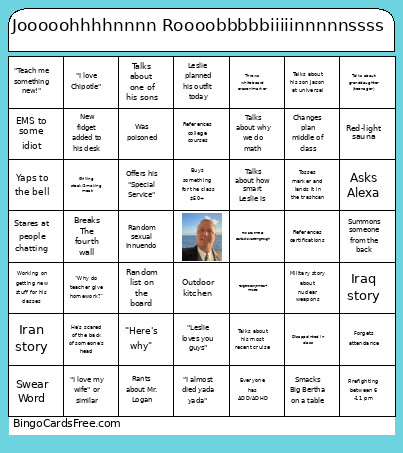 This John Robbins Bingo Cards Game contains following Words or Phrases: "Here's why", "I almost died yada yada", "I love Chipotle", "I love my wife" or similar, "Leslie loves you guys", "Teach me something new!", "Who's my job foreman", "Why do teacher give homework?", "You people don't say that here, do you?", Adjusts dice cups, Asks Alexa, ASVAB test, Breaks The fourth wall, Disappointed in class, Draws something illegible on the board, Everyone has ADD/ADHD, Forgets attendance, Grilling steak/Smoking meat, He's scared of the back of someone's head, Heirarchy of needs, Iran story, Iraq story, Leslie planned his outfit today, Military story about nuclear weapons, Offers his "Special Service", Outdoor kitchen, Paces across room, Random list on the board, Random sexual innuendo, Rants about Mr. Barret, Rants about Mr. Logan, Red-light sauna, References certifications, References college courses, Smacks Big Bertha on a table, Someone comes in late/no pass, Stares at people chatting, Summons someone from the back, Swear Word, Takes something literally, Talks about childhood in Texas, Talks about granddaughter (baby), Talks about granddaughter (teenager), Talks about his most recent cruise, Talks about his son Jason at universal, Talks about his whole family cruise he paid for, Talks about how smart Leslie is, Talks about one of his sons, Talks about why we do math, Tangent/storytime 5+ minutes, Throws whiteboard eraser/marker, Tosses marker and lands it in the trashcan, Two at a time at Starbucks/watering trough, Was poisoned, Working on getting new stuff for his classes, Yaps to the bell, New fidget added to his desk, Buys something for the class $50+, Talks about how small Morgan is, Firefighting between 12 - 5 am, Firefighting between 6 -11 pm, EMS to some idiot, Changes plan middle of class, Random adventures in the middle-east.