Julia and Anson Wedding Bingo Cards - Print Free or Customize
Print free Julia and Anson Wedding bingo cards or adjust them,
limitless prints! Pick from 41,900+ designs or use the bingo card generator.
Add numbers, words, pictures, or mix them all.
Play using printable PDF, virtual bingo cards,
and the virtual bingo caller, or go hybrid.
About: This bingo card is perfect for a lively reunion or gathering of Anson and Julia’s friends, family, and colleagues. It’s designed to spark conversation and help people discover unexpected connections, from quirky hobbies to shared histories. The tone is fun and welcoming, making it ideal for breaking the ice at a close-knit social event.
How To: To download a PDF to print, click the Print button.
You can alter the card quantity and other
print options on the Print tab.
Grid items and free space text can be edited on the Basic tab.
Appearance can be entirely personalized on the
corresponding tabs, or you can easily search any option
using the 🔍 tab.
How to play Julia and Anson Wedding Bingo Cards?
Paper Caller: Print PDF calling list & calling slips and manually select the slips.
Virtual Caller: Click on the Play button above.
Virtual Players: Click on the Play button above, and then click on the 🎫 button.
Paper Players: Print PDF bingo cards and manually cross off the cards.
Mixed Play: Select any combination above.
For example, caller can be either Paper or Virtual.
And players can be Paper or Virtual or a combo of both.
Step-By-Step:
Start by downloading the Julia and Anson Wedding PDF by clicking on the "Print" button above.
Open the PDF and print a hard copy.
For random calling, you can print another copy of the call list, cut, fold and then pull them randomly at play time.
Cut the bingo cards at the cut marks if there are more than 1 bingo cards per page.
Distribute one card per player. For marking, you can use crayons. Crayons cost the least.
Select one person to be the caller. If you are playing in a small group, the caller can also play along with their own Bingo card.
The caller opens the game by randomly picking an item from the call list and saying it to all players.
The players scan their cards to see if they have the announced word. If they do, they cross off that word.
The first player to complete a horizontal, vertical, or a diagonal line of crossed items announces "Bingo!" and wins the game.
The caller checks that the items crossed off form a correct line according to the Bingo card and call list.
You can play for varied patterns or a full card blackout for an extended game.
This Julia and Anson Wedding Bingo Cards Game contains following Words or Phrases: Someone very knowledgeable about fire safety, A School teacher, current or former, Someone Anson once worked with, Someone Julia once worked with, Owned a project car, Someone who ran a marathon, Someone who lived with Anson OR Julia, Someone who lived with Anson AND Julia, Speaks (or signs) 4 Languages fluently,, Has been in a band that's performed on stage, Sold Movado Watches, Professional artist, Is a Great Grandmother, Disc golfed at least twice, Can operate a "boat with sails" alone, A woman in STEM, Started their own business, Strongly Resembles Santa Claus, A professional Librarian, Has played Dungeons and Dragons with Anson & Julia, Lived in the Southern Hemisphere, Borrowed comic books from Anson, Attended SUNY Geneseo, Knows how to play Fall River Whist or Durak, Knows what the Phrase "Give me Wednesday eyes" means, Doesn't eat added sugar, Lived in a country that touches the Mediterranean sea directly, Competed in a dance competition, Met Anson within his first 24 hours of life, Knows how to alter clothes, Has a child under 5, Knew Anson OR Julia in Highschool, Loves horses, Has a dog, Served or serves in the military, Has seen Shrek the musical, stage production, Owns a crossbow or sword, Snowboards or Skis, Lives within 1.2 miles of Julia and Anson, Has a garden.

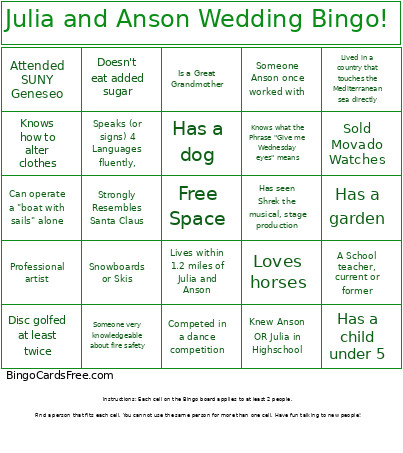 This Julia and Anson Wedding Bingo Cards Game contains following Words or Phrases: Someone very knowledgeable about fire safety, A School teacher, current or former, Someone Anson once worked with, Someone Julia once worked with, Owned a project car, Someone who ran a marathon, Someone who lived with Anson OR Julia, Someone who lived with Anson AND Julia, Speaks (or signs) 4 Languages fluently,, Has been in a band that's performed on stage, Sold Movado Watches, Professional artist, Is a Great Grandmother, Disc golfed at least twice, Can operate a "boat with sails" alone, A woman in STEM, Started their own business, Strongly Resembles Santa Claus, A professional Librarian, Has played Dungeons and Dragons with Anson & Julia, Lived in the Southern Hemisphere, Borrowed comic books from Anson, Attended SUNY Geneseo, Knows how to play Fall River Whist or Durak, Knows what the Phrase "Give me Wednesday eyes" means, Doesn't eat added sugar, Lived in a country that touches the Mediterranean sea directly, Competed in a dance competition, Met Anson within his first 24 hours of life, Knows how to alter clothes, Has a child under 5, Knew Anson OR Julia in Highschool, Loves horses, Has a dog, Served or serves in the military, Has seen Shrek the musical, stage production, Owns a crossbow or sword, Snowboards or Skis, Lives within 1.2 miles of Julia and Anson, Has a garden.