Print free Kampeerbingo cards or adjust them,
limitless cards! Select from 41,500+ designs or use our bingo card generator.
Add numbers, phrases, images, or mix them all.
Play using printed PDF, online bingo cards,
and our online bingo caller, or mix physical and digital.
How To: To download a printable PDF, click the Print button.
You can modify the card count and other
print options on the Print tab.
Grid items and free space content can be changed on the Basic tab.
Appearance can be totally customized on the
corresponding tabs, or you can easily search any preference
on the 🔍 tab.
How to play Kampeerbingo Cards?
Virtual Players: Click on the Play button above, and then click on the 🎫 button.
Virtual Caller: Click on the Play button above.
Paper Players: Print PDF bingo cards and manually scratch the cards.
Paper Caller: Print PDF calling list & calling slips and manually draw the slips.
Combo Mode: Select any combination above.
For example, caller can be either Printed or Virtual.
And players can be Printed or Virtual or a combination of both.
Step-By-Step:
Start by getting the Kampeerbingo PDF by clicking on the "Print" button above.
Open the PDF and print a hard copy.
For random calling, you can print another copy of the call list, cut, fold and then pull them randomly at play time.
Cut the bingo cards at the cut marks if there are more than 1 bingo cards per page.
Give one card to each player. For marking, you can use pencils. Crayons are the cheapest.
Select one person to be the caller. If you are playing in a small group, the caller may as well play along with their own Bingo card.
The caller starts the game by randomly pulling an item from the call list and calling out it to all players.
The players scan their cards to see if they have the called word. If they do, they mark that word.
The first player to complete a horizontal, vertical, or a diagonal line of marked items yells "Bingo!" and wins the game.
The caller confirms that the items marked form a proper line as per the Bingo card and call list.
You can play for multiple patterns or a full card blackout for an extended game.
This Kampeerbingo Cards Game contains following Words or Phrases: Johan valt in slaap op de stoel, Hessel kruipt als laatste uit z'n tent, Vincent, Dylan en Hessel vinden een vierde persoon voor klaverjassen, Broodje chips, Douwe en Dorien bloeden, Johan hakt het bos om, Worst op plek waar het niet hoort, Niels Kijm wordt opgebeld, Legendarische verhalen doen de ronde, Douwe gaat iets bouwen, De activiteiten gaan weer eens niet door, Simon sleept zijn halve inboedel mee, Hessel is als eerste aanwezig, Ruben trekt een blik bier met kracht open (rats!), Simon vertelt over een nudistencamping, Lars vloekt over (vrij in te vullen), Het kampvuur verandert in een toegangspoort naar de hel, Dorien slaapt in een hangmat, Johan heeft de tipi mee, Jong kind jankt, Ruben en Hessel harde kern, Dylan luistert Disneymuziek, Lieke heeft iets gevonden en laat dit aan iedereen zien, Er zijn minimaal twee gameconsoles aanwezig op het terrein, Iemand is vergeten een stoel mee te nemen, Er gaat kampeeruitrusting stuk, Iris heeft het koud, Minimaal vijf achter elkaar opvolgende roggelcore nummers, Hessel draagt een vuig shirt, Michiel maakt foto's, "Mag de muziek zachter?", Johan heeft mede mee, Lilian legt de klemtoon bij marshmallows verkeerd, Lars moet weer dj spelen, Snikkelmix doet de ronde, Iemand is bestek kwijt, Het is kutweer (regen of hitte), Er worden plannen gesmeed voor een festival, Niemand wil mee boodschappen doen, Overleden rockster wordt herdacht, Instant bingo: iemand zeikt in z'n eigen tent.

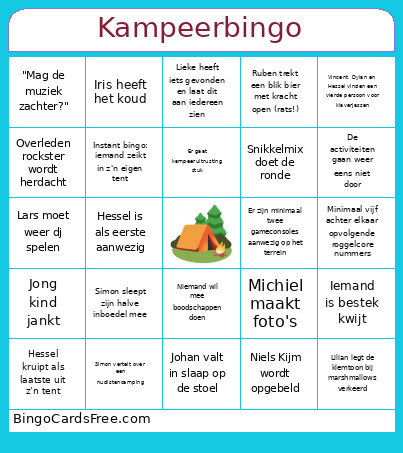 This Kampeerbingo Cards Game contains following Words or Phrases: Johan valt in slaap op de stoel, Hessel kruipt als laatste uit z'n tent, Vincent, Dylan en Hessel vinden een vierde persoon voor klaverjassen, Broodje chips, Douwe en Dorien bloeden, Johan hakt het bos om, Worst op plek waar het niet hoort, Niels Kijm wordt opgebeld, Legendarische verhalen doen de ronde, Douwe gaat iets bouwen, De activiteiten gaan weer eens niet door, Simon sleept zijn halve inboedel mee, Hessel is als eerste aanwezig, Ruben trekt een blik bier met kracht open (rats!), Simon vertelt over een nudistencamping, Lars vloekt over (vrij in te vullen), Het kampvuur verandert in een toegangspoort naar de hel, Dorien slaapt in een hangmat, Johan heeft de tipi mee, Jong kind jankt, Ruben en Hessel harde kern, Dylan luistert Disneymuziek, Lieke heeft iets gevonden en laat dit aan iedereen zien, Er zijn minimaal twee gameconsoles aanwezig op het terrein, Iemand is vergeten een stoel mee te nemen, Er gaat kampeeruitrusting stuk, Iris heeft het koud, Minimaal vijf achter elkaar opvolgende roggelcore nummers, Hessel draagt een vuig shirt, Michiel maakt foto's, "Mag de muziek zachter?", Johan heeft mede mee, Lilian legt de klemtoon bij marshmallows verkeerd, Lars moet weer dj spelen, Snikkelmix doet de ronde, Iemand is bestek kwijt, Het is kutweer (regen of hitte), Er worden plannen gesmeed voor een festival, Niemand wil mee boodschappen doen, Overleden rockster wordt herdacht, Instant bingo: iemand zeikt in z'n eigen tent.