
Kennenlernen Bingo Cards - Print Free or Customize
Print free Kennenlernen bingo cards or personalize, limitless cards! Pick from 42,600+ templates or use our bingo card generator. Add numbers, phrases, pictures, or any combination. Play using printed PDF, online bingo cards, and our online bingo caller, or combine all formats.
How To: To download a PDF to print, click the Print button. You can adjust the card quantity and other print settings on the Print tab. Grid items and free space text can be edited on the Basic tab. Appearance can be highly personalized on the relevant tabs, or you can quickly locate any preference on the 🔍 tab.
How to play Kennenlernen Bingo Cards?
- Printed Caller: Print PDF calling list & calling slips and physically select the slips.
- Virtual Players: Click on the Play button above, and then click on the 🎫 button.
- Virtual Caller: Click on the Play button above.
- Printed Players: Print PDF bingo cards and physically scratch the cards.
- Hybrid Play: Pick any combination above. For example, caller can be either Offline or Virtual. And players can be Offline or Virtual or a mix of both.
Step-By-Step:
- Start by saving the Kennenlernen PDF by clicking on the "Print" button above.
- Open the PDF and print a hard copy.
- For random calling, you can print another copy of the call list, cut, fold and then draw them randomly at play time.
- Cut the bingo cards at the cut marks if there are greater than 1 bingo cards per page.
- Give one card to each player. For marking, you can use pens. Crayons are the cheapest.
- Pick one person to be the caller. If you are playing in a small group, the caller can as well play along with their own Bingo card.
- The caller initiates the play by randomly drawing an item from the call list and calling out it to everyone.
- The players check their cards to see if they have the announced word. If they do, they mark that word.
- The first player to finish a horizontal, vertical, or a diagonal line of crossed items yells "Bingo!" and wins the play.
- The caller confirms that the items marked form a proper line according to the Bingo card and call list.
- You can play for multiple patterns or a full card blackout for an extended play.
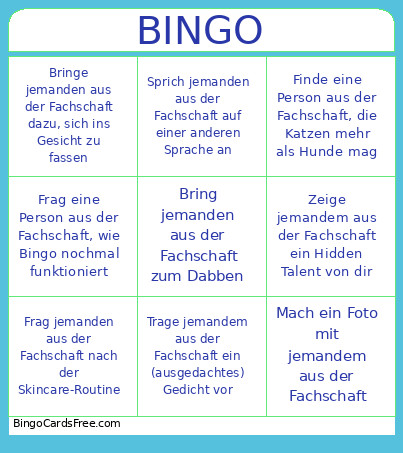 This Kennenlernen Bingo Cards Game contains following Words or Phrases: Bring jemanden aus der Fachschaft dazu, mit dir rauszugehen, Bring jemanden aus der Fachschaft dazu, einen Schuh auszuziehen, Dreh jemandem aus der Fachschaft ein Getränk an, Bring jemanden aus der Fachschaft dazu, mit dir Schnick Schnack Schnuck zu spielen, Bring jemanden aus der Fachschaft dazu, Kapitalismus zu kritisieren, Gib jemandem aus der Fachschaft einen Stock in die Hand, Bring jemanden aus der Fachschaft dazu, sich im Kreis zu drehen, Gib jemandem aus der Fachschaft einen Löffel in die Hand, Frag jemanden aus der Fachschaft nach der Skincare-Routine, Finde das Sternzeichen von jemandem aus der Fachschaft heraus, Bring jemanden aus der Fachschaft zum Dabben, Stoß mit jemandem aus der Fachschaft an, aber dein Gegenstand ist kein Getränk, Mach ein Bottle-Flip Battle mit jemandem aus der Fachschaft, Ahm jemanden aus der Fachschaft nach, bis die Person es merkt, Bringe jemanden aus der Fachschaft dazu, ein Tiergeräusch zu machen, Sprich jemanden aus der Fachschaft mit falschem Namen an, Gib jemandem aus der Fachschaft ein Kompliment, Mache jemandem aus der Fachschaft einen Heiratsantrag, Frage jemandem aus der Fachschaft nach der Bedeutung eines Tattoos, Mach ein Foto mit jemandem aus der Fachschaft, Sprich jemanden aus der Fachschaft auf einer anderen Sprache an, Erzähl jemandem aus der Fachschaft einen Flachwitz, Frag eine Person aus der Fachschaft, ob sie #TeamBibi oder #TeamDagi, Frag jemanden aus der Fachschaft nach einem Wlan-Passwort, Täusche an jemandem aus der Fachschaft ein High-Five zu geben, aber dabbe stattdessen, Frag jemanden aus der Fachschaft nach dem besten Mark Forster Song, Sage jemandem aus der Fachschaft, dass er/sie aussieht wie Mark Forster, Bringe jemanden aus der Fachschaft dazu, einen Song mit dir zu singen, Finde jemanden aus der Fachschaft mit der gleichen Schuhgröße, Frage jemanden aus der Fachschaft nach der Email-Adresse, Bringe jemanden aus der Fachschaft dazu, sich ins Gesicht zu fassen, Frag eine Person aus der Fachschaft, welches Shampoo sie benutzt, Bring jemanden aus der Fachschaft dazu, Frag eine Person aus der Fachschaft nach ihrem Lieblingswort, Finde eine Person aus der Fachschaft, die vegan ist, Frag eine Person aus der Fachschaft nach ihrer Bildschirmzeit, Bringe eine Person aus der Fachschaft dazu, ihre Zunge zu rollen, Trage jemandem aus der Fachschaft ein (ausgedachtes) Gedicht vor, Finde eine Person aus der Fachschaft, die Wein lieber als Bier mag, Tu so, als würdest du jemanden aus der Fachschaft von woanders schon kennen, Frag eine Person aus der Fachschaft nach ihrem besten Kochrezept, Mach mit jemandem aus der Fachschaft ein Staringcontest, Frage eine Person aus der Fachschaft, nach ihrem Lieblings-Sprichwort, Frage eine Person aus der Fachschaft, nach ihrer Lieblingszahl, Finde eine Person aus der Fachschaft, die bald Geburtstag hat, Verkaufe jemandem aus der Fachschaft, dass du adlig bist, Sprich in einer Konversation mit einer Person aus der Fachschaft nur in Reimen, Frag eine Person aus der Fachschaft, wie Bingo nochmal funktioniert, Rede mit einer Person aus der Fachschaft, aber steh dabei auf einem Bein, Zeige jemandem aus der Fachschaft ein Hidden Talent von dir, Schüttle einer Person aus der Fachschaft die Hand, Frag eine Person aus der Fachschaft nach dem besten Handyspiel, Bringe jemanden aus der Fachschaft dazu, eine Dehnübung mit dir zu machen, Finde eine Person aus der Fachschaft, die Katzen mehr als Hunde mag.