Print free Klaxon bingo cards or modify,
limitless prints! Select from 41,500+ designs or use our bingo card generator.
Add numbers, phrases, images, or any combination.
Play using printed PDF, digital bingo cards,
and our digital bingo caller, or combine all formats.
About: This bingo card is perfect for a lively family gathering where everyone's quirks and classic moments come out in full force. With playful nods to inside jokes, generational differences, and some light family drama, it’s an ideal way to add fun and laughter to a holiday get-together or reunion with relatives who know each other all too well.
How To: To get a printable PDF, click the Print button.
You can adjust the number of cards and other
printing settings on the Print tab.
Grid items and free space content can be edited on the Basic tab.
Appearance can be exactly personalized on the
corresponding tabs, or you can easily find any preference
using the 🔍 tab.
How to play Klaxon Bingo Cards?
Online Players: Click on the Play button above, and then click on the 🎫 button.
Online Caller: Click on the Play button above.
Printed Players: Print PDF bingo cards and physically scratch the cards.
Printed Caller: Print PDF calling list & calling slips and physically select the slips.
Mixed Play: Pick any combination above.
For instance, caller can be either Paper or Online.
And players can be Paper or Online or a combination of both.
Step-By-Step:
Start by getting the Klaxon PDF by clicking on the "Print" button above.
Open the PDF and print a hard copy.
For random drawing, you can print another copy of the call list, cut, fold and then draw them randomly at play time.
Cut the bingo cards at the cut marks if there are greater than 1 bingo cards per page.
Give one card to each player. For marking, you can use markers. Crayons are the cheapest.
Pick one person to be the caller. If you are playing in a small group, the caller can as well play along with their own Bingo card.
The caller opens the play by randomly pulling an item from the call list and calling out it to all players.
The players check their cards to see if they have the called word. If they do, they mark that word.
The first player to finish a horizontal, vertical, or a diagonal line of marked items shouts "Bingo!" and wins the play.
The caller confirms that the items marked form a correct line according to the Bingo card and call list.
You can play for multiple patterns or a full card blackout for a longer play.
This Klaxon Bingo Cards Game contains following Words or Phrases: Alyssa goes to pet the cats, Vanessa complains about being swollen, Teri tells someone that you have to close your eyes, Jan asks "What did you say", Kolton doesn't speak for an hour, Kolton makes a joke about someones' appearance, Justin watches a sports game on phone, Steve gets political, Teri gets political, Alyssa sits in dog bed, The boys laugh and won't leave Max alone, Kolton tries to play with the boys, Teri gets mad that we don't drink, Steve gets mad that we don't drink, Teri says, "What do you think you're better than me", Steve doesn't laugh at a joke that Max makes, Teri says, "RUDEEEEE", Vanessa disagrees with a undeniable fact, The boys want to play outside, The boys make a fart joke, Justin asks how Will is, Justin asks if Cassie is playing fantasy football, The TV is on during present time, Teri forces us to take a "nice" picture, The family picture takes 30 minutes, Teri makes a rude comment about Max's family, A & V talk about being preggo, Someone mentions Trump, A neighborhood drunk arrives, Someone comments on how much both of us read, Steve tries to discuss financial matters with Cassie, Breakfast is scrambled eggs and fried meat, Someone brings up that we drink "fancy" coffee, Jan sits in Teri's chair and expects to be waited on, Someone drunk drives, Duke pees inside, Someone makes Max do a weird chore, "Don't you want a drink?", Fox news is on TV, Teri is playing her German music channel, Steve tells us we need to buy the TV box, Steve talks about why you need to own a gun, Steve says "You kids", Steve acts old.

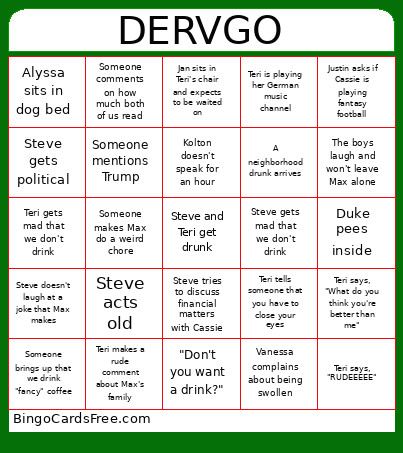 This Klaxon Bingo Cards Game contains following Words or Phrases: Alyssa goes to pet the cats, Vanessa complains about being swollen, Teri tells someone that you have to close your eyes, Jan asks "What did you say", Kolton doesn't speak for an hour, Kolton makes a joke about someones' appearance, Justin watches a sports game on phone, Steve gets political, Teri gets political, Alyssa sits in dog bed, The boys laugh and won't leave Max alone, Kolton tries to play with the boys, Teri gets mad that we don't drink, Steve gets mad that we don't drink, Teri says, "What do you think you're better than me", Steve doesn't laugh at a joke that Max makes, Teri says, "RUDEEEEE", Vanessa disagrees with a undeniable fact, The boys want to play outside, The boys make a fart joke, Justin asks how Will is, Justin asks if Cassie is playing fantasy football, The TV is on during present time, Teri forces us to take a "nice" picture, The family picture takes 30 minutes, Teri makes a rude comment about Max's family, A & V talk about being preggo, Someone mentions Trump, A neighborhood drunk arrives, Someone comments on how much both of us read, Steve tries to discuss financial matters with Cassie, Breakfast is scrambled eggs and fried meat, Someone brings up that we drink "fancy" coffee, Jan sits in Teri's chair and expects to be waited on, Someone drunk drives, Duke pees inside, Someone makes Max do a weird chore, "Don't you want a drink?", Fox news is on TV, Teri is playing her German music channel, Steve tells us we need to buy the TV box, Steve talks about why you need to own a gun, Steve says "You kids", Steve acts old.