KVIIT 50th Reunion Bingo Cards - Print Free or Customize
Print free KVIIT 50th Reunion bingo cards or adjust them,
unlimited prints! Choose from 41,500+ designs or use the bingo card generator.
Add numbers, phrases, pictures, or any combination.
Play using printed PDF, digital bingo cards,
and the digital bingo caller, or combine all formats.
How To: To download a PDF to print, click the Print button.
You can change the number of cards and other
printing preferences on the Print tab.
Grid items and free space content can be edited on the Basic tab.
Appearance can be highly customized on the
corresponding tabs, or you can quickly find any setting
on the 🔍 tab.
How to play KVIIT 50th Reunion Bingo Cards?
Paper Caller: Print PDF calling list & calling slips and manually pick the slips.
Digital Caller: Click on the Play button above.
Digital Players: Click on the Play button above, and then click on the 🎫 button.
Paper Players: Print PDF bingo cards and manually write on the cards.
Hybrid Play: Pick any combination above.
For example, caller can be either Printed or Digital.
And players can be Printed or Digital or a combination of both.
Step-By-Step:
Start by downloading the KVIIT 50th Reunion PDF by clicking on the "Print" button above.
Open the PDF and print it.
For random drawing, you can print another copy of the call list, cut, fold and then pull them randomly at play time.
Cut the bingo cards at the cut lines if there are greater than 1 bingo cards per page.
Give one card to each player. For marking, you can use pens. Crayons cost the least.
Pick one person to be the caller. If you are playing in a small group, the caller can as well play along with their own Bingo card.
The caller starts the play by randomly pulling an item from the call list and announcing it to everyone.
The players check their cards to see if they have the called word. If they do, they cross off that word.
The first player to complete a horizontal, vertical, or a diagonal line of marked items yells "Bingo!" and wins the play.
The caller confirms that the items crossed off form a correct line according to the Bingo card and call list.
You can play for varied patterns or a full card blackout for a longer play.
This KVIIT 50th Reunion Bingo Cards Game contains following Words or Phrases: Lag Ja Gale Se Phir, Chura Liya Hai Tumne Jo Dil Ko, Pal Pal Dil Ke Paas, Kabhi Kabhie Mere Dil Mein, Yeh Sham Mastani, O Mere Dil Ke Chain, Mere Sapnon Ki Rani, Gulabi Aankhen, Ek Ajnabee Haseena Se, Kehna Hai, Roop Tera Mastana, Yeh Jo Mohabbat Hai, Neele Neele Ambar Par, Chingari Koi Bhadke, Hothon Se Chhoo Lo Tum, Kya Hua Tera Wada, Aajkal Paon Zameen Par Nahin Padte, Bade Achhe Lagte Hain, Aane Wala Pal Janewala Hai, Tere Bina Zindagi Se, Tum Aa Gaye Ho Noor Aa Gaya, Is Ankhon Ki Masti, Pyar Diwana Hota Hai, Sagar Kinare, Raat Kali Ek Khwab Mein Aayi, Chand Mera Dil, Dil Kya Kare, Zindagi Ek Safar Hai Suhana, Kasme Vaade Nibhayenge Hum, Likhe Jo Khat Tujhe, Kya Yehi Pyar Hai, O Saathi Re, Kora Kagaz Tha Yeh Man Mera, Chalte Chalte Yun Hi Koi, Tum Bin Jaun Kahan, Dil Aaj Shayar Hai, Yeh Reshmi Zulfen, Aaj Jane Ki Zid Na Karo, Pukarta Chala Hoon Main, Jaane Jaan Dhoondta Phir Raha, Abhi Na Jao Chhod Kar, Din Dhal Jaye Haye, Diwana Hua Badal, Kisi Ki Muskurahaton Se, Main Zindagi Ka Saath Nibhata Chala, Maine Tere Liye, Meri Bheegi Bheegi Si, Na Tum Hamen Jano, Muskurata Hua, Do Lafzon Ki Hai Dil Ki Kahani, Dil Dhoondta Hai, Dil Ki Nazar Se, Aye Dil-E-Nadan, Khwab Ho Tum Ya Koi Haqeeqat, Karoge Yaad To, Sama Hai Suhana Suhana, Ankhon Hi Ankhon Mein, Ajib Dastan Hai Yeh, Badi Sooni Sooni Hai Zindagi, Piya Bawri, Hum Bewafa Hargiz Na The, Hum Bekhudi Mein Tum Ko Pukare, Chhu Kar Mere Man Ko, Yeh Sama Sama Hai Pyar Ka, Mera Saaya Saath Hoga, Beeti Na Bitai Raina, Raina Beeti Jaye, Naina Barse Rim Jhim Rim Jhim, Waqt Ne Kiya Kya Haseen Sitam, Tere Mere Milan Ki Yeh Raina, Yeh Dil Na Hota Bechara, Zindagi Kaisi Hai Paheli, Woh Sham Kuchh Ajeeb Thi, Ek Pyar Ka Nagma Hai, Tujhse Naraz Nahin Zindagi, Yaad Kiya Dil Ne, Aaja Re O Mere Dilbar Aaja, Jab Koi Baat Bigad Jaye, Is Mod Se Jate Hain, Zindagi Ka Safar.

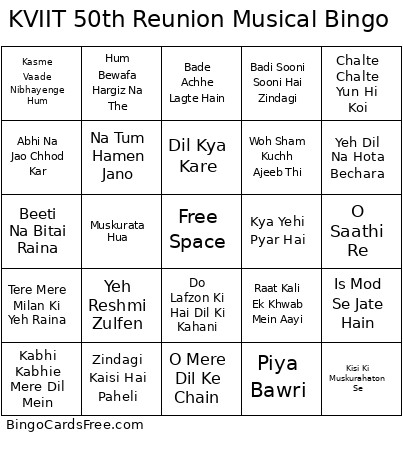 This KVIIT 50th Reunion Bingo Cards Game contains following Words or Phrases: Lag Ja Gale Se Phir, Chura Liya Hai Tumne Jo Dil Ko, Pal Pal Dil Ke Paas, Kabhi Kabhie Mere Dil Mein, Yeh Sham Mastani, O Mere Dil Ke Chain, Mere Sapnon Ki Rani, Gulabi Aankhen, Ek Ajnabee Haseena Se, Kehna Hai, Roop Tera Mastana, Yeh Jo Mohabbat Hai, Neele Neele Ambar Par, Chingari Koi Bhadke, Hothon Se Chhoo Lo Tum, Kya Hua Tera Wada, Aajkal Paon Zameen Par Nahin Padte, Bade Achhe Lagte Hain, Aane Wala Pal Janewala Hai, Tere Bina Zindagi Se, Tum Aa Gaye Ho Noor Aa Gaya, Is Ankhon Ki Masti, Pyar Diwana Hota Hai, Sagar Kinare, Raat Kali Ek Khwab Mein Aayi, Chand Mera Dil, Dil Kya Kare, Zindagi Ek Safar Hai Suhana, Kasme Vaade Nibhayenge Hum, Likhe Jo Khat Tujhe, Kya Yehi Pyar Hai, O Saathi Re, Kora Kagaz Tha Yeh Man Mera, Chalte Chalte Yun Hi Koi, Tum Bin Jaun Kahan, Dil Aaj Shayar Hai, Yeh Reshmi Zulfen, Aaj Jane Ki Zid Na Karo, Pukarta Chala Hoon Main, Jaane Jaan Dhoondta Phir Raha, Abhi Na Jao Chhod Kar, Din Dhal Jaye Haye, Diwana Hua Badal, Kisi Ki Muskurahaton Se, Main Zindagi Ka Saath Nibhata Chala, Maine Tere Liye, Meri Bheegi Bheegi Si, Na Tum Hamen Jano, Muskurata Hua, Do Lafzon Ki Hai Dil Ki Kahani, Dil Dhoondta Hai, Dil Ki Nazar Se, Aye Dil-E-Nadan, Khwab Ho Tum Ya Koi Haqeeqat, Karoge Yaad To, Sama Hai Suhana Suhana, Ankhon Hi Ankhon Mein, Ajib Dastan Hai Yeh, Badi Sooni Sooni Hai Zindagi, Piya Bawri, Hum Bewafa Hargiz Na The, Hum Bekhudi Mein Tum Ko Pukare, Chhu Kar Mere Man Ko, Yeh Sama Sama Hai Pyar Ka, Mera Saaya Saath Hoga, Beeti Na Bitai Raina, Raina Beeti Jaye, Naina Barse Rim Jhim Rim Jhim, Waqt Ne Kiya Kya Haseen Sitam, Tere Mere Milan Ki Yeh Raina, Yeh Dil Na Hota Bechara, Zindagi Kaisi Hai Paheli, Woh Sham Kuchh Ajeeb Thi, Ek Pyar Ka Nagma Hai, Tujhse Naraz Nahin Zindagi, Yaad Kiya Dil Ne, Aaja Re O Mere Dilbar Aaja, Jab Koi Baat Bigad Jaye, Is Mod Se Jate Hain, Zindagi Ka Safar.