ky derby 151 bingo Cards - Print Free or Customize
Print free ky derby 151 bingo cards or alter them,
limitless prints! Select from 41,500+ designs or use the bingo card generator.
Add numbers, phrases, images, or mix them all.
Play using PDF prints, virtual bingo cards,
and the virtual bingo caller, or go hybrid.
About: This bingo card is perfect for a Kentucky Derby watch party, capturing the excitement, quirks, and traditions of the big day. With nods to fancy hats, famous faces, classic race lingo, and all the spectacle on TV, it’s ideal for friends or family who love horse racing—or just want to have fun spotting every Derby cliché as it happens.
How To: To save a printable PDF, click the Print button.
You can modify the card count and other
print options on the Print tab.
Grid items and free space text can be changed on the Basic tab.
Appearance can be entirely personalized on the
relevant tabs, or you can quickly locate any setting
using the 🔍 tab.
How to play ky derby 151 bingo Cards?
Digital Players: Click on the Play button above, and then click on the 🎫 button.
Paper Caller: Print PDF calling list & calling slips and manually choose the slips.
Paper Players: Print PDF bingo cards and manually write on the cards.
Digital Caller: Click on the Play button above.
Combo Play: Select any combination above.
For instance, caller can be either Printed or Digital.
And players can be Printed or Digital or a combo of both.
Step-By-Step:
Start by downloading the ky derby 151 bingo PDF by clicking on the "Print" button above.
Open the PDF and print a hard copy.
For random drawing, you can print another copy of the call list, cut, fold and then pick them randomly at play time.
Cut the bingo cards at the cut marks if there are greater than 1 bingo cards per page.
Give one card to each player. For marking, you can use pencils. Crayons cost the least.
Select one person to be the caller. If you are playing in a small group, the caller can also play along with their own Bingo card.
The caller starts the game by randomly pulling an item from the call list and saying it to all players.
The players check their cards to see if they have the called word. If they do, they dab that word.
The first player to finish a horizontal, vertical, or a diagonal line of marked items yells "Bingo!" and wins the game.
The caller verifies that the items marked form a proper line according to the Bingo card and call list.
You can play for varied patterns or a full card blackout for an extended game.
This ky derby 151 bingo Cards Game contains following Words or Phrases: mint julep featured in an ad, reporter on a horse, hannah explains a derby/horseracing rule unprompted, someone at the party has a hat on, tv interview with a millionare's kid/grandkid, celebrity sighting, cigars featured on tv coverage, pano footage of louisville, horse scratches day of the race, camera pans to someone who doesn't know the words to "My Old Kentucky Home", bugler feature, recognize the celebrity who says "Riders Up", camera cuts to someone visibly plastered, broadcaster explains Derby points or odds, someone mentions horse breeding, distance described in lengths, distance described in furlongs, broadcaster says "fastest two minutes in sports", mention of "first Saturday in May", mention of the Kentucky Oaks, camera cuts to statue of a jockey, explanation of the Triple Crown, racehorse does something silly, racehorse does not want to go into the stall, "They're off!", footage of the infield, hannah complains about infield ticket prices, footage of rose garland construction, lady jockey, paddock footage, trainer interview, jockey interview, "wow the jockeys are short", "my mom actually works right by there", someone on tv says "loo-ee-ville", jack harlow appearance, silly racehorse name, "horse names are like usernames but trickier" or smth like that, Barbaro mention, Eight Bells mention, jockey raises hand in the air when crossing the finish line, person in a bow tie, hat with ~architecture~, hat with live flowers, footage of the twin spires, horse farm footage, slutty boy summer outfit, hat with feathers, hat with horses, fedora.

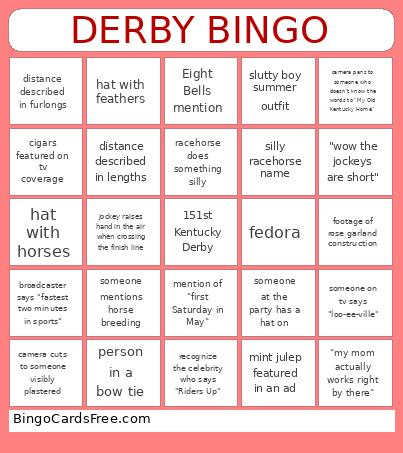 This ky derby 151 bingo Cards Game contains following Words or Phrases: mint julep featured in an ad, reporter on a horse, hannah explains a derby/horseracing rule unprompted, someone at the party has a hat on, tv interview with a millionare's kid/grandkid, celebrity sighting, cigars featured on tv coverage, pano footage of louisville, horse scratches day of the race, camera pans to someone who doesn't know the words to "My Old Kentucky Home", bugler feature, recognize the celebrity who says "Riders Up", camera cuts to someone visibly plastered, broadcaster explains Derby points or odds, someone mentions horse breeding, distance described in lengths, distance described in furlongs, broadcaster says "fastest two minutes in sports", mention of "first Saturday in May", mention of the Kentucky Oaks, camera cuts to statue of a jockey, explanation of the Triple Crown, racehorse does something silly, racehorse does not want to go into the stall, "They're off!", footage of the infield, hannah complains about infield ticket prices, footage of rose garland construction, lady jockey, paddock footage, trainer interview, jockey interview, "wow the jockeys are short", "my mom actually works right by there", someone on tv says "loo-ee-ville", jack harlow appearance, silly racehorse name, "horse names are like usernames but trickier" or smth like that, Barbaro mention, Eight Bells mention, jockey raises hand in the air when crossing the finish line, person in a bow tie, hat with ~architecture~, hat with live flowers, footage of the twin spires, horse farm footage, slutty boy summer outfit, hat with feathers, hat with horses, fedora.