Layng Gang 2026 Bingo Cards - Print Free or Customize
Print free Layng Gang 2026 bingo cards or adjust them,
unlimited cards! Select from 42,600+ templates or use our bingo card generator.
Add numbers, words, images, or any combination.
Play using printable PDF, virtual bingo cards,
and our virtual bingo caller, or combine all formats.
About: This bingo card is perfect for a lively family reunion, especially one that takes place poolside. The activities capture playful moments, lighthearted mishaps, and all the unique interactions that make big family gatherings special. It’s a fun, interactive way to get everyone—kids and adults alike—involved and celebrating family traditions together.
How To: To get a PDF to print, click the Print button.
You can adjust the card count and other
print options on the Print tab.
Grid items and free space content can be edited on the Basic tab.
Appearance can be completely customized on the
corresponding tabs, or you can quickly find any setting
on the 🔍 tab.
How to play Layng Gang 2026 Bingo Cards?
Paper Caller: Print PDF calling list & calling slips and manually select the slips.
Virtual Players: Click on the Play button above, and then click on the 🎫 button.
Virtual Caller: Click on the Play button above.
Paper Players: Print PDF bingo cards and manually mark the cards.
Combo Mode: Pick any combination above.
For example, caller can be either Offline or Virtual.
And players can be Offline or Virtual or a mix of both.
Step-By-Step:
Start by downloading the Layng Gang 2026 PDF by clicking on the "Print" button above.
Open the PDF and print it.
For random drawing, you can print another copy of the call list, cut, fold and then pick them randomly at play time.
Cut the bingo cards at the cut marks if there are more than 1 bingo cards per page.
Distribute one card per player. For marking, you can use pencils. Crayons cost the least.
Pick one person to be the caller. If you are playing in a small group, the caller may also play along with their own Bingo card.
The caller opens the game by randomly drawing an item from the call list and calling out it to all players.
The players scan their cards to see if they have the announced word. If they do, they dab that word.
The first player to complete a horizontal, vertical, or a diagonal line of marked items announces "Bingo!" and wins the game.
The caller verifies that the items marked form a correct line according to the Bingo card and call list.
You can play for multiple patterns or a full card blackout for an extended game.
This Layng Gang 2026 Bingo Cards Game contains following Words or Phrases: A kid interrupts your conversation, A kid wins a game against an adult, Cannonball in the pool, Chat with someone who lives in a different state, Clean up 5 pieces of trash, Get pruny from the pool, Hear the same family story twice, Hit someone with a pool noodle, Knock down the tower in Jenga, Learn something new about a cousin, Lose a game (any game), Make a s'more, Photo bomb someone's picture, Play a game of Cornhole, Play Rummikub, Play your favorite song on the speaker, Put on a "Layng gang" temporary tattoo, Someone drops their food, Someone forgets which drink is theirs, Someone gets in the pool after the sun sets, Someone gets sunburnt, Someone needs a bandaid, Someone needs a nap, Someone spills a drink, Someone needs a phone charger, 2 people are wearing the same color swimsuit, Take a group photo with everyone, Take a pic with a cousin you haven't seen in a while, Take a pic with someone who drove here, Take a pic with someone who flew here, Take a selfie with every cousin, Team up with someone for a game, Tell a favorite family story, The next reunion gets scheduled, Touch the deep end of the pool, Upload 5 photos to the shared album, Use 4+ pool noodles at once, Wear sunscreen, Win a game (any game), Write a family story for the story jar.

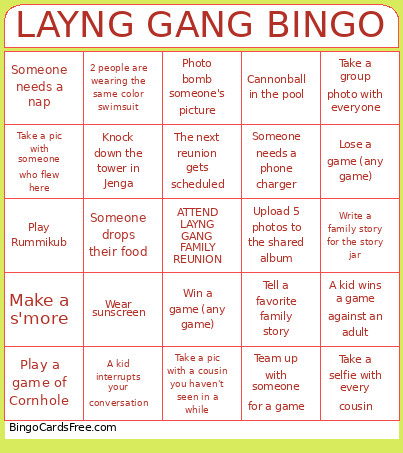 This Layng Gang 2026 Bingo Cards Game contains following Words or Phrases: A kid interrupts your conversation, A kid wins a game against an adult, Cannonball in the pool, Chat with someone who lives in a different state, Clean up 5 pieces of trash, Get pruny from the pool, Hear the same family story twice, Hit someone with a pool noodle, Knock down the tower in Jenga, Learn something new about a cousin, Lose a game (any game), Make a s'more, Photo bomb someone's picture, Play a game of Cornhole, Play Rummikub, Play your favorite song on the speaker, Put on a "Layng gang" temporary tattoo, Someone drops their food, Someone forgets which drink is theirs, Someone gets in the pool after the sun sets, Someone gets sunburnt, Someone needs a bandaid, Someone needs a nap, Someone spills a drink, Someone needs a phone charger, 2 people are wearing the same color swimsuit, Take a group photo with everyone, Take a pic with a cousin you haven't seen in a while, Take a pic with someone who drove here, Take a pic with someone who flew here, Take a selfie with every cousin, Team up with someone for a game, Tell a favorite family story, The next reunion gets scheduled, Touch the deep end of the pool, Upload 5 photos to the shared album, Use 4+ pool noodles at once, Wear sunscreen, Win a game (any game), Write a family story for the story jar.