Lego Battles Wiki Bingo Cards - Print Free or Customize
Print free Lego Battles Wiki bingo cards or personalize,
unlimited cards! Choose from 41,100+ templates or use our bingo card generator.
Add numbers, phrases, pictures, or mix them all.
Play using PDF prints, virtual bingo cards,
and our virtual bingo caller, or mix physical and digital.
About: Dive into a world where LEGO themes, game mechanics, and cheeky inside jokes collide. This bingo card is perfect for fans of strategy games or LEGO enthusiasts at tournaments, meetups, or gaming nights. With references spanning classic sets and common gameplay moments, it promises plenty of laughs and friendly competition among longtime players and newcomers alike.
How To: To save a printable PDF, click the Print button.
You can change the number of cards and other
printing options on the Print tab.
Grid items and free space content can be added on the Basic tab.
Appearance can be entirely personalized on the
relevant tabs, or you can quickly search any option
using the 🔍 tab.
How to play Lego Battles Wiki Bingo Cards?
Paper Caller: Print PDF calling list & calling slips and manually select the slips.
Virtual Caller: Click on the Play button above.
Paper Players: Print PDF bingo cards and manually cross off the cards.
Virtual Players: Click on the Play button above, and then click on the 🎫 button.
Hybrid Play: Choose any combination above.
For instance, caller can be either Printed or Virtual.
And players can be Printed or Virtual or a combo of both.
Step-By-Step:
Start by downloading the Lego Battles Wiki PDF by clicking on the "Print" button above.
Open the PDF and print a hard copy.
For random drawing, you can print another copy of the call list, cut, fold and then draw them randomly at play time.
Cut the bingo cards at the cut lines if there are more than 1 bingo cards per page.
Distribute one card per player. For marking, you can use pens. Crayons cost the least.
Choose one person to be the caller. If you are playing in a small group, the caller may as well play along with their own Bingo card.
The caller initiates the play by randomly pulling an item from the call list and announcing it to everyone.
The players check their cards to see if they have the announced word. If they do, they dab that word.
The first player to complete a horizontal, vertical, or a diagonal line of marked items announces "Bingo!" and wins the game.
The caller confirms that the items crossed off form a proper line as per the Bingo card and call list.
You can play for multiple patterns or a full card blackout for a longer game.
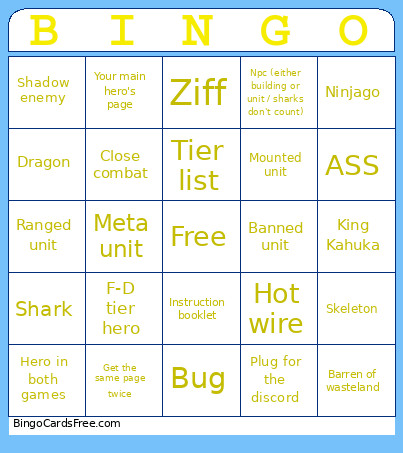
This Lego Battles Wiki Bingo Cards Game contains following Words or Phrases: Ninjago, King Kahuka, Banned unit, Bug, Close combat, Tier list, Ziff, Instruction booklet, Skeleton, Shark, Barren of wasteland, Hero in both games, Hot wire, Get the same page twice, Dragon, Shadow enemy, Plug for the discord, Npc (either building or unit / sharks don't count), Ranged unit, Mounted unit, ASS, Meta unit, F-D tier hero, Your main hero's page.

 This Lego Battles Wiki Bingo Cards Game contains following Words or Phrases: Ninjago, King Kahuka, Banned unit, Bug, Close combat, Tier list, Ziff, Instruction booklet, Skeleton, Shark, Barren of wasteland, Hero in both games, Hot wire, Get the same page twice, Dragon, Shadow enemy, Plug for the discord, Npc (either building or unit / sharks don't count), Ranged unit, Mounted unit, ASS, Meta unit, F-D tier hero, Your main hero's page.