Print free lente bingo cards or modify,
unlimited prints! Select from 42,200+ templates or use the bingo card generator.
Add numbers, words, pictures, or all of them.
Play using printed PDF, digital bingo cards,
and the digital bingo caller, or mix physical and digital.
How To: To get a printable PDF, click the Print button.
You can alter the card count and other
printing settings on the Print tab.
Grid items and free space content can be changed on the Basic tab.
Appearance can be totally customized on the
corresponding tabs, or you can quickly find any option
using the 🔍 tab.
How to play lente bingo Cards?
Digital Players: Click on the Play button above, and then click on the 🎫 button.
Paper Caller: Print PDF calling list & calling slips and physically choose the slips.
Paper Players: Print PDF bingo cards and physically cross off the cards.
Digital Caller: Click on the Play button above.
Combo Play: Pick any combination above.
For example, caller can be either Printed or Digital.
And players can be Printed or Digital or a combination of both.
Step-By-Step:
Start by saving the lente bingo PDF by clicking on the "Print" button above.
Open the PDF and print it.
For random calling, you can print another copy of the call list, cut, fold and then pick them randomly at play time.
Cut the bingo cards at the cut marks if there are greater than 1 bingo cards per page.
Distribute one card per player. For marking, you can use crayons. Crayons cost the least.
Pick one person to be the caller. If you are playing in a small group, the caller may as well play along with their own Bingo card.
The caller initiates the game by randomly picking an item from the call list and saying it to all players.
The players scan their cards to see if they have the called word. If they do, they cross off that word.
The first player to finish a horizontal, vertical, or a diagonal line of crossed items shouts "Bingo!" and wins the game.
The caller confirms that the items crossed off form a proper line as per the Bingo card and call list.
You can play for varied patterns or a full card blackout for a longer game.
This lente bingo Cards Game contains following Words or Phrases: Bijen zoemen rond bloemen in de lente, Bijtjes verzamelen nectar uit kleurrijke bloemen, Bomen krijgen knoppen aan hun takken bij lentetijd, De dagen worden langer in de lente, De lente brengt mooie bloemen in de tuin, De lucht is blauw met witte wolkjes boven weilanden, De lucht ruikt fris in het voorjaar, De zon schijnt vaker en langer bij mooi weer, Eenden zwemmen met hun kuikens in het park, Er zijn meer regenbogen te zien in het voorjaar, Er zijn veel leuke feesten en markten met Pasen, Het gras wordt groener in de lente, Iedereen krijgt meer energie door zonnige lentedagen, In de lente groeien jonge blaadjes aan bomen, In de lente kun je buiten spelen, In de lente kun je zonder jas naar buiten, In de lente worden lammetjes geboren, In parken zie je veel spelende kinderen en honden, Je hoort kikkers kwaken bij vijvers en sloten, Je kunt plantjes zaaien voor een moestuin, Je ziet meer mensen wandelen of fietsen buiten, Kinderen fietsen graag buiten tijdens de lente, Kinderen zoeken paaseieren in de lente, Krokussen bloeien vroeg in het voorjaar, Lammetjes springen blij rond op groene velden, Lente begint na de winter, Lente betekent warmer weer en zonneschijn, Lente is het seizoen van nieuw leven, Lente is perfect om samen buiten te picknicken, Lente is tijd voor picknicken op het grasveld, Mensen dragen lichtere kleding als het warmer wordt, Op school knutselen kinderen vaak iets over Pasen, Sneeuw smelt weg als het lente wordt, Soms regent het zachtjes in de lente, Soms waait er een frisse lentebries buiten, Soms zie je jonge konijntjes huppelen over velden, Veldbloemen bloeien volop tijdens het voorjaar, Vlinders vliegen vrolijk in de lentetuin, Vogels bouwen nestjes in de lente, Vogels zingen vrolijk als ze wakker worden.

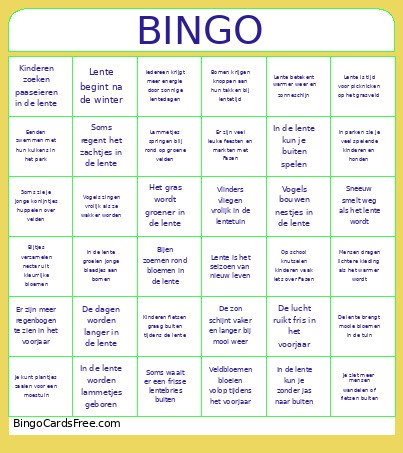 This lente bingo Cards Game contains following Words or Phrases: Bijen zoemen rond bloemen in de lente, Bijtjes verzamelen nectar uit kleurrijke bloemen, Bomen krijgen knoppen aan hun takken bij lentetijd, De dagen worden langer in de lente, De lente brengt mooie bloemen in de tuin, De lucht is blauw met witte wolkjes boven weilanden, De lucht ruikt fris in het voorjaar, De zon schijnt vaker en langer bij mooi weer, Eenden zwemmen met hun kuikens in het park, Er zijn meer regenbogen te zien in het voorjaar, Er zijn veel leuke feesten en markten met Pasen, Het gras wordt groener in de lente, Iedereen krijgt meer energie door zonnige lentedagen, In de lente groeien jonge blaadjes aan bomen, In de lente kun je buiten spelen, In de lente kun je zonder jas naar buiten, In de lente worden lammetjes geboren, In parken zie je veel spelende kinderen en honden, Je hoort kikkers kwaken bij vijvers en sloten, Je kunt plantjes zaaien voor een moestuin, Je ziet meer mensen wandelen of fietsen buiten, Kinderen fietsen graag buiten tijdens de lente, Kinderen zoeken paaseieren in de lente, Krokussen bloeien vroeg in het voorjaar, Lammetjes springen blij rond op groene velden, Lente begint na de winter, Lente betekent warmer weer en zonneschijn, Lente is het seizoen van nieuw leven, Lente is perfect om samen buiten te picknicken, Lente is tijd voor picknicken op het grasveld, Mensen dragen lichtere kleding als het warmer wordt, Op school knutselen kinderen vaak iets over Pasen, Sneeuw smelt weg als het lente wordt, Soms regent het zachtjes in de lente, Soms waait er een frisse lentebries buiten, Soms zie je jonge konijntjes huppelen over velden, Veldbloemen bloeien volop tijdens het voorjaar, Vlinders vliegen vrolijk in de lentetuin, Vogels bouwen nestjes in de lente, Vogels zingen vrolijk als ze wakker worden.