
LFP five or more Bingo Cards - Print Free or Customize
Print free LFP five or more bingo cards or alter them, limitless prints! Choose from 41,500+ templates or use the bingo card generator. Add numbers, phrases, images, or any combination. Play using PDF prints, digital bingo cards, and the digital bingo caller, or combine all formats.
About: This bingo card perfectly captures the daily adventures of working in a public library, especially at a busy service desk. With a mix of quirky patron interactions, unexpected staff moments, and classic library mishaps, it's sure to keep library workers laughing and commiserating together. It’s an ideal icebreaker or team-building activity for library staff events or training days.
How To: To save a PDF to print, click the Print button. You can modify the card quantity and other print preferences on the Print tab. Grid items and free space text can be added on the Basic tab. Appearance can be highly personalized on the corresponding tabs, or you can quickly search any setting using the 🔍 tab.
How to play LFP five or more Bingo Cards?
- Paper Caller: Print PDF calling list & calling slips and manually pick the slips.
- Online Players: Click on the Play button above, and then click on the 🎫 button.
- Paper Players: Print PDF bingo cards and manually write on the cards.
- Online Caller: Click on the Play button above.
- Combo Mode: Select any combination above. For example, caller can be either Printed or Online. And players can be Printed or Online or a combination of both.
Step-By-Step:
- Start by downloading the LFP five or more PDF by clicking on the "Print" button above.
- Open the PDF and print it.
- For random calling, you can print another copy of the call list, cut, fold and then pick them randomly at play time.
- Cut the bingo cards at the cut lines if there are more than 1 bingo cards per page.
- Distribute one card per player. For marking, you can use pens. Crayons cost the least.
- Select one person to be the caller. If you are playing in a small group, the caller can also play along with their own Bingo card.
- The caller starts the play by randomly drawing an item from the call list and announcing it to everyone.
- The players check their cards to see if they have the called word. If they do, they dab that word.
- The first player to complete a horizontal, vertical, or a diagonal line of crossed items shouts "Bingo!" and wins the game.
- The caller validates that the items marked form a correct line according to the Bingo card and call list.
- You can play for varied patterns or a full card blackout for a longer game.
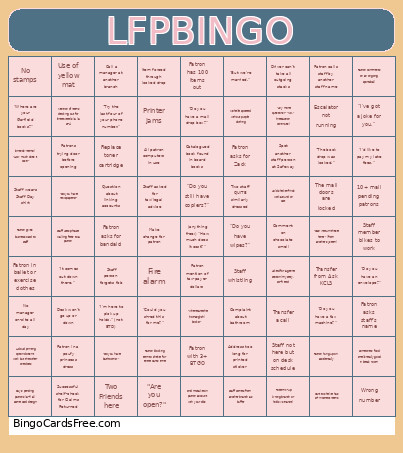 This LFP five or more Bingo Cards Game contains following Words or Phrases: "Do you have an envelope?", Patron asks for bandaid, "Do you have a fax machine?", Replace toner cartridge, Complaint about bathroom, Catalogued book found in board books, No manager on-site all day, "Can I return these here?" (from another system), Patron blocking item to shelve for entire cart's time, "Try the last four of your phone number.", Patron hung up on accidentally, Tote mix-up (wrong branch or holds vs transit), (anything free:) "How much does it cost?", (Friends' items:) "How much does it cost?", Staff not here but on desk schedule, Two staff QUITE similarly dressed, "But we're married.", Question about linking accounts, "I'm here to pick up holds." (not BTD), Address too long for printed sticker, Patron asks staff's name, "Where are your Garfield books?", "Could you shred this for me?", Hold shelver finds workaround on cart, "I'd like to pay my late fees.", "Do you have bathrooms?", "Do you have a mail drop box?", Patron comments on an ongoing sportsball, Transfer from Ask KCLS, Call a manager at another branch, Asked for a genre section (mystery, sci-fi, etc), Patron has 100 items out, Staff asked for tax/legal advice, Staff whistling, "Are you open?", Successful shelf-check for Claims Returned, "I've got a joke for you.", Wrong number, Day's pending patrons (3+) all same card design, "Do you still have copiers?", Staff person forgets fob, Staff uses phrase 'walking feet' to a patron, Transfer a call, Desk won't go up or down, Printer jams, Find mistake on patron account with your dibs, Someone's food smells really good in break room, A cloud printing option doesn't work but the other one does, Patron calls staff by another staff name, Use of yellow mat, "Any more questions?" "No." (interaction continues), Staff comes from another branch as buffer, Patron gives business card to staff, Two Friends here, Patron with 3+ BTGO, "It comes out down there.", Item forced through locked drop, Make change for patron, Cart to shelve has 2+ incorrect items, Driver can't take all outgoing stacks, "The book drop was locked.", No stamps, 10+ mail pending patrons, Comment on chocolate smell, "Where are the (not-English) books?", "Do you have newspapers?", Mention of items checking out for three weeks (a la SPL), Patron in a poufy princess dress, "Do you have wipes?", The mall doors are locked, Fire alarm, Escalator not running, All patron computers in use, Patron mention of tax-payer dollars, Staff wears Staff Day shirt, Spot another staff person at Safeway, Patron asks for Zack, Staff member bikes to work, Patron in ballet or exercise clothes, Patrons trying door before opening, Michelle spotted without purple clothing.