Library Resources Bingo Cards - Print Free or Customize
Print free Library Resources bingo cards or personalize,
unlimited cards! Select from 42,600+ templates or use the bingo card generator.
Add numbers, phrases, images, or any combination.
Play using printable PDF, online bingo cards,
and the online bingo caller, or go hybrid.
About: This bingo card is all about making the most of your school library’s resources, both digital and in-person. Perfect for student orientations, class visits, or library tours, it introduces handy tools, exclusive access perks, and navigation tips to help every learner become a library pro while keeping things upbeat and approachable.
How To: To download a printable PDF, click the Print button.
You can adjust the card count and other
printing options on the Print tab.
Grid items and free space content can be changed on the Basic tab.
Appearance can be exactly customized on the
relevant tabs, or you can easily search any preference
using the 🔍 tab.
How to play Library Resources Bingo Cards?
Digital Caller: Click on the Play button above.
Digital Players: Click on the Play button above, and then click on the 🎫 button.
Paper Players: Print PDF bingo cards and manually write on the cards.
Paper Caller: Print PDF calling list & calling slips and manually pick the slips.
Combo Play: Select any combination above.
For instance, caller can be either Paper or Digital.
And players can be Paper or Digital or a mix of both.
Step-By-Step:
Start by saving the Library Resources PDF by clicking on the "Print" button above.
Open the PDF and print a hard copy.
For random calling, you can print another copy of the call list, cut, fold and then draw them randomly at play time.
Cut the bingo cards at the cut lines if there are greater than 1 bingo cards per page.
Give one card to each player. For marking, you can use pens. Crayons are the cheapest.
Select one person to be the caller. If you are playing in a small group, the caller may also play along with their own Bingo card.
The caller initiates the play by randomly drawing an item from the call list and calling out it to all players.
The players check their cards to see if they have the called word. If they do, they dab that word.
The first player to complete a horizontal, vertical, or a diagonal line of marked items shouts "Bingo!" and wins the play.
The caller verifies that the items marked form a correct line according to the Bingo card and call list.
You can play for varied patterns or a full card blackout for a longer play.
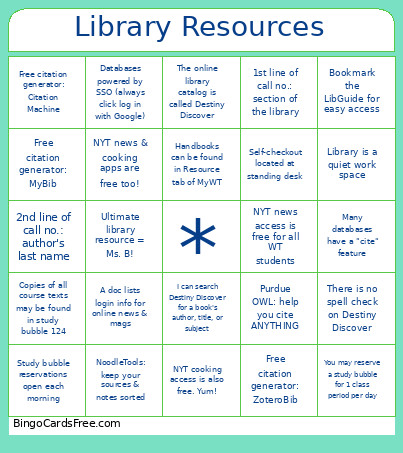
This Library Resources Bingo Cards Game contains following Words or Phrases: Bookmark the LibGuide for easy access, Many databases have a "cite" feature, NYT news access is free for all WT students, NYT cooking access is also free. Yum!, NYT news & cooking apps are free too!, Handbooks can be found in Resource tab of MyWT, The online library catalog is called Destiny Discover, I can search Destiny Discover for a book's author, title, or subject, There is no spell check on Destiny Discover, Copies of all course texts may be found in study bubble 124, You may reserve a study bubble for 1 class period per day, Study bubble reservations open each morning, Purdue OWL: help you cite ANYTHING, NoodleTools: keep your sources & notes sorted, Free citation generator: MyBib, Free citation generator: Citation Machine, Free citation generator: ZoteroBib, 1st line of call no.: section of the library, 2nd line of call no.: author's last name, Self-checkout located at standing desk, Library is a quiet work space, Ultimate library resource = Ms. B!, A doc lists login info for online news & mags, Databases powered by SSO (always click log in with Google).

 This Library Resources Bingo Cards Game contains following Words or Phrases: Bookmark the LibGuide for easy access, Many databases have a "cite" feature, NYT news access is free for all WT students, NYT cooking access is also free. Yum!, NYT news & cooking apps are free too!, Handbooks can be found in Resource tab of MyWT, The online library catalog is called Destiny Discover, I can search Destiny Discover for a book's author, title, or subject, There is no spell check on Destiny Discover, Copies of all course texts may be found in study bubble 124, You may reserve a study bubble for 1 class period per day, Study bubble reservations open each morning, Purdue OWL: help you cite ANYTHING, NoodleTools: keep your sources & notes sorted, Free citation generator: MyBib, Free citation generator: Citation Machine, Free citation generator: ZoteroBib, 1st line of call no.: section of the library, 2nd line of call no.: author's last name, Self-checkout located at standing desk, Library is a quiet work space, Ultimate library resource = Ms. B!, A doc lists login info for online news & mags, Databases powered by SSO (always click log in with Google).