light the way human bingo Cards - Print Free or Customize
Print free light the way human bingo cards or alter them,
limitless prints! Choose from 41,500+ templates or use our bingo card generator.
Add numbers, words, images, or any combination.
Play using PDF printouts, digital bingo cards,
and our digital bingo caller, or go hybrid.
Similar Bingo Cards: Personalfinance, Moneyhabits, Financialliteracy
About: This bingo card is perfect for a group discussion or workshop focused on personal finance habits and milestones. With a mix of practical money management achievements, spending styles, and even a touch of fun, it's ideal for financial literacy events, church groups, or team-building sessions where participants can learn and laugh about their financial journeys together.
How To: To get a printable PDF, click the Print button.
You can alter the number of cards and other
printing settings on the Print tab.
Grid items and free space text can be added on the Basic tab.
Appearance can be fully customized on the
relevant tabs, or you can easily find any option
using the 🔍 tab.
How to play light the way human bingo Cards?
Online Caller: Click on the Play button above.
Printed Caller: Print PDF calling list & calling slips and physically pick the slips.
Printed Players: Print PDF bingo cards and physically mark the cards.
Online Players: Click on the Play button above, and then click on the 🎫 button.
Hybrid Mode: Select any combination above.
For example, caller can be either Printed or Online.
And players can be Printed or Online or a combo of both.
Step-By-Step:
Start by saving the light the way human bingo PDF by clicking on the "Print" button above.
Open the PDF and print a hard copy.
For random drawing, you can print another copy of the call list, cut, fold and then pull them randomly at play time.
Cut the bingo cards at the cut lines if there are greater than 1 bingo cards per page.
Distribute one card per player. For marking, you can use pencils. Crayons are the cheapest.
Select one person to be the caller. If you are playing in a small group, the caller can also play along with their own Bingo card.
The caller opens the play by randomly picking an item from the call list and saying it to everyone.
The players look at their cards to see if they have the announced word. If they do, they dab that word.
The first player to complete a horizontal, vertical, or a diagonal line of crossed items yells "Bingo!" and wins the play.
The caller verifies that the items marked form a proper line as per the Bingo card and call list.
You can play for multiple patterns or a full card blackout for an extended play.
This light the way human bingo Cards Game contains following Words or Phrases: I/we have a written budget _________, After moving out, moved back in with parents _________, I'm the spender in our family _________, I'm the saver in our family _________, Pays off Credit card balances every month________, Started a retirement acct before age 30 _________, Has an emergency fund with 3+ mo expenses _________, I know my current credit score_________, I can quote a Scripture verse about money_________, Has paid off all student loans _________, Owns cryptocurrancy _________, Owns more than one home _________, Uses budgetting app, YNAB, everydollar, mint_________, Has life insurance _________, Maxed out retirement contrib last yr. _________, Received tax refund last yr. _________, Donates regularly to non-profit/church_________, Has a will or estate plan _________, Has traveled outside of the US _________, Has bought a car with cash, no loan used _________, I have mentored or coached someone _________, I'm a free spirit when it comes to spending_________, I'm tight when it comes to spending _________, I/we track income and expenses every mo. _________, I have gone to a casino and spent money _________.

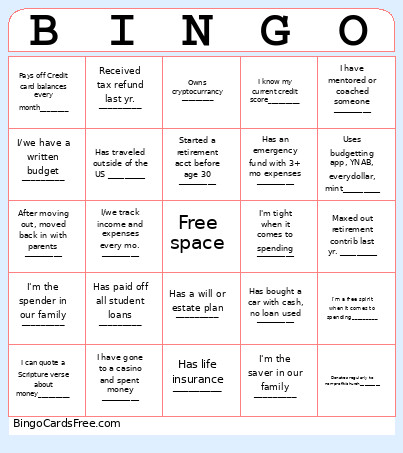 This light the way human bingo Cards Game contains following Words or Phrases: I/we have a written budget _________, After moving out, moved back in with parents _________, I'm the spender in our family _________, I'm the saver in our family _________, Pays off Credit card balances every month________, Started a retirement acct before age 30 _________, Has an emergency fund with 3+ mo expenses _________, I know my current credit score_________, I can quote a Scripture verse about money_________, Has paid off all student loans _________, Owns cryptocurrancy _________, Owns more than one home _________, Uses budgetting app, YNAB, everydollar, mint_________, Has life insurance _________, Maxed out retirement contrib last yr. _________, Received tax refund last yr. _________, Donates regularly to non-profit/church_________, Has a will or estate plan _________, Has traveled outside of the US _________, Has bought a car with cash, no loan used _________, I have mentored or coached someone _________, I'm a free spirit when it comes to spending_________, I'm tight when it comes to spending _________, I/we track income and expenses every mo. _________, I have gone to a casino and spent money _________.