
LM24 bingo Cards - Print Free or Customize
Print free LM24 bingo cards or alter them, limitless prints! Select from 41,500+ designs or use our bingo card generator. Add numbers, phrases, pictures, or mix them all. Play using PDF prints, online bingo cards, and our online bingo caller, or mix physical and digital.
About: This bingo card captures all the chaos and charm of the 24 Hours of Le Mans, perfect for race fans tuning in with friends or following along in a watch party or online chat. From dramatic crashes to quirky commentary moments and unpredictable weather, expect plenty of action, humor, and Le Mans-specific antics that make this legendary endurance race unforgettable.
How To: To save a printable PDF, click the Print button. You can adjust the number of cards and other print options on the Print tab. Grid items and free space content can be edited on the Basic tab. Appearance can be highly personalized on the corresponding tabs, or you can easily find any preference using the 🔍 tab.
How to play LM24 bingo Cards?
- Online Players: Click on the Play button above, and then click on the 🎫 button.
- Online Caller: Click on the Play button above.
- Paper Caller: Print PDF calling list & calling slips and manually choose the slips.
- Paper Players: Print PDF bingo cards and manually scratch the cards.
- Mixed Play: Choose any combination above. For example, caller can be either Paper or Online. And players can be Paper or Online or a combo of both.
Step-By-Step:
- Start by getting the LM24 bingo PDF by clicking on the "Print" button above.
- Open the PDF and print a hard copy.
- For random drawing, you can print another copy of the call list, cut, fold and then draw them randomly at play time.
- Cut the bingo cards at the cut marks if there are more than 1 bingo cards per page.
- Give one card to each player. For marking, you can use pens. Crayons cost the least.
- Choose one person to be the caller. If you are playing in a small group, the caller may also play along with their own Bingo card.
- The caller initiates the play by randomly drawing an item from the call list and calling out it to everyone.
- The players scan their cards to see if they have the announced word. If they do, they dab that word.
- The first player to finish a horizontal, vertical, or a diagonal line of marked items announces "Bingo!" and wins the play.
- The caller checks that the items crossed off form a proper line according to the Bingo card and call list.
- You can play for different patterns or a full card blackout for a longer play.
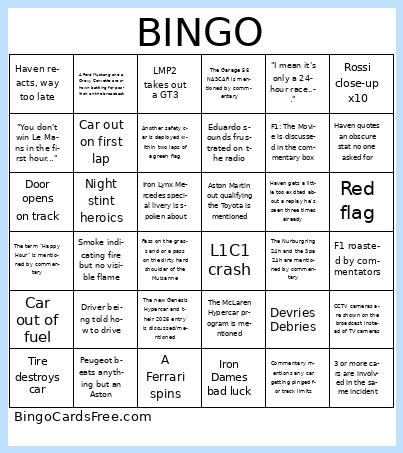 This LM24 bingo Cards Game contains following Words or Phrases: Kmag defends aggressively, Team Lemons, Fire, Smoke indicating fire but no visible flame, GT3 takes out hypercar, L1C1 crash, Hypercar winner _______, LMP2 winner ______, GT3 winner ______, JOTA cadillacs crash with each other, Mick Schumacher leads a lap, Ferrari 1,2,3 on track, Car out of fuel, Iron Dames bad luck, Aston beats anything but a Peugeot, Peugeot beats anything but an Aston, Devries Debries, LMP2 takes out a GT3, Rain, Driver being former F1 mentioned, Mechanic prank, Tire destroys car, Aston Martin sound, Driver being told how to drive, Red flag, Keatings experience mentioned, Car out on first lap, Leader (any class) crashes, Haven reacts, way too late, Crash during SC, Door opens on track, Night stint heroics, 4 wheels in the air, "I mean it's only a 24-hour race...", A Vanthoor leads their class, A Porsche car has an incident at the Porsche Curves, Aston Martin out qualifying the Toyota is mentioned, BLIMP, A Ferrari spins, The #7 toyota gets a puncture during the race, Rossi close-up x10, Amount of insects mentioned, Rossi waves to camera x5, F1 roasted by commentators, Driver can't hear interview question, "No power", Car limps to pits on three wheels, "You don't win Le Mans in the first hour...", Haven quotes an obscure stat no one asked for, Haven gets a little too excited about a replay he's seen three times already, A mechanic is shown sleeping, 3 or more cars are involved in the same incident, An incident takes place at the Dunlop Chicane, Vanwall, Isotta Fraschini, or Glickenhaus are mentioned by commentary in any context, A Ford Retires after crashing out and/or failing to reach the Pit Lane, A Penske Porsche lead the race at any point, The throwback livery on the #7 Toyota is discussed by commentary, The Audi LMP1 Program / Audi's dominance at Le Mans in the 2000s is mentioned by commentary, The Garage 56 NASCAR is mentioned by commentary, The Nurburgring 24h and the Spa 24h are mentioned by commentary, A Ford Mustang and a Chevy Corvette are shown battling for position on the broadcast, Commentary mentions any car getting pinged for track limits, The r/wec discord gets a shout out, The Daytona 24 Hours is mentioned by commentary, The McLaren Hypercar program is mentioned, F1: The Movie is discussed in the commentary box, Two cars from the same manufacturer collide on track, Michelle Gatting's absence is explained by commentary, CCTV cameras are shown on the broadcast instead of TV cameras, Iron Lynx Mercedes special livery is spoken about, Eduardo sounds frustrated on the radio, Pass on the grass and or a pass on the dirty hard shoulder of the Mulsanne, Another safety car is deployed within two laps of a green flag, The new Genesis Hypercar and their 2026 entry is discussed/mentioned, Car messes up the pit entry, Rossi drops numerous EHHH in a single interview, A car straight lines either of the Mulsanne Chicanes, A shot of the pit exit queue during a SC whilst they wait for the next safety car, The term "Happy Hour" is mentioned by commentary, A french car is leading the race..