Print free LMS bingo Week 2 cards or adjust them,
limitless cards! Choose from 40,100+ designs or use our bingo card generator.
Add numbers, words, photos, or any combination.
Play using PDF prints, virtual bingo cards,
and our virtual bingo caller, or go hybrid.
About: This bingo card is perfect for energizing a support team or customer service event, especially one focused on case management and teamwork. The prompts encourage sharing wins, helping colleagues, and tackling tricky requests, making the atmosphere collaborative and upbeat. It’s a great way to bring some fun competition into a fast-paced workday among team members.
How To: To save a PDF to print, click the Print button.
You can change the card count and other
printing preferences on the Print tab.
Grid items and free space text can be edited on the Basic tab.
Appearance can be fully customized on the
relevant tabs, or you can quickly find any setting
on the 🔍 tab.
How to play LMS Bingo Week 2 Cards?
Digital Players: Click on the Play button above, and then click on the 🎫 button.
Digital Caller: Click on the Play button above.
Paper Players: Print PDF bingo cards and physically mark the cards.
Paper Caller: Print PDF calling list & calling slips and physically draw the slips.
Combo Play: Choose any combination above.
For example, caller can be either Paper or Digital.
And players can be Paper or Digital or a combination of both.
Step-By-Step:
Start by getting the LMS Bingo Week 2 PDF by clicking on the "Print" button above.
Open the PDF and print it.
For random drawing, you can print another copy of the call list, cut, fold and then draw them randomly at play time.
Cut the bingo cards at the cut marks if there are more than 1 bingo cards per page.
Give one card to each player. For marking, you can use crayons. Crayons cost the least.
Choose one person to be the caller. If you are playing in a small group, the caller can as well play along with their own Bingo card.
The caller opens the game by randomly picking an item from the call list and saying it to everyone.
The players check their cards to see if they have the announced word. If they do, they cross off that word.
The first player to finish a horizontal, vertical, or a diagonal line of crossed items announces "Bingo!" and wins the game.
The caller verifies that the items crossed off form a proper line according to the Bingo card and call list.
You can play for different patterns or a full card blackout for an extended game.
This LMS Bingo Week 2 Cards Game contains following Words or Phrases: Share a "win" from a tough case, Requestor asks for refund, Resolve a Digital Rights Management case, Complete your queue by EOD, Free Space, Resolve a MyHub case, Help a teammate out with a case, Resolve an NSCPrint case, Assist a long-winded email that could've been summed in a few words, Close out a duplicate case, Share a funny case, How to open and view EPDF, Assisted with a closed or non-participate school, Explained processing option, Assisted a NSCPrint case, Closed 10 cases in 1 hr?, Sent TO ordering instructions, Sent TO trouble instructions, Receive an inquiry on an old order, Share positive customer feedback, Sent TO ordering instructions, Help a teammate out with a case, Free Space, Complete your queue by EOD.

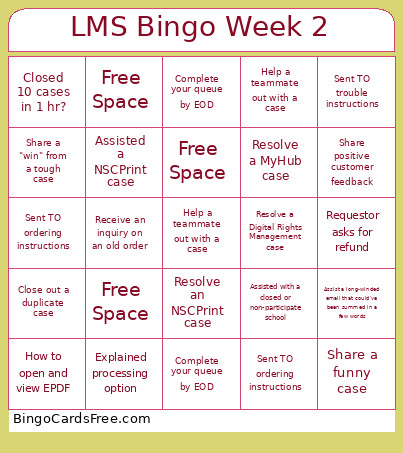 This LMS Bingo Week 2 Cards Game contains following Words or Phrases: Share a "win" from a tough case, Requestor asks for refund, Resolve a Digital Rights Management case, Complete your queue by EOD, Free Space, Resolve a MyHub case, Help a teammate out with a case, Resolve an NSCPrint case, Assist a long-winded email that could've been summed in a few words, Close out a duplicate case, Share a funny case, How to open and view EPDF, Assisted with a closed or non-participate school, Explained processing option, Assisted a NSCPrint case, Closed 10 cases in 1 hr?, Sent TO ordering instructions, Sent TO trouble instructions, Receive an inquiry on an old order, Share positive customer feedback, Sent TO ordering instructions, Help a teammate out with a case, Free Space, Complete your queue by EOD.