Print free LMS bingo Week 3 cards or personalize,
limitless prints! Select from 42,200+ designs or use our bingo card generator.
Add numbers, words, pictures, or mix them all.
Play using PDF printouts, virtual bingo cards,
and our virtual bingo caller, or combine all formats.
About: This bingo card is all about celebrating teamwork and support within a workplace, especially for teams that use LMS or Teams for daily communication. It encourages positive actions like offering help, sharing resources, and recognizing each other's efforts. Perfect for a team-building event or a staff appreciation week, it brings an upbeat and collaborative vibe to any gathering.
How To: To get a PDF to print, click the Print button.
You can alter the card quantity and other
printing preferences on the Print tab.
Grid items and free space content can be added on the Basic tab.
Appearance can be completely customized on the
corresponding tabs, or you can easily locate any setting
using the 🔍 tab.
How to play LMS Bingo Week 3 Cards?
Paper Caller: Print PDF calling list & calling slips and physically choose the slips.
Online Caller: Click on the Play button above.
Online Players: Click on the Play button above, and then click on the 🎫 button.
Paper Players: Print PDF bingo cards and physically mark the cards.
Hybrid Play: Select any combination above.
For instance, caller can be either Offline or Online.
And players can be Offline or Online or a mix of both.
Step-By-Step:
Start by getting the LMS Bingo Week 3 PDF by clicking on the "Print" button above.
Open the PDF and print it.
For random calling, you can print another copy of the call list, cut, fold and then pick them randomly at play time.
Cut the bingo cards at the cut lines if there are greater than 1 bingo cards per page.
Distribute one card per player. For marking, you can use pens. Crayons are the cheapest.
Select one person to be the caller. If you are playing in a small group, the caller can as well play along with their own Bingo card.
The caller begins the play by randomly pulling an item from the call list and saying it to all players.
The players check their cards to see if they have the called word. If they do, they cross off that word.
The first player to finish a horizontal, vertical, or a diagonal line of marked items shouts "Bingo!" and wins the play.
The caller checks that the items marked form a correct line as per the Bingo card and call list.
You can play for different patterns or a full card blackout for a longer play.
This LMS Bingo Week 3 Cards Game contains following Words or Phrases: Took an escalation for a teammate, Checked in on a teammate who was having a tough call, Sent a supportive or encouraging Teams message, Took an escalation for a teammate, Answered a teammate's question in LMS Teams chat, Shared a resource or tip in Teams, Gave helpful feedback to a team member, Reminded a teammate of a policy or procedure, Helped a teammate troubleshoot an internal Tech issue, Free Space, Answered a teammate's question in LMS Teams chat, Partnered with a teammate to solve a tough issue, Gave a teammate a shout‑out or recognition, Answered a teammate's question in LMS Teams chat, Shared a shortcut, tip, or time‑saver, Shared a template or script that could benefit the LMS Team, Thanked a team member, Recognized another team member on Awardco, Free Space, Helped a teammate troubleshoot an internal Tech issue, Thanked a team member, Answered a teammate's question in LMS Teams chat, Sent a supportive or encouraging Teams message, Helped a team member handle an angry customer.

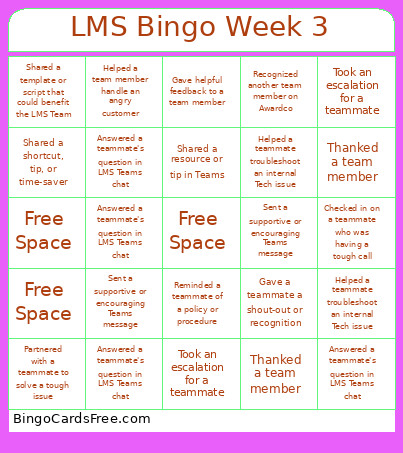 This LMS Bingo Week 3 Cards Game contains following Words or Phrases: Took an escalation for a teammate, Checked in on a teammate who was having a tough call, Sent a supportive or encouraging Teams message, Took an escalation for a teammate, Answered a teammate's question in LMS Teams chat, Shared a resource or tip in Teams, Gave helpful feedback to a team member, Reminded a teammate of a policy or procedure, Helped a teammate troubleshoot an internal Tech issue, Free Space, Answered a teammate's question in LMS Teams chat, Partnered with a teammate to solve a tough issue, Gave a teammate a shout‑out or recognition, Answered a teammate's question in LMS Teams chat, Shared a shortcut, tip, or time‑saver, Shared a template or script that could benefit the LMS Team, Thanked a team member, Recognized another team member on Awardco, Free Space, Helped a teammate troubleshoot an internal Tech issue, Thanked a team member, Answered a teammate's question in LMS Teams chat, Sent a supportive or encouraging Teams message, Helped a team member handle an angry customer.