
LOVE BOAT BINGO Cards - Print Free or Customize
Print free LOVE BOAT BINGO cards or adjust them, unlimited cards! Select from 38,000+ designs or use the bingo card generator. Add numbers, phrases, images, or mix them all. Play using printed PDF, virtual bingo cards, and the virtual bingo caller, or combine all formats.
About: This bingo card is perfect for a lively family cruise, wedding trip, or any big group getaway. It captures all the funny habits, classic mishaps, and inside jokes that make traveling together so memorable. Expect laughs, playful competitiveness, and plenty of “that’s so you!” moments as everyone recognizes themselves in the squares.
How To: To save a PDF to print, click the Print button. You can change the card count and other printing preferences on the Print tab. Grid items and free space text can be changed on the Basic tab. Appearance can be highly personalized on the relevant tabs, or you can easily search any setting on the 🔍 tab.
How to play LOVE BOAT BINGO Cards?
- Digital Caller: Click on the Play button above.
- Printed Players: Print PDF bingo cards and physically scratch the cards.
- Printed Caller: Print PDF calling list & calling slips and physically pick the slips.
- Digital Players: Click on the Play button above, and then click on the 🎫 button.
- Mixed Play: Choose any combination above. For example, caller can be either Paper or Digital. And players can be Paper or Digital or a mix of both.
Step-By-Step:
- Start by getting the LOVE BOAT BINGO PDF by clicking on the "Print" button above.
- Open the PDF and print a hard copy.
- For random calling, you can print another copy of the call list, cut, fold and then pick them randomly at play time.
- Cut the bingo cards at the cut marks if there are greater than 1 bingo cards per page.
- Give one card to each player. For marking, you can use markers. Crayons are the cheapest.
- Choose one person to be the caller. If you are playing in a small group, the caller may as well play along with their own Bingo card.
- The caller opens the game by randomly drawing an item from the call list and announcing it to everyone.
- The players check their cards to see if they have the called word. If they do, they dab that word.
- The first player to complete a horizontal, vertical, or a diagonal line of crossed items yells "Bingo!" and wins the game.
- The caller confirms that the items marked form a proper line according to the Bingo card and call list.
- You can play for different patterns or a full card blackout for a longer game.
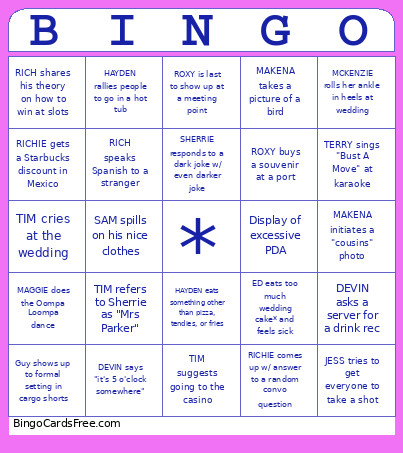 This LOVE BOAT BINGO Cards Game contains following Words or Phrases: MCKENZIE orders a cocktail off-menu, MCKENZIE is on time for something, MCKENZIE rolls her ankle in heels at wedding, SAM wins a ping pong tournament, SAM goes to bed early, SAM spills on his nice clothes, ALYCIA complains about getting no sleep, ALYCIA confuses the M names, ALYCIA falls asleep during a performance, DEVIN asks a server for a drink rec, DEVIN falls asleep in a chair, DEVIN says "it's 5 o'clock somewhere", ED asks how old you are, ED eats too much wedding cake* and feels sick, ED mentions a Jim Carrey movie, MAGGIE tries a new food, MAGGIE does the Oompa Loompa dance, MAGGIE flosses on the wedding dance floor, SHERRIE breaks a nail, SHERRIE forgets to pack important wedding item, SHERRIE makes fun of Tim for over-packing, SHERRIE makes a 'buyer's remorse' joke about her recent nuptials, SHERRIE responds to a dark joke w/ even darker joke, TIM refers to Sherrie as "Mrs Parker", TIM talks about saving money on something, TIM talks about Dan Lanning, TIM suggests going to the casino, TIM cries at the wedding, JESS wears Oregon Ducks logo, JESS makes a fish reference, JESS tries to get everyone to take a shot, ROXY is last to show up at a meeting point, ROXY buys a souvenir at a port, ROXY orders a 'fufu' drink from the bar, CASEY tans by the pool, CASEY makes a comment about "old people music", CASEY buys local artisan-made jewelry, TERRY sings "Bust A Move" at karaoke, TERRY calls Casey by her "gov't name", TERRY joins a group dance on the ship, RICH speaks Spanish to a stranger, RICH rallies people to go play trivia, RICH shares his theory on how to win at slots, MAKENA takes a picture of a bird, MAKENA makes a Simpsons reference, MAKENA initiates a "cousins" photo, HAYDEN eats something other than pizza, tendies, or fries, HAYDEN repeats a story, HAYDEN rallies people to go in a hot tub, RICHIE wears glasses that match shirt color, RICHIE comes up w/ answer to a random convo question, RICHIE gets a Starbucks discount in Mexico, Someone in our group is over-served, Someone in our group recognizes another passenger, Someone in our group wins cruise-hosted game, Couple in our group shows up in matching outfits, Couple argues loudly in public, Guy shows up to formal setting in cargo shorts, Passenger left behind at port, Display of excessive PDA, Intoxicated passenger gets kicked out of something, Demonstration revealed to be a scammy sales pitch.