Print free LOVE ISLAND bingo cards or modify,
unlimited prints! Select from 42,200+ designs or use the bingo card generator.
Add numbers, phrases, photos, or mix them all.
Play using printed PDF, virtual bingo cards,
and the virtual bingo caller, or combine all formats.
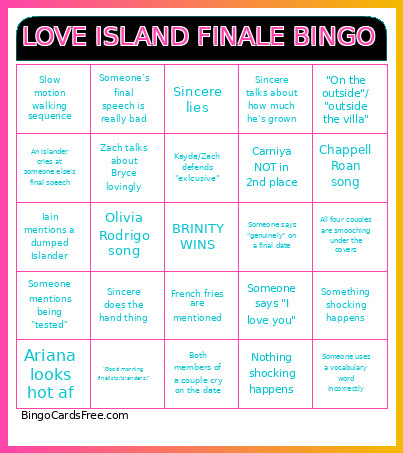
About: This bingo card captures all the drama, awkward moments, and heartfelt confessions you’d expect from a reality dating show finale. Perfect for watch parties or virtual hangouts, it keeps everyone engaged as they track classic show tropes, emotional speeches, and wild surprises. Great for fans ready to celebrate the rollercoaster of a big finale night together!
How To: To download a printable PDF, click the Print button.
You can change the card quantity and other
print preferences on the Print tab.
Grid items and free space content can be changed on the Basic tab.
Appearance can be entirely customized on the
corresponding tabs, or you can quickly locate any preference
using the 🔍 tab.
How to play LOVE ISLAND Bingo Cards?
Paper Players: Print PDF bingo cards and manually mark the cards.
Virtual Caller: Click on the Play button above.
Paper Caller: Print PDF calling list & calling slips and manually pick the slips.
Virtual Players: Click on the Play button above, and then click on the 🎫 button.
Hybrid Mode: Choose any combination above.
For instance, caller can be either Offline or Virtual.
And players can be Offline or Virtual or a mix of both.
Step-By-Step:
Start by getting the LOVE ISLAND PDF by clicking on the "Print" button above.
Open the PDF and print it.
For random drawing, you can print another copy of the call list, cut, fold and then draw them randomly at play time.
Cut the bingo cards at the cut marks if there are greater than 1 bingo cards per page.
Distribute one card per player. For marking, you can use pencils. Crayons are the cheapest.
Choose one person to be the caller. If you are playing in a small group, the caller can also play along with their own Bingo card.
The caller begins the play by randomly pulling an item from the call list and announcing it to all players.
The players check their cards to see if they have the called word. If they do, they mark that word.
The first player to complete a horizontal, vertical, or a diagonal line of crossed items announces "Bingo!" and wins the game.
The caller verifies that the items crossed off form a correct line as per the Bingo card and call list.
You can play for multiple patterns or a full card blackout for a longer game.
This LOVE ISLAND Bingo Cards Game contains following Words or Phrases: Someone says "genuinely" on a final date, Sincere talks about how much he's grown, Someone says "I love you", Both members of a couple cry on the date, Zach makes a mean/dumb joke during the final date or speech, Ariana looks hot af, French fries are mentioned, Olivia Rodrigo song, Chappell Roan song, Sincere lies, Someone mentions being "tested", Owl spotted, Another couple becomes boyfriend and girlfriend, Zach talks about Bryce lovingly, Iain says something shady about Sincere or Zach, Iain mentions a dumped Islander, Big group photobooth photo, Kayda/Zach defends "exlcusive", Sincere makes a nonsensical metaphor, "On the outside"/ "outside the villa", All four couples are smooching under the covers, Carniya NOT in 2nd place, Someone says "journey" in their final speech, Sincere does the hand thing, Slow motion walking sequence, An islander cries at someone else's final speech, Someone uses a vocabulary word incorrectly, Someone's final speech is really bad, Everyone jumps in the pool together, "Good morning finalists/islanders!", Something shocking happens, Nothing shocking happens.

 This LOVE ISLAND Bingo Cards Game contains following Words or Phrases: Someone says "genuinely" on a final date, Sincere talks about how much he's grown, Someone says "I love you", Both members of a couple cry on the date, Zach makes a mean/dumb joke during the final date or speech, Ariana looks hot af, French fries are mentioned, Olivia Rodrigo song, Chappell Roan song, Sincere lies, Someone mentions being "tested", Owl spotted, Another couple becomes boyfriend and girlfriend, Zach talks about Bryce lovingly, Iain says something shady about Sincere or Zach, Iain mentions a dumped Islander, Big group photobooth photo, Kayda/Zach defends "exlcusive", Sincere makes a nonsensical metaphor, "On the outside"/ "outside the villa", All four couples are smooching under the covers, Carniya NOT in 2nd place, Someone says "journey" in their final speech, Sincere does the hand thing, Slow motion walking sequence, An islander cries at someone else's final speech, Someone uses a vocabulary word incorrectly, Someone's final speech is really bad, Everyone jumps in the pool together, "Good morning finalists/islanders!", Something shocking happens, Nothing shocking happens.