
LTN Music Bingo Cards - Print Free or Customize
Print free LTN Music bingo cards or adjust them, unlimited cards! Choose from 41,500+ designs or use our bingo card generator. Add numbers, phrases, pictures, or any combination. Play using printed PDF, online bingo cards, and our online bingo caller, or mix physical and digital.
About: This bingo card is a musical lover's dream, packed with iconic songs and unforgettable moments from Broadway and beyond. Whether you’re hosting a theater night, a cast party, or a themed trivia event, this card invites fans of all ages to relive their favorite show tunes and celebrate the magic of the stage together.
How To: To download a printable PDF, click the Print button. You can adjust the number of cards and other print options on the Print tab. Grid items and free space content can be changed on the Basic tab. Appearance can be exactly personalized on the relevant tabs, or you can quickly search any preference on the 🔍 tab.
How to play LTN Music Bingo Cards?
- Printed Players: Print PDF bingo cards and physically write on the cards.
- Printed Caller: Print PDF calling list & calling slips and physically draw the slips.
- Digital Caller: Click on the Play button above.
- Digital Players: Click on the Play button above, and then click on the 🎫 button.
- Mixed Mode: Choose any combination above. For instance, caller can be either Printed or Digital. And players can be Printed or Digital or a combo of both.
Step-By-Step:
- Start by getting the LTN Music Bingo PDF by clicking on the "Print" button above.
- Open the PDF and print a hard copy.
- For random calling, you can print another copy of the call list, cut, fold and then pick them randomly at play time.
- Cut the bingo cards at the cut lines if there are greater than 1 bingo cards per page.
- Distribute one card per player. For marking, you can use pens. Crayons cost the least.
- Choose one person to be the caller. If you are playing in a small group, the caller may as well play along with their own Bingo card.
- The caller initiates the play by randomly picking an item from the call list and announcing it to everyone.
- The players check their cards to see if they have the called word. If they do, they dab that word.
- The first player to complete a horizontal, vertical, or a diagonal line of marked items yells "Bingo!" and wins the game.
- The caller validates that the items crossed off form a proper line according to the Bingo card and call list.
- You can play for different patterns or a full card blackout for an extended game.
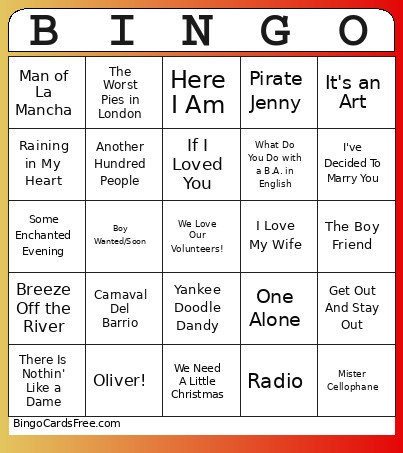 This LTN Music Bingo Cards Game contains following Words or Phrases: Piragua- Reprise, Everybody Wants To Be Black On A Saturday Night, Oliver!, Johanna, I Love My Wife, Tomorrow, Superboy and the Invisible Girl, Man of La Mancha, My Cup Runneth Over, Romeo & Juliet, The Impossible Dream, Once In A Blue Moon, The Worst Pies in London, Agony, Little Mary Sunshine, Radio, I Am Aldopho, Why Are All The D'Ysquiths Dying, My One and Only, Breeze Off the River, There's a Fine, Fine Line, Young And Foolish, Beautiful City, Feeling Good, The Party's Over, Here I Am, Don't Rain On My Parade, Every Day a Little Death, The Boy Friend, Run, Freedom, Run!, Let's Begin, Corner of the Sky, The Sailor of My Dreams, This Is All Very New To Me, Vanilla Ice Cream, Some Enchanted Evening, Pulled, We Need A Little Christmas, One Alone, IIona, Something to Hold On To, Yesterdays, Reefer Madness, Day by Day, It's a Perfect Relationship, The Desert Song, I Am the One, Safer, I Could Be Happy with You, Girl, You're A Woman, People, If My Friends Could See Me Now, Millwork, Big Spender, Suddenly Seymour, Jeanette's Showbiz Number, No One Is Alone, Open a New Window, It's a Privilege to Pee, Underground, Consider Yourself, Who Can I Turn To, There Is Nothin' Like a Dame, The Uramiun Suite, Something That Will Last, Superstar, Give My Regards to Broadway, Send In The Clowns, I've Decided To Marry You, Skid Row, What's The Buzz?/Strange Thing, Mystifying, It's an Art, Mein Herr, Get Out And Stay Out, Mister Cellophane, When You're An Adams, Another Chapter, All About Reprecht, Magic to Do, Pirate Jenny, Show Off, Boy Wanted/Soon, N.Y.C., Nine to Five, Being Alive, Raining in My Heart, It's Not A Game/It's Just A Ride, A Lil' Ole Bitty Pissant Country, Overture/Ballad of Mack the Knife, Another Hundred People, What Do You Do with a B.A. in English, Cell Block Tango, June Is Bustin' Out All Over, Carnaval Del Barrio, Wilkommen, Yankee Doodle Dandy, If I Loved You.