
Lunatics, Haters, Punk Trash Bingo Cards - Print Free or Customize
Print free Lunatics, Haters, Punk Trash bingo cards or modify, unlimited prints! Pick from 42,600+ designs or use the bingo card generator. Add numbers, words, pictures, or any combination. Play using PDF prints, virtual bingo cards, and the virtual bingo caller, or combine all formats.
About: This bingo card is perfect for movie lovers and Oscar night parties, capturing all the memorable moments, shocking surprises, heartfelt speeches, and unexpected celebrity antics that make awards shows so much fun to watch. With a playful tone and references to everything from emotional shout-outs to pop culture zingers, it’s sure to keep your friends engaged throughout the broadcast.
How To: To save a printable PDF, click the Print button. You can adjust the number of cards and other print settings on the Print tab. Grid items and free space content can be added on the Basic tab. Appearance can be totally personalized on the relevant tabs, or you can quickly locate any preference using the 🔍 tab.
How to play Lunatics, Haters, Punk Trash Bingo Cards?
- Online Players: Click on the Play button above, and then click on the 🎫 button.
- Online Caller: Click on the Play button above.
- Paper Players: Print PDF bingo cards and manually write on the cards.
- Paper Caller: Print PDF calling list & calling slips and manually select the slips.
- Hybrid Mode: Choose any combination above. For instance, caller can be either Offline or Online. And players can be Offline or Online or a combination of both.
Step-By-Step:
- Start by downloading the Lunatics, Haters, Punk Trash PDF by clicking on the "Print" button above.
- Open the PDF and print a hard copy.
- For random calling, you can print another copy of the call list, cut, fold and then draw them randomly at play time.
- Cut the bingo cards at the cut lines if there are greater than 1 bingo cards per page.
- Distribute one card per player. For marking, you can use crayons. Crayons cost the least.
- Choose one person to be the caller. If you are playing in a small group, the caller can also play along with their own Bingo card.
- The caller initiates the game by randomly pulling an item from the call list and calling out it to everyone.
- The players scan their cards to see if they have the announced word. If they do, they dab that word.
- The first player to complete a horizontal, vertical, or a diagonal line of marked items shouts "Bingo!" and wins the play.
- The caller confirms that the items marked form a proper line as per the Bingo card and call list.
- You can play for multiple patterns or a full card blackout for a longer play.
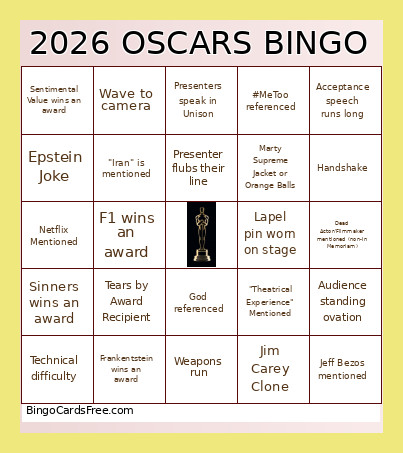 This Lunatics, Haters, Punk Trash Bingo Cards Game contains following Words or Phrases: "Trump" mentioned, Tears by Award Recipient, Envelope Fumble or Trip, God referenced, Meryl Streep, Male in non-black suit, Winner thanks Wife/Husband, Winner thanks parents, Winner mention children, Winner thanks Director, Winner congratulates other nominees, Someone speaks in a foreign language, 5+ On stage to accept award, Kiss on Camera, Wave to camera, Movie wins multiple awards, Winner pulls out notes, Winner is a film you haven't seen, Winner is a film you have seen, Pregnant actress, Winner thanks Academy, #MeToo referenced, Acceptance speech runs long, Bleep/Censored, Oscar is Heavy Joke, Cell Phone on Camera, Reading Glasses, Presenters speak in Unison, Audience standing ovation, Paramount Mentioned, Netflix Mentioned, Neon Studios mentioned, Actress wears pants, AI mentioned, Kylie Jenner, Comment about show running time, Epstein Joke, Conan sings or dances, Conan sits with the audience, First-time winner, Handshake, Heated Rivalry mentioned, High-five, Joke about age of women Leo dates, Lapel pin worn on stage, Mentions hometown where they grew up, Presenter flubs their line, Second win of the night for a movie, Takes a selfie, Tells orchestra to stop, Tells their kids to go to bed, Jim Carey Clone, "Iran" is mentioned, Ballet/Opera mentioned, One Battle After Another wins an award, Sinners wins an award, Hamnet wins an award, Sentimental Value wins an award, Frankentstein wins an award, KPop Demon Hunters wins an award, F1 wins an award, Avatar wins an award, Bobby does an Asian voice, Jeff Bezos mentioned, Technical difficulty, "Theatrical Experience" Mentioned, "A Few Small Beers", Weapons run, ICE mentioned, Nominee isn't present, Marty Supreme Jacket or Orange Balls, Palestine Mentioned, Someone on stage wears a hat or headwear, Dead Actor/Filmmaker mentioned (non-In Memoriam), Shakespeare mentioned.