MAFS Watch Party Bingo Cards - Print Free or Customize
Print free MAFS Watch Party bingo cards or modify,
unlimited prints! Choose from 42,200+ designs or use the bingo card generator.
Add numbers, words, photos, or any combination.
Play using PDF printouts, virtual bingo cards,
and the virtual bingo caller, or combine all formats.
About: This bingo card is perfect for a dramatic reality TV watch party, especially if you and your friends love shows full of heated arguments, tears, and jaw-dropping confessions. With moments ranging from emotional admissions to playful banter and classic reality TV catchphrases, it captures all the chaos and unpredictability that fans can't get enough of.
How To: To download a printable PDF, click the Print button.
You can adjust the card quantity and other
printing preferences on the Print tab.
Grid items and free space text can be edited on the Basic tab.
Appearance can be fully customized on the
relevant tabs, or you can quickly search any preference
using the 🔍 tab.
How to play MAFS Watch Party Bingo Cards?
Printed Caller: Print PDF calling list & calling slips and manually draw the slips.
Printed Players: Print PDF bingo cards and manually mark the cards.
Virtual Players: Click on the Play button above, and then click on the 🎫 button.
Virtual Caller: Click on the Play button above.
Mixed Play: Choose any combination above.
For example, caller can be either Paper or Virtual.
And players can be Paper or Virtual or a combo of both.
Step-By-Step:
Start by downloading the MAFS Watch Party Bingo PDF by clicking on the "Print" button above.
Open the PDF and print it.
For random drawing, you can print another copy of the call list, cut, fold and then draw them randomly at play time.
Cut the bingo cards at the cut marks if there are greater than 1 bingo cards per page.
Distribute one card per player. For marking, you can use pens. Crayons cost the least.
Choose one person to be the caller. If you are playing in a small group, the caller may as well play along with their own Bingo card.
The caller opens the game by randomly picking an item from the call list and saying it to all players.
The players check their cards to see if they have the called word. If they do, they cross off that word.
The first player to complete a horizontal, vertical, or a diagonal line of crossed items announces "Bingo!" and wins the game.
The caller verifies that the items marked form a correct line as per the Bingo card and call list.
You can play for varied patterns or a full card blackout for a longer game.
This MAFS Watch Party Bingo Cards Game contains following Words or Phrases: Someone says "gaslight", Mel talks about being a stalker, Julia being bisexual is brought up, Someone cries at the table, Someone leaves early, Someone calls another contestant fake, Someone brings up how their partner ranked them in the photo challenge, A couple fights while having breakfast/morning coffee, Someone says "the experts matched us for a reason", They cut to the ad break while someone has their mouth open in shock, The producers are shown calming a contestant down, Someone says "100%", Rebecca calls Steve a silver fox, Someone says "my person", Someone cries in their confessional, Alissa says "daddy", Rachel giggles, Luke cries, Someone gets accused of not being here for the right reasons, Chris says he was cynical but that he actually likes Brook, David brings up the getting down on one knee thing, Someone says their partner didn't have their back, Scott pretends he's fine with Gia being a mum, Mel brings up the rings or the chewing gum, Gia calls her child a kid, Bec implies Gia is fake, Gia asks someone how much sex they've had, Steven stumbles over his words.

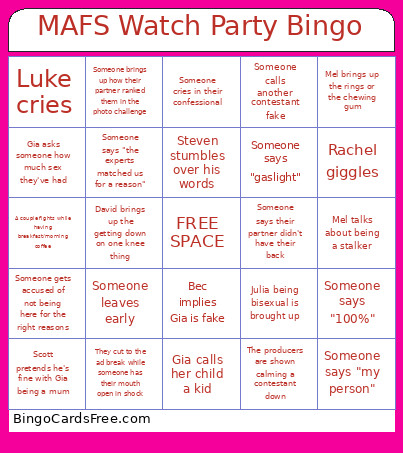 This MAFS Watch Party Bingo Cards Game contains following Words or Phrases: Someone says "gaslight", Mel talks about being a stalker, Julia being bisexual is brought up, Someone cries at the table, Someone leaves early, Someone calls another contestant fake, Someone brings up how their partner ranked them in the photo challenge, A couple fights while having breakfast/morning coffee, Someone says "the experts matched us for a reason", They cut to the ad break while someone has their mouth open in shock, The producers are shown calming a contestant down, Someone says "100%", Rebecca calls Steve a silver fox, Someone says "my person", Someone cries in their confessional, Alissa says "daddy", Rachel giggles, Luke cries, Someone gets accused of not being here for the right reasons, Chris says he was cynical but that he actually likes Brook, David brings up the getting down on one knee thing, Someone says their partner didn't have their back, Scott pretends he's fine with Gia being a mum, Mel brings up the rings or the chewing gum, Gia calls her child a kid, Bec implies Gia is fake, Gia asks someone how much sex they've had, Steven stumbles over his words.