Mario Movie 2 BINGO Cards - Print Free or Customize
Print free Mario Movie 2 BINGO cards or alter them,
limitless cards! Choose from 41,500+ designs or use our bingo card generator.
Add numbers, words, images, or any combination.
Play using PDF prints, digital bingo cards,
and our digital bingo caller, or mix physical and digital.
About: This bingo card is perfect for a movie night or watch party centered on a Mario-themed film, especially if you love spotting easter eggs and wild crossovers. Expect references from across the Mario universe, quirky character moments, and possible cameos from other Nintendo favorites. This card brings fun, nostalgia, and friendly competition to any fan gathering.
How To: To save a printable PDF, click the Print button.
You can alter the card quantity and other
printing preferences on the Print tab.
Grid items and free space content can be edited on the Basic tab.
Appearance can be fully personalized on the
corresponding tabs, or you can quickly find any option
on the 🔍 tab.
How to play Mario Movie 2 BINGO Cards?
Online Caller: Click on the Play button above.
Printed Caller: Print PDF calling list & calling slips and manually draw the slips.
Online Players: Click on the Play button above, and then click on the 🎫 button.
Printed Players: Print PDF bingo cards and manually mark the cards.
Hybrid Mode: Choose any combination above.
For example, caller can be either Offline or Online.
And players can be Offline or Online or a mix of both.
Step-By-Step:
Start by saving the Mario Movie 2 BINGO PDF by clicking on the "Print" button above.
Open the PDF and print it.
For random drawing, you can print another copy of the call list, cut, fold and then draw them randomly at play time.
Cut the bingo cards at the cut marks if there are greater than 1 bingo cards per page.
Give one card to each player. For marking, you can use crayons. Crayons are the cheapest.
Choose one person to be the caller. If you are playing in a small group, the caller can also play along with their own Bingo card.
The caller starts the game by randomly picking an item from the call list and saying it to everyone.
The players check their cards to see if they have the announced word. If they do, they dab that word.
The first player to finish a horizontal, vertical, or a diagonal line of crossed items announces "Bingo!" and wins the play.
The caller confirms that the items marked form a proper line according to the Bingo card and call list.
You can play for varied patterns or a full card blackout for an extended play.
This Mario Movie 2 BINGO Cards Game contains following Words or Phrases: Daisy cameo, Toadette cameo, Egad cameo, Lubba appears, Lumalee and Lubba reunite, Space Junk Galaxy, Megahammer, Rock Mushroom, Yoshi Pepper, Dino Piranha, Mario meets Fox at the Space hub, Good Egg Galaxy, Wario and/or Waluigi, Rosalina captured, Yoshi scene at the beginning, Yoshi throws eggs, Baby luma teams up with mario, Peach and toad stranded/captured, "Do a barrel roll", Bowser pulled into new york, Luigi scared of ghosts, Comment about mushrooms, Toad offended, Tiktok dance of ANY kind, Jack Black sings, It's so over (bad movie), It's so peak (great movie), Mario fails to plumb, "The princess is in another castle", "He's right behind me isn't he...", Luigi vaccuum, Sassy toad, Mario Mario, Super Smash Bros mention, Mario & Luigi babies, Yoshi & Toad to the past, Luigi's mansion, Fox destroys UFO, Bowser & BowserJr. duet, StarFox movie, Flippy the frog, Cosmic Cove Galaxy, Fluzzard, F.L.U.D.D., King Kaliente, Pikmin cameo.

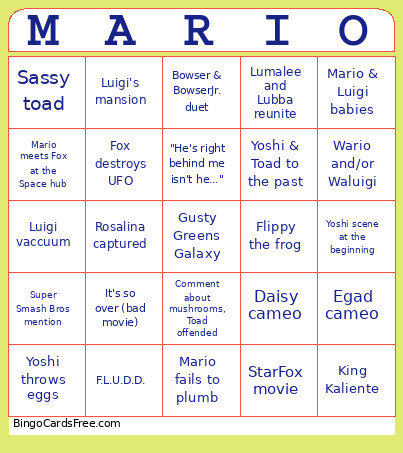 This Mario Movie 2 BINGO Cards Game contains following Words or Phrases: Daisy cameo, Toadette cameo, Egad cameo, Lubba appears, Lumalee and Lubba reunite, Space Junk Galaxy, Megahammer, Rock Mushroom, Yoshi Pepper, Dino Piranha, Mario meets Fox at the Space hub, Good Egg Galaxy, Wario and/or Waluigi, Rosalina captured, Yoshi scene at the beginning, Yoshi throws eggs, Baby luma teams up with mario, Peach and toad stranded/captured, "Do a barrel roll", Bowser pulled into new york, Luigi scared of ghosts, Comment about mushrooms, Toad offended, Tiktok dance of ANY kind, Jack Black sings, It's so over (bad movie), It's so peak (great movie), Mario fails to plumb, "The princess is in another castle", "He's right behind me isn't he...", Luigi vaccuum, Sassy toad, Mario Mario, Super Smash Bros mention, Mario & Luigi babies, Yoshi & Toad to the past, Luigi's mansion, Fox destroys UFO, Bowser & BowserJr. duet, StarFox movie, Flippy the frog, Cosmic Cove Galaxy, Fluzzard, F.L.U.D.D., King Kaliente, Pikmin cameo.