mario plush slop video Bingo Cards - Print Free or Customize
Print free mario plush slop video bingo cards or personalize,
unlimited prints! Select from 41,500+ templates or use our bingo card generator.
Add numbers, phrases, pictures, or all of them.
Play using PDF prints, digital bingo cards,
and our digital bingo caller, or go hybrid.
About: This bingo card dives into the chaotic and often hilarious world of amateur plush YouTube videos. Packed with common production quirks and wild plot choices, it’s perfect for fans watching together or at a viewing party. Whether you’re a longtime plush video follower or just in it for the laughs, this card keeps things lighthearted and entertaining.
How To: To get a printable PDF, click the Print button.
You can change the number of cards and other
print options on the Print tab.
Grid items and free space text can be edited on the Basic tab.
Appearance can be entirely customized on the
corresponding tabs, or you can quickly locate any setting
using the 🔍 tab.
How to play mario plush slop video Bingo Cards?
Printed Players: Print PDF bingo cards and manually mark the cards.
Digital Caller: Click on the Play button above.
Digital Players: Click on the Play button above, and then click on the 🎫 button.
Printed Caller: Print PDF calling list & calling slips and manually draw the slips.
Mixed Mode: Choose any combination above.
For example, caller can be either Offline or Digital.
And players can be Offline or Digital or a combination of both.
Step-By-Step:
Start by getting the mario plush slop video PDF by clicking on the "Print" button above.
Open the PDF and print it.
For random drawing, you can print another copy of the call list, cut, fold and then draw them randomly at play time.
Cut the bingo cards at the cut marks if there are more than 1 bingo cards per page.
Distribute one card per player. For marking, you can use markers. Crayons are the cheapest.
Choose one person to be the caller. If you are playing in a small group, the caller may as well play along with their own Bingo card.
The caller initiates the play by randomly drawing an item from the call list and announcing it to everyone.
The players look at their cards to see if they have the announced word. If they do, they cross off that word.
The first player to complete a horizontal, vertical, or a diagonal line of marked items announces "Bingo!" and wins the game.
The caller verifies that the items crossed off form a correct line according to the Bingo card and call list.
You can play for different patterns or a full card blackout for an extended game.
This mario plush slop video Bingo Cards Game contains following Words or Phrases: loud = funny, no attempt to do different voices, inconsistent voices, bad greenscreen, filming in public, insane crossover, incomprehensible speech, mispronounced words, video is too dark or too bright, plushes are dirty or damaged, swearing, little to no plot, entire video takes place in one room, low quality recording, bad microphone, out of place sound effects, filmed vertically, music is louder than the dialogue, wannabe of a famous plush youtuber, mario is a horrible person, mario is an idiot, toad abuse, messy house, kid's parent is seen or heard, everyone is mean, pointless commentary, footage is unedited, bootleg plushes, pet cameo, personal info/photos appear on camera, pointless arguing, shapes and noises, "kid" is actually a grown adult, shaky camera, finger in front of camera, unintentional face reveal, plushes get beaten up, phone flashlight in a dark room, filming in a car, plush gets in direct contact with water or food.

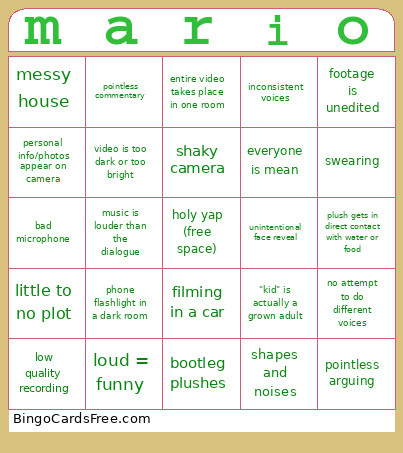 This mario plush slop video Bingo Cards Game contains following Words or Phrases: loud = funny, no attempt to do different voices, inconsistent voices, bad greenscreen, filming in public, insane crossover, incomprehensible speech, mispronounced words, video is too dark or too bright, plushes are dirty or damaged, swearing, little to no plot, entire video takes place in one room, low quality recording, bad microphone, out of place sound effects, filmed vertically, music is louder than the dialogue, wannabe of a famous plush youtuber, mario is a horrible person, mario is an idiot, toad abuse, messy house, kid's parent is seen or heard, everyone is mean, pointless commentary, footage is unedited, bootleg plushes, pet cameo, personal info/photos appear on camera, pointless arguing, shapes and noises, "kid" is actually a grown adult, shaky camera, finger in front of camera, unintentional face reveal, plushes get beaten up, phone flashlight in a dark room, filming in a car, plush gets in direct contact with water or food.