
MBMBINGO Cards - Print Free or Customize
Print free MBMBINGO cards or modify, unlimited cards! Pick from 41,500+ templates or use the bingo card generator. Add numbers, words, photos, or all of them. Play using PDF prints, online bingo cards, and the online bingo caller, or mix physical and digital.
About: This bingo card perfectly captures the chaotic, hilarious spirit of a McElroy brothers "Best Year Ever" podcast episode. Packed with their signature in-jokes, sibling squabbles, and endless riffing on possible year names, it’s ideal for fans listening to a new naming special or rewatching old favorites with friends. Expect laughs, callbacks, and plenty of shenanigans.
How To: To get a PDF to print, click the Print button. You can modify the number of cards and other printing preferences on the Print tab. Grid items and free space text can be added on the Basic tab. Appearance can be totally customized on the relevant tabs, or you can easily search any preference on the 🔍 tab.
How to play MBMBINGO Cards?
- Printed Caller: Print PDF calling list & calling slips and manually choose the slips.
- Online Players: Click on the Play button above, and then click on the 🎫 button.
- Online Caller: Click on the Play button above.
- Printed Players: Print PDF bingo cards and manually mark the cards.
- Mixed Play: Select any combination above. For example, caller can be either Paper or Online. And players can be Paper or Online or a combination of both.
Step-By-Step:
- Start by getting the MBMBINGO PDF by clicking on the "Print" button above.
- Open the PDF and print it.
- For random calling, you can print another copy of the call list, cut, fold and then pull them randomly at play time.
- Cut the bingo cards at the cut marks if there are greater than 1 bingo cards per page.
- Distribute one card per player. For marking, you can use pens. Crayons cost the least.
- Select one person to be the caller. If you are playing in a small group, the caller may as well play along with their own Bingo card.
- The caller opens the game by randomly picking an item from the call list and announcing it to all players.
- The players look at their cards to see if they have the called word. If they do, they cross off that word.
- The first player to complete a horizontal, vertical, or a diagonal line of crossed items announces "Bingo!" and wins the game.
- The caller validates that the items marked form a proper line as per the Bingo card and call list.
- You can play for varied patterns or a full card blackout for a longer game.
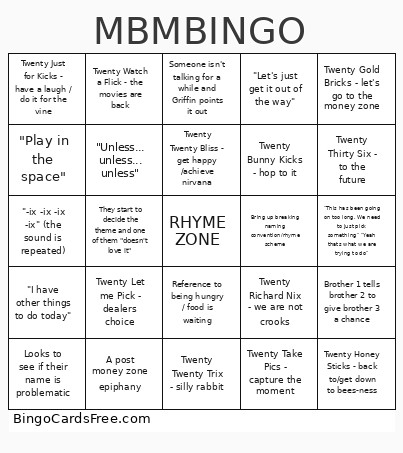 This MBMBINGO Cards Game contains following Words or Phrases: Recaps previous years, Someone forgets a previous year and gets shit for it, "Let's just get it out of the way", Griffin says smth about sucking dick, "Twenty suck my dick", FREE SPACE IS RHYME ZONE, "No we are getting to far from the "ix" sound", "So we are just going to ignore 'Twenty'", We make another character/guy, Travis says "oooo", They start to argue: "We can't do this to each other" / "Please don't leave/ please come back" / "We can't end it like this", They start to decide the theme and one of them "doesn't love it", Its another 2 part podcast / "we can't make another 2 parter", They bring back tummy buddy / remind us of tummy buddy being a "stinker", Travis brings back thunder force, Someone isn't talking for a while and Griffin points it out, Justin "I'm on RHYME ZONE", Other family member / Lin Manuel Miranda suggestions, "I have other things to do today", "This has been going on too long. We need to just pick something" "Yeah thats what we are trying to do", "Don't be a dick / ass / jerk", Reference to being hungry / food is waiting, Boys need to stand up (for creative juices to flow), A post money zone epiphany, Episode is over an hour long, Disappointment for having to tell the team the name / "I'm about to send the text to the team", Reference to a bathroom break, Brother 1 tells brother 2 to give brother 3 a chance, "Now wait a second let's hear him out first", "-ix -ix -ix -ix" (the sound is repeated), They decide the year name but workshop for a while on the tag line, "That's it, that's the one", They come back to a previously hated name and start to like it, Looks to see if their name is problematic, "Play in the space", "Unless... unless... unless", Bring up breaking naming convention/rhyme scheme, Justin annoyed at Travis interrupting him, Beesness reference, Twenty Honey Sticks - back to/get down to bees-ness, Twenty Bunny Kicks - hop to it, Twenty Let me Fix - be the solution, Twenty Pick up Sticks - 1, 2 buckle my shoe, Twenty Twenty Ditch - leave it behind/leave it in the past, Twenty Let me Pick - dealers choice, Twenty Just for Kicks - have a laugh / do it for the vine, Twenty No More Sick - get vaccinated, Twenty Twenty Bliss - get happy /achieve nirvana, Twenty Hit the Bricks - get out there / get out of town, Twenty Thirty Six - to the future, Twenty Twenty Licks - shred it / find your center / come to center, Twenty Pickle Ricks - wabalubadubdub / bazinga, Twenty Twenty Tricks - bring back the magic / old dogs can learn, Twenty Twenty Trix - silly rabbit, Twenty Lay the Bricks - lay the foundation, Twenty Take Pics - capture the moment, Twenty Richard Nix - we are not crooks, Twenty Stevie Nicks - edge of seventeen / break the chain / edge of Twenty seven, Tummy Buddy Fix - pull up a plate / pull up a smile / dare to care, Thunder Force Six, Twenty Get Your Fix, Get Your Kicks - on route 66, Twenty Brothers Six - twice the brothers, Twenty Bag of Dicks - dont be one, Twenty Lookin Slick - you clean up nice / take pride in your appearance, Twenty Watch a Flick - the movies are back, Twenty Gold Bricks - let's go to the money zone, Twenty in the Mix - anything is possible.