meet & greet Bingo Cards - Print Free or Customize
Print free meet & greet bingo cards or customize,
unlimited cards! Pick from 42,200+ designs or use our bingo card generator.
Add numbers, words, images, or all of them.
Play using printed PDF, online bingo cards,
and our online bingo caller, or go hybrid.
About: This bingo card is perfect for anyone wanting to explore and celebrate the vibrant business community of Pomona. With a focus on local flavor, diversity, and creativity, it highlights everything from food spots and art venues to family-run shops and nonprofits. It’s ideal for neighborhood events, networking mixers, or city festivals where connecting with local businesses takes center stage.
How To: To download a PDF to print, click the Print button.
You can adjust the card quantity and other
printing settings on the Print tab.
Grid items and free space text can be edited on the Basic tab.
Appearance can be entirely personalized on the
relevant tabs, or you can quickly search any preference
on the 🔍 tab.
How to play meet & greet Bingo Cards?
Online Caller: Click on the Play button above.
Online Players: Click on the Play button above, and then click on the 🎫 button.
Paper Caller: Print PDF calling list & calling slips and manually choose the slips.
Paper Players: Print PDF bingo cards and manually write on the cards.
Hybrid Play: Pick any combination above.
For instance, caller can be either Offline or Online.
And players can be Offline or Online or a combination of both.
Step-By-Step:
Start by getting the meet & greet PDF by clicking on the "Print" button above.
Open the PDF and print it.
For random calling, you can print another copy of the call list, cut, fold and then draw them randomly at play time.
Cut the bingo cards at the cut lines if there are greater than 1 bingo cards per page.
Give one card to each player. For marking, you can use pencils. Crayons cost the least.
Pick one person to be the caller. If you are playing in a small group, the caller can as well play along with their own Bingo card.
The caller opens the game by randomly pulling an item from the call list and saying it to everyone.
The players scan their cards to see if they have the announced word. If they do, they mark that word.
The first player to finish a horizontal, vertical, or a diagonal line of crossed items shouts "Bingo!" and wins the game.
The caller verifies that the items crossed off form a proper line as per the Bingo card and call list.
You can play for varied patterns or a full card blackout for an extended game.
This meet & greet Bingo Cards Game contains following Words or Phrases: Accepts Apple Pay / digital payments, Accepts walk-ins, Art related business, Attended or worked at SAE, Attended or worked at Western University, Attends City Council or community meetings, Born in Pomona, Business has a mascot or logo character, Collaborated with another local business, Employs high school or college students, Family-owned business, First-generation business owner, Food related business, Grew up in Pomona, Has a loyalty program or membership perks, Has a mural, art piece, or unique décor at their business, Has a storefront and online shop, Has appeared in the local newspaper or news, Has environmentally friendly practices, Has hosted a community event, Has live music or entertainment, Has more than 5 employees, Has outdoor seating, Home-based business, Hosts karaoke, trivia, or game nights, In business less than 2 years, In business more than 10 years, In business more than 5 years, It is a nonprofit organization, Located East of Garey Ave, Located on 1st Street, Located on 2nd Street, Located on 3rd Street, Located on 4th Street, Located on Mission Blvd, Located West of Garey Ave, Minority-owned business, Offers delivery or online sales, Offers discounts for students or seniors, Offers vegan or vegetarian options, Offers workshops or classes, Open during Artwalk, Open late evenings, Open on Mondays, Owns multiple businesses, Participated in Artwalk before, Planning to expand soon, Provides curbside pickup, Provides internships or mentorship, Recently remodeled or expanded, Retail shop, Serves alcohol at their bizz, Service-based business, Shares space with another business, Speaks more than 2 languages at work, This is their first business, Uses social media for marketing, Volunteers locally, Woman-owned business, Works in education.

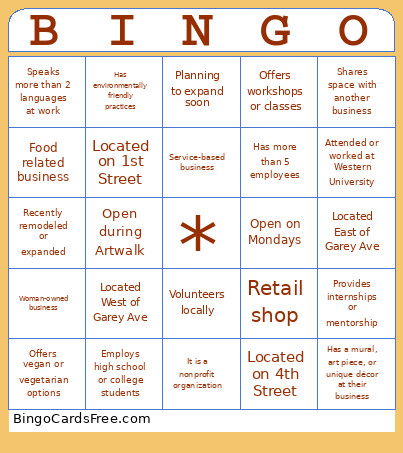 This meet & greet Bingo Cards Game contains following Words or Phrases: Accepts Apple Pay / digital payments, Accepts walk-ins, Art related business, Attended or worked at SAE, Attended or worked at Western University, Attends City Council or community meetings, Born in Pomona, Business has a mascot or logo character, Collaborated with another local business, Employs high school or college students, Family-owned business, First-generation business owner, Food related business, Grew up in Pomona, Has a loyalty program or membership perks, Has a mural, art piece, or unique décor at their business, Has a storefront and online shop, Has appeared in the local newspaper or news, Has environmentally friendly practices, Has hosted a community event, Has live music or entertainment, Has more than 5 employees, Has outdoor seating, Home-based business, Hosts karaoke, trivia, or game nights, In business less than 2 years, In business more than 10 years, In business more than 5 years, It is a nonprofit organization, Located East of Garey Ave, Located on 1st Street, Located on 2nd Street, Located on 3rd Street, Located on 4th Street, Located on Mission Blvd, Located West of Garey Ave, Minority-owned business, Offers delivery or online sales, Offers discounts for students or seniors, Offers vegan or vegetarian options, Offers workshops or classes, Open during Artwalk, Open late evenings, Open on Mondays, Owns multiple businesses, Participated in Artwalk before, Planning to expand soon, Provides curbside pickup, Provides internships or mentorship, Recently remodeled or expanded, Retail shop, Serves alcohol at their bizz, Service-based business, Shares space with another business, Speaks more than 2 languages at work, This is their first business, Uses social media for marketing, Volunteers locally, Woman-owned business, Works in education.