
Meet & Match Bingo Cards - Print Free or Customize
Print free Meet & Match bingo cards or modify, unlimited cards! Choose from 42,200+ templates or use the bingo card generator. Add numbers, phrases, images, or mix them all. Play using printable PDF, virtual bingo cards, and the virtual bingo caller, or mix physical and digital.
About: This bingo card is all about getting to know people better in a fun, interactive way. Perfect for retreats, icebreaker sessions, or team-building events, it encourages conversations around personal interests, habits, and quirky facts. It’s ideal for groups who want to break the ice, spark laughter, and discover surprising connections with each other.
How To: To save a PDF to print, click the Print button. You can modify the number of cards and other printing preferences on the Print tab. Grid items and free space content can be edited on the Basic tab. Appearance can be entirely personalized on the corresponding tabs, or you can quickly search any setting using the 🔍 tab.
How to play Meet & Match Bingo Cards?
- Online Caller: Click on the Play button above.
- Printed Caller: Print PDF calling list & calling slips and manually choose the slips.
- Online Players: Click on the Play button above, and then click on the 🎫 button.
- Printed Players: Print PDF bingo cards and manually mark the cards.
- Mixed Mode: Choose any combination above. For example, caller can be either Offline or Online. And players can be Offline or Online or a combo of both.
Step-By-Step:
- Start by downloading the Meet & Match Bingo PDF by clicking on the "Print" button above.
- Open the PDF and print a hard copy.
- For random drawing, you can print another copy of the call list, cut, fold and then pull them randomly at play time.
- Cut the bingo cards at the cut lines if there are more than 1 bingo cards per page.
- Give one card to each player. For marking, you can use crayons. Crayons are the cheapest.
- Choose one person to be the caller. If you are playing in a small group, the caller can also play along with their own Bingo card.
- The caller opens the play by randomly drawing an item from the call list and announcing it to all players.
- The players scan their cards to see if they have the announced word. If they do, they cross off that word.
- The first player to finish a horizontal, vertical, or a diagonal line of crossed items announces "Bingo!" and wins the game.
- The caller confirms that the items marked form a proper line as per the Bingo card and call list.
- You can play for varied patterns or a full card blackout for a longer game.
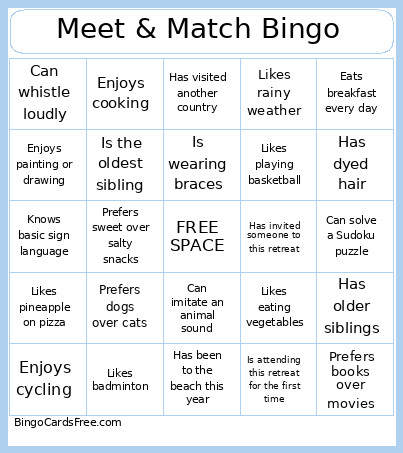 This Meet & Match Bingo Cards Game contains following Words or Phrases: Has the same birth month as you, Shares the same favorite food as you, Has the same favorite subject as you, Is the oldest sibling, Is the youngest sibling, Is wearing braces, Is wearing a watch, Is wearing something blue, Is wearing sneakers, Has curly hair, Has dyed hair, Wears glasses, Has celebrated a birthday this year, Shares the same favorite color as you, Was born in the first half of the year, Was born in the second half of the year, Has the same first initial as you, Is an only child, Has younger siblings, Has older siblings, Plays a musical instrument, Likes watching movies, Likes jogging or running, Goes to the gym, Enjoys cycling, Enjoys camping, Loves solving puzzles, Likes DIY projects, Enjoys writing stories or poems, Likes playing basketball, Likes volleyball, Likes badminton, Plays online games, Enjoys board games, Enjoys painting or drawing, Likes photography, Can snap their fingers, Can speak three or more languages or dialects, Can type without looking at the keyboard, Knows how to swim, Can use chopsticks well, Can solve a Sudoku puzzle, Can whistle loudly, Knows basic sign language, Can ride a bicycle, Can play chess, Likes eating vegetables, Loves ice cream, Prefers coffee over tea, Prefers spicy food, Prefers sweet desserts, Likes kimchi, Has cooked for their family, Eats breakfast every day, Likes drinking milk tea, Likes pineapple on pizza, Loves chocolate, Drinks coffee every morning, Likes seafood, Prefers sweet over salty snacks, Enjoys cooking, Can tell a good joke, Has taken a selfie today, Likes taking group photos, Enjoys trivia games, Can imitate an animal sound, Has stayed awake all night, Is afraid of heights, Has flown on an airplane, Has traveled by ferry, Has visited another country, Has been to the beach this year, Is excited for the retreat, Likes meeting new people, Has attended a retreat before, Has joined more than two retreats, Is attending this retreat for the first time, Has invited someone to this retreat, Likes rainy weather, Likes sunny weather, Is a morning person, Is a night owl, Prefers books over movies, Prefers dogs over cats, Prefers mountains over beaches, Prefers texting over calling.