Meme Market Rivals Bingo Cards - Print Free or Customize
Print free Meme Market Rivals bingo cards or modify,
limitless prints! Choose from 42,200+ templates or use our bingo card generator.
Add numbers, words, images, or mix them all.
Play using printed PDF, virtual bingo cards,
and our virtual bingo caller, or mix physical and digital.
About: This bingo card is perfect for fans of superhero-themed team shooters and anyone who loves the chaos of online multiplayer matches. With a tongue-in-cheek tone, it highlights those wild, funny, and all-too-familiar moments that make each game memorable. Great for friends or guilds looking to add extra fun to their next gaming session!
How To: To download a printable PDF, click the Print button.
You can change the number of cards and other
print preferences on the Print tab.
Grid items and free space text can be added on the Basic tab.
Appearance can be exactly personalized on the
relevant tabs, or you can easily search any option
on the 🔍 tab.
How to play Meme Market Rivals Bingo Cards?
Virtual Caller: Click on the Play button above.
Virtual Players: Click on the Play button above, and then click on the 🎫 button.
Paper Players: Print PDF bingo cards and physically scratch the cards.
Paper Caller: Print PDF calling list & calling slips and physically pick the slips.
Hybrid Mode: Pick any combination above.
For instance, caller can be either Printed or Virtual.
And players can be Printed or Virtual or a combo of both.
Step-By-Step:
Start by saving the Meme Market Rivals Bingo PDF by clicking on the "Print" button above.
Open the PDF and print it.
For random calling, you can print another copy of the call list, cut, fold and then pick them randomly at play time.
Cut the bingo cards at the cut marks if there are greater than 1 bingo cards per page.
Distribute one card per player. For marking, you can use pencils. Crayons are the cheapest.
Pick one person to be the caller. If you are playing in a small group, the caller can also play along with their own Bingo card.
The caller begins the play by randomly picking an item from the call list and announcing it to everyone.
The players check their cards to see if they have the announced word. If they do, they mark that word.
The first player to finish a horizontal, vertical, or a diagonal line of marked items shouts "Bingo!" and wins the game.
The caller verifies that the items marked form a correct line as per the Bingo card and call list.
You can play for different patterns or a full card blackout for a longer game.
This Meme Market Rivals Bingo Cards Game contains following Words or Phrases: Lord Spiderman, Solo Healer, Team Wipe, AGAIN, Warlock dies in Ult, Moon Knight with > 30% accuracy, Jeff Suicide + Kill, Peni Cancer Mines in Spawn, Magneto Whiff, BP Negative, 4 DPS, Insta Lock Psylocke, Jumped by Iron Fist, Wand dies Mid ult, Iron Man whiff, Support with more damage than heals, "GG EZ", Rocket 1000+ damage, (Self) Get MVP or SVP, Fantastic dies in Ult, Cap Ults with no kill, C&D With less than 85% accuracy, Pheonix ults into Support, Friendly leaves the Psylocke circle, Enemy team types "x diff", 3 or more flying heros on team at once, Negative Black Widow, Baby Banner gets a kill, Hulk gets slam kill, Strange Shield eats whole ult, Non-Party Emma player without goon name, Groot gets a 6 strangle, Hawkeye 1 shots you, Hela Ults very poorly, 3 + Fantastic Four on 1 team, Invisible Woman boop environmental, Loki dies in ult before copy ult, Luna Snow Dance Off, 3+ Dive DPS, Mantis Sleep Interrupts Ult, Namor gets Whale Kill, Wanda 3+ piece, Squirrel Girl afterlife, Spiderman drag environmental, Star Lord Ult no kill, Punisher Ult gets shutdown, Thing knockup 3+ or Thing Thong, Thor whiff, Ultron moans, Venom gets kill in ult combo, Winter Soldier goes whole game with no Again, Wolverine success Ult no kill, "First time as x hero", Bot Game, 2+ in row Solo Tank Game, Support out-damages any DPS (same team), 1 Support heals more than other team, (Self) 40k+ Tank damage blocked, (Self) 30k+ Heals, (Self) no death game, (Self) 30k+ Damage, Racially insensitive GamerTag, Curse in Chat, On mic in QP, Goon Name, Goon Message in Chat, Sexist remark in Chat, Slur in Chat, Same Map twice in row, Change of conscience, Teammate Abandon, MVP gets stolen within party.

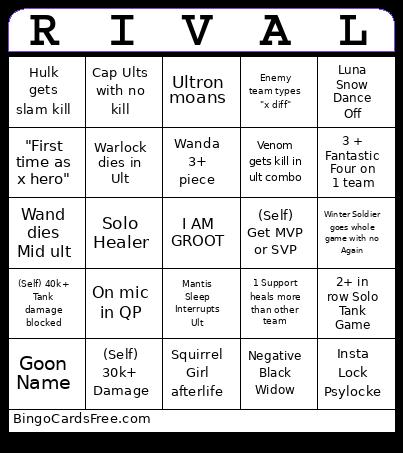 This Meme Market Rivals Bingo Cards Game contains following Words or Phrases: Lord Spiderman, Solo Healer, Team Wipe, AGAIN, Warlock dies in Ult, Moon Knight with > 30% accuracy, Jeff Suicide + Kill, Peni Cancer Mines in Spawn, Magneto Whiff, BP Negative, 4 DPS, Insta Lock Psylocke, Jumped by Iron Fist, Wand dies Mid ult, Iron Man whiff, Support with more damage than heals, "GG EZ", Rocket 1000+ damage, (Self) Get MVP or SVP, Fantastic dies in Ult, Cap Ults with no kill, C&D With less than 85% accuracy, Pheonix ults into Support, Friendly leaves the Psylocke circle, Enemy team types "x diff", 3 or more flying heros on team at once, Negative Black Widow, Baby Banner gets a kill, Hulk gets slam kill, Strange Shield eats whole ult, Non-Party Emma player without goon name, Groot gets a 6 strangle, Hawkeye 1 shots you, Hela Ults very poorly, 3 + Fantastic Four on 1 team, Invisible Woman boop environmental, Loki dies in ult before copy ult, Luna Snow Dance Off, 3+ Dive DPS, Mantis Sleep Interrupts Ult, Namor gets Whale Kill, Wanda 3+ piece, Squirrel Girl afterlife, Spiderman drag environmental, Star Lord Ult no kill, Punisher Ult gets shutdown, Thing knockup 3+ or Thing Thong, Thor whiff, Ultron moans, Venom gets kill in ult combo, Winter Soldier goes whole game with no Again, Wolverine success Ult no kill, "First time as x hero", Bot Game, 2+ in row Solo Tank Game, Support out-damages any DPS (same team), 1 Support heals more than other team, (Self) 40k+ Tank damage blocked, (Self) 30k+ Heals, (Self) no death game, (Self) 30k+ Damage, Racially insensitive GamerTag, Curse in Chat, On mic in QP, Goon Name, Goon Message in Chat, Sexist remark in Chat, Slur in Chat, Same Map twice in row, Change of conscience, Teammate Abandon, MVP gets stolen within party.