Print free Mentee bingo cards or personalize,
limitless cards! Pick from 41,500+ templates or use the bingo card generator.
Add numbers, words, photos, or any combination.
Play using printed PDF, virtual bingo cards,
and the virtual bingo caller, or combine all formats.
About: This bingo card is perfect for an academic conference or a gathering of environmental scientists, especially those in the fields of ecology and toxicology. The squares capture the classic triumphs, challenges, and quirks of academic life, encouraging laughs and conversations among colleagues who have navigated reference letters, conferences, mentorship, and the ever-present email avalanche.
How To: To get a PDF to print, click the Print button.
You can change the card count and other
printing settings on the Print tab.
Grid items and free space content can be added on the Basic tab.
Appearance can be exactly customized on the
relevant tabs, or you can quickly search any preference
using the 🔍 tab.
How to play Mentee Bingo Cards?
Paper Players: Print PDF bingo cards and physically cross off the cards.
Virtual Caller: Click on the Play button above.
Virtual Players: Click on the Play button above, and then click on the 🎫 button.
Paper Caller: Print PDF calling list & calling slips and physically choose the slips.
Hybrid Play: Select any combination above.
For example, caller can be either Offline or Virtual.
And players can be Offline or Virtual or a combination of both.
Step-By-Step:
Start by getting the Mentee Bingo PDF by clicking on the "Print" button above.
Open the PDF and print it.
For random calling, you can print another copy of the call list, cut, fold and then pick them randomly at play time.
Cut the bingo cards at the cut lines if there are greater than 1 bingo cards per page.
Distribute one card per player. For marking, you can use markers. Crayons are the cheapest.
Select one person to be the caller. If you are playing in a small group, the caller may as well play along with their own Bingo card.
The caller opens the game by randomly drawing an item from the call list and announcing it to everyone.
The players look at their cards to see if they have the announced word. If they do, they cross off that word.
The first player to complete a horizontal, vertical, or a diagonal line of crossed items announces "Bingo!" and wins the play.
The caller verifies that the items marked form a proper line according to the Bingo card and call list.
You can play for multiple patterns or a full card blackout for a longer play.
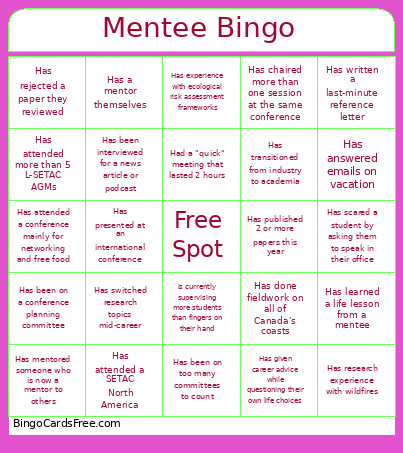
This Mentee Bingo Cards Game contains following Words or Phrases: Has written a last-minute reference letter, Has scared a student by asking them to speak in their office, Has published 2 or more papers this year, Has been on too many committees to count, Has been interviewed for a news article or podcast, Had a "quick" meeting that lasted 2 hours, Has experience with ecological risk assessment frameworks, Is currently supervising more students than fingers on their hand, Has learned a life lesson from a mentee, Has been on a conference planning committee, Has research experience with wildfires, Has mentored someone who is now a mentor to others, Has done fieldwork on all of Canada's coasts, Has attended a SETAC North America, Has attended more than 5 L-SETAC AGMs, Has rejected a paper they reviewed, Has given career advice while questioning their own life choices, Has chaired more than one session at the same conference, Has attended a conference mainly for networking and free food, Has transitioned from industry to academia, Has answered emails on vacation, Has presented at an international conference, Has switched research topics mid-career, Has a mentor themselves.

 This Mentee Bingo Cards Game contains following Words or Phrases: Has written a last-minute reference letter, Has scared a student by asking them to speak in their office, Has published 2 or more papers this year, Has been on too many committees to count, Has been interviewed for a news article or podcast, Had a "quick" meeting that lasted 2 hours, Has experience with ecological risk assessment frameworks, Is currently supervising more students than fingers on their hand, Has learned a life lesson from a mentee, Has been on a conference planning committee, Has research experience with wildfires, Has mentored someone who is now a mentor to others, Has done fieldwork on all of Canada's coasts, Has attended a SETAC North America, Has attended more than 5 L-SETAC AGMs, Has rejected a paper they reviewed, Has given career advice while questioning their own life choices, Has chaired more than one session at the same conference, Has attended a conference mainly for networking and free food, Has transitioned from industry to academia, Has answered emails on vacation, Has presented at an international conference, Has switched research topics mid-career, Has a mentor themselves.